How to Create and Use a Lease Renewal Template Online
TL;DR: A lease renewal agreement lets a tenant stay past the original end date and records what’s changing, usually the new term and the rent. The fastest way to handle these is a reusable template that already has the signature fields and roles set up. Fill in what’s different, send it out, and skip rebuilding the document from scratch every time a lease is about to expire.
Lease renewals rarely go wrong because they’re complicated. They go wrong because they start late. The date sits buried in a spreadsheet, someone notices it six weeks out, and now you’re rebuilding a lease renewal form from scratch while the tenant is already looking at other places.
Here’s how to renew a lease agreement without redoing that work every time: build a lease renewal agreement template once, know exactly what to change from the original lease before you touch it, and send it out for signature in a way that doesn’t need you to babysit it.
One thing worth knowing before you start. People use “renewal” and “extension” interchangeably, but they’re not the same thing, and which one you use can affect whether you’re allowed to raise the rent. More on that below.
Renewal, extension, or a whole new lease
These three get mixed up constantly, and that’s usually where renewals start to go wrong. The line that matters: a renewal is treated as a brand new agreement, while an extension just pushes out the end date on the one you already have.
That distinction matters most when money’s involved. eForms points out that if you’re raising the rent or adding new terms, you want a renewal, not an extension. And if the changes go beyond that, say you’re overhauling most of the lease, it’s usually cleaner to just write a new one.
| What you're actually doing | What you probably need |
| Just pushing back the end date | Lease extension |
| Continuing the lease with a rent increase or a few updated terms | Lease renewal agreement |
| Changing most of the terms, or adding or removing tenants | A brand new lease |
| Changing one thing mid-lease, not touching the end date | A lease amendment |
That last row is worth a second look. A new pet, an added parking spot, a switch in how rent gets paid, none of that needs a renewal. It’s an amendment, and it can happen any time during the lease, not just near the end. If your team handles both, this piece on how eSignature workflows treat lease renewals and amendments differently is worth a look.
Keep the lease renewal letter and the renewal agreement separate in your head too. The letter is the heads-up you send saying the lease is ending soon and asking if the tenant wants to stay. The agreement is what both of you actually sign.
And a quick disclaimer: none of this is legal advice. Rules on rent increases and renewal notice periods vary by state and sometimes by city, so confirm state law compliance before you lock in any numbers.
What to check before you fill in the details
A lease renewal doesn’t need to be long, but it does need a few things in it every time. Zillow’s guidance for landlords lists the basics: names and contact details for both landlord and tenant, the property address, a reference back to the original lease agreement, the updated lease terms or any changes, the new rent if there is one, and the proposed end date.
Two things most short templates leave out. One, a line stating that everything in the original lease that isn’t mentioned here still applies. Two, a signature and date line for every adult on the lease, not just whoever’s been emailing you.
Before you fill any of that in, decide what’s actually changing:
- The term. New start and end dates, or a switch to month-to-month.
- The rent. New amount, and when it kicks in. Check your local notice rules before you decide the number.
- Who’s on the lease. If someone moved out or a new adult moved in, fix that now.
- The deposit. Staying the same, topping it up, or leaving it alone.
- Any policies. Pets, parking, insurance, how rent gets paid.
- Notice period for next time. Worth resetting if the last one wasn’t enough time.
If more than a couple of these are changing, it’s often faster to just write a new lease than to patch an old one with exceptions.
Also check whether your original lease already has a renewal clause spelling out how this is supposed to work, the notice period, the allowed increase, and so on. Follow that. A renewal that contradicts its own lease is the kind of thing that only gets noticed when it matters most.
Get ahead of the date
The lease expiration date isn’t your real deadline. The notice date is, and it comes well before that. eForms says a renewal letter for a tenant in good standing usually goes out 30 to 90 days before the lease ends, and recommends at least 30.
Zillow pushes for even more lead time, and their reasoning holds up: they suggest 90 days, since more than half of renters know less than three months out that they’ll need to move. Give people less warning than that and you’re rushing a decision that affects where they live.
Missing the window has real consequences too. In some states, a lease that isn’t renewed or terminated in time automatically rolls into a month-to-month arrangement. And if a tenant stays and keeps paying rent that you keep accepting, some places treat that as an implied renewal whether you meant it to be or not.
A good rule of thumb: set your own reminder for two weeks before the notice date, not the lease end date. That gives you time to actually have the document ready when you need it, instead of writing it under pressure.
Turn it into a template you can actually reuse
This is where most of the wasted time in property management actually lives. Teams save a lease renewal template as a Word file or PDF and call that the reusable part. It’s only half the job.
Even with the document saved, you’re still placing signature fields, date fields, and initials by hand every time you send it. That’s how fields end up on the wrong page, and how a renewal comes back signed by the tenant with no landlord signature at all, because nobody built a spot for it.
A proper eSignature template solves this by storing the document and its fields together. In BoldSign, you set up the signer roles and place the fields once, and they stay put every time you use the template. Fields get attached to a role like “Tenant” instead of a specific person’s name, which is what makes one template work for every renewal you send.
AI-powered field detection can even place most of those fields for you the first time you upload the file. The same setup works for other documents real estate teams send on repeat, like amendments, move-out forms, and the original leases themselves. If you’re managing more than a handful of units, that adds up fast across a full rental portfolio.
A landlord lease renewal agreement built from a template takes minutes to fill in instead of hours to draft. A tenant lease renewal agreement that’s just as clear takes seconds to read and sign, since nothing about the layout is a surprise.
Here’s how to actually build one
You’ll need a BoldSign account, and the free trial doesn’t ask for a credit card. You’ll also need your renewal document saved as a PDF or Word file. If you don’t have one yet, the free contract template library has residential and commercial lease templates you can start from, though you should still have any renewal wording checked against your local rules before using it with a real tenant.
Everything below is done by you, the landlord, property manager, or leasing coordinator. The tenant never sees any of this part.
Start the template. Click Create New, then Create New Template. Give it a title you’ll actually recognize later, something like “Residential lease renewal, 12 month,” add a short description, and upload your file.
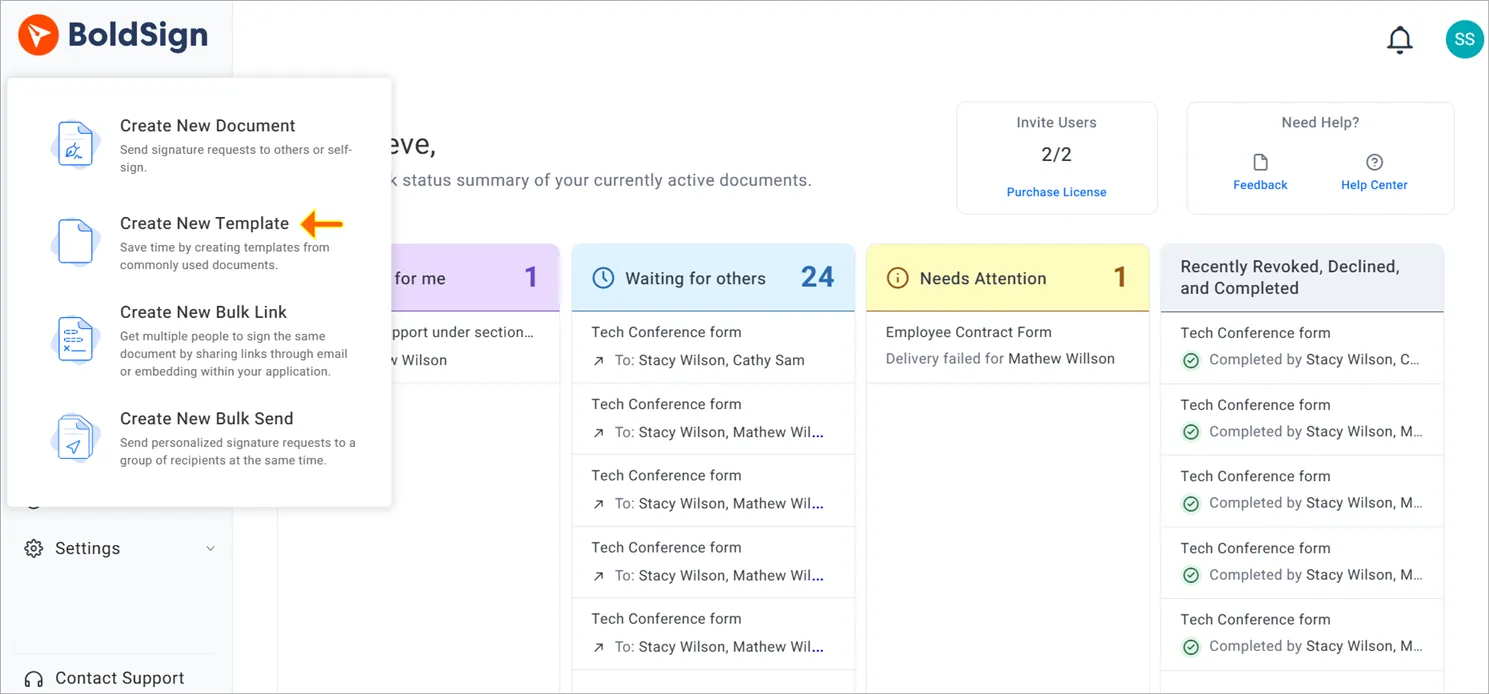
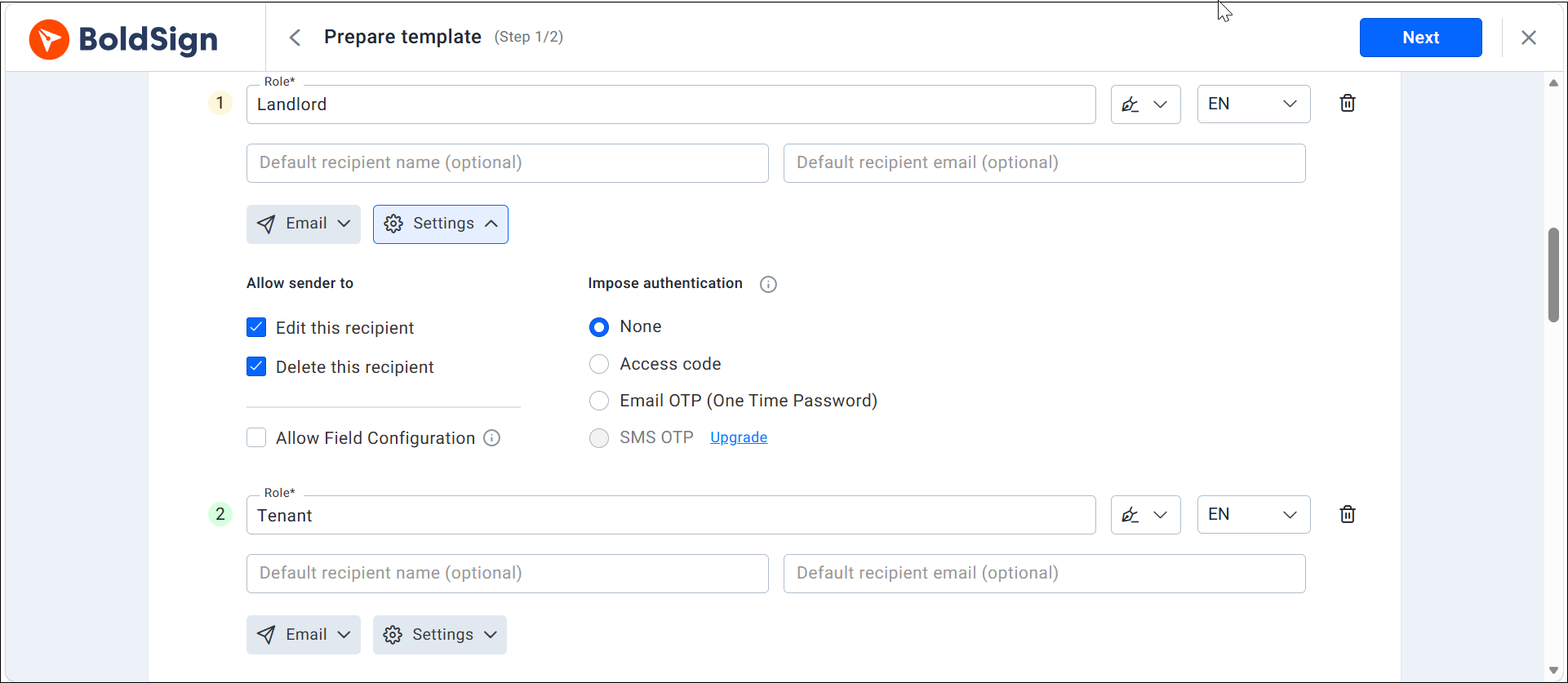
Add a role for everyone who signs. Create a role for Landlord and one for Tenant, and a second tenant role if two people sign. A role is just a stand-in, so you’re not typing anyone’s actual name in yet. Add another role too if someone needs to approve the renewal before it goes out.
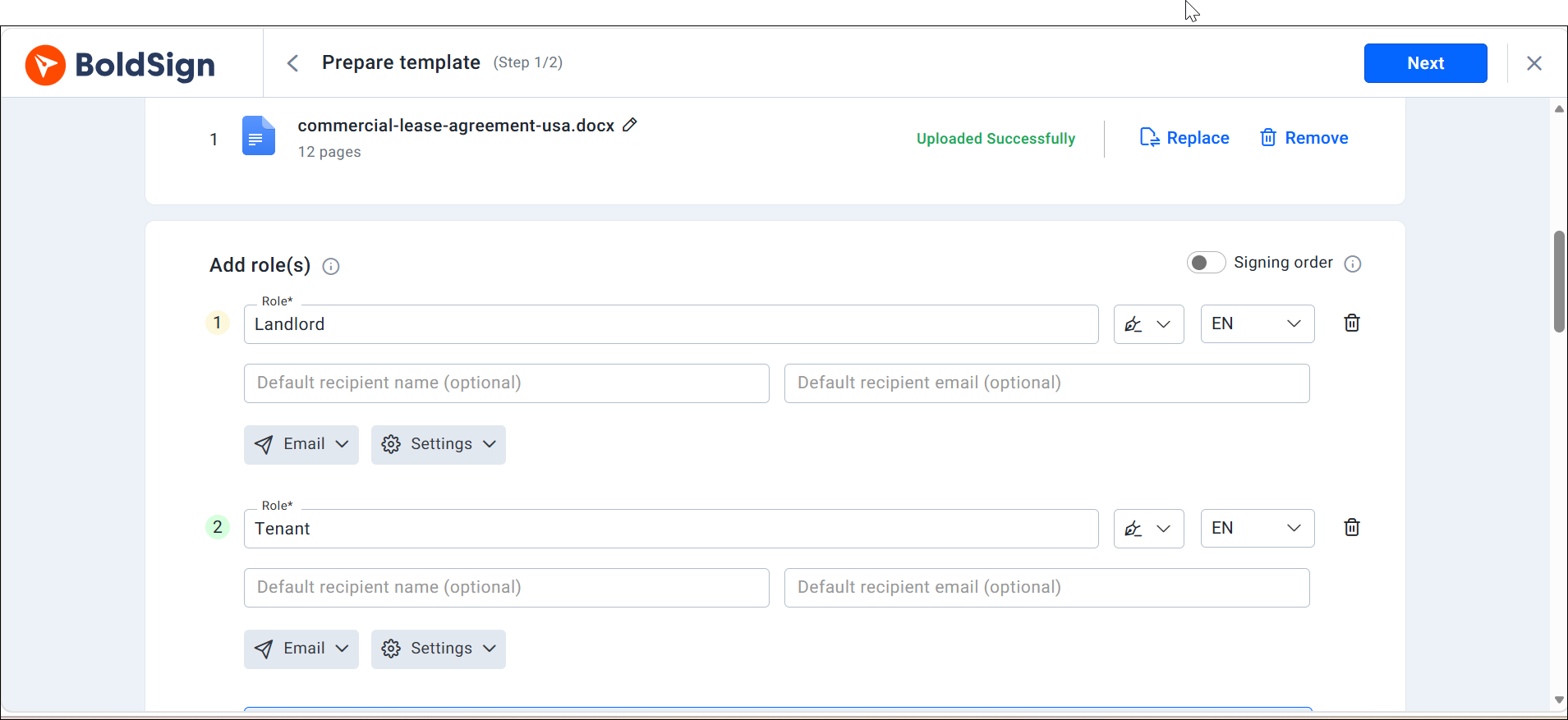
Decide what stays locked. Under Show Settings, turning off “Edit this recipient” keeps that person’s name and email fixed once the template is in use. If your property owner or accounting team should get a copy without being asked to sign, add them as a CC recipient here.
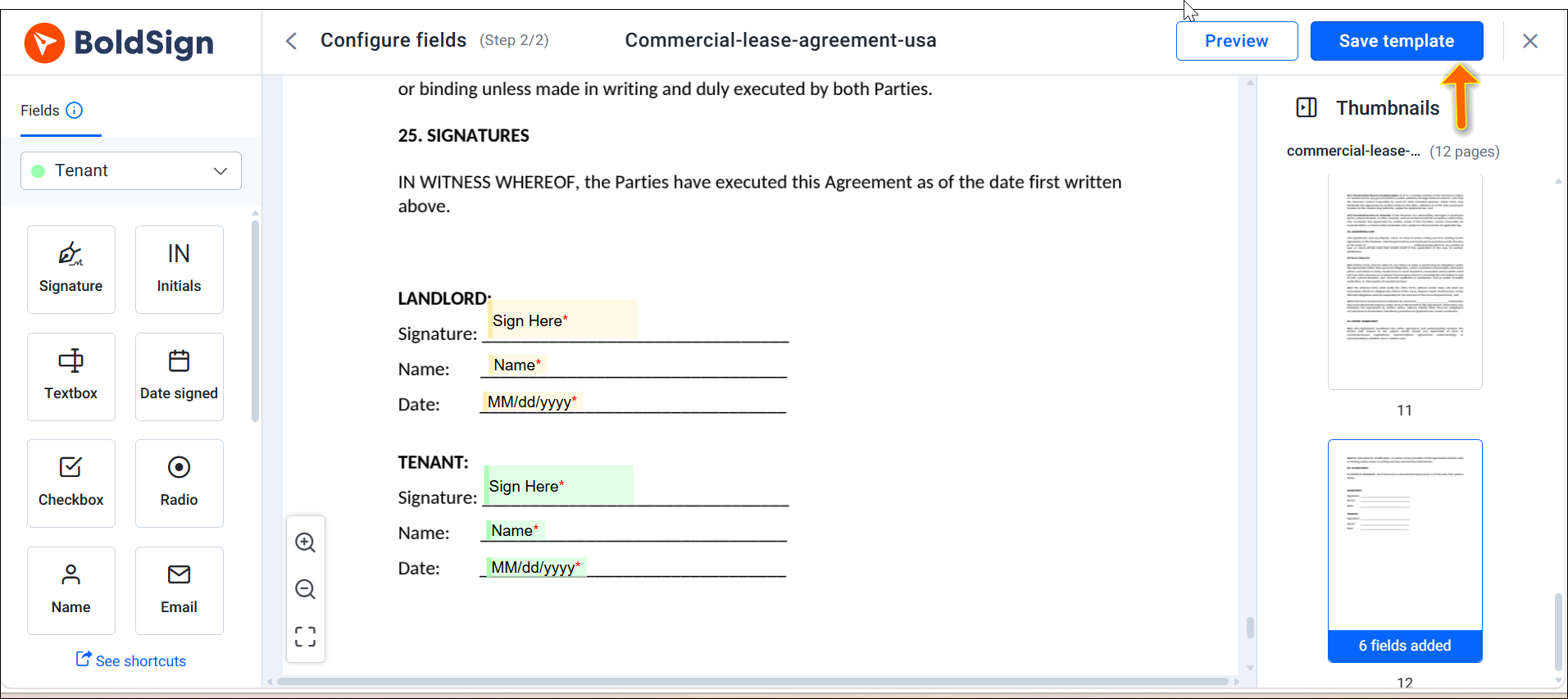
Place the fields and assign them. Click Next to get to the prepare page, then add what the renewal actually needs, the new rent, the start and end dates, initials by the rent change, and a signature and date for each party. Assign each field to the right role from the dropdown.
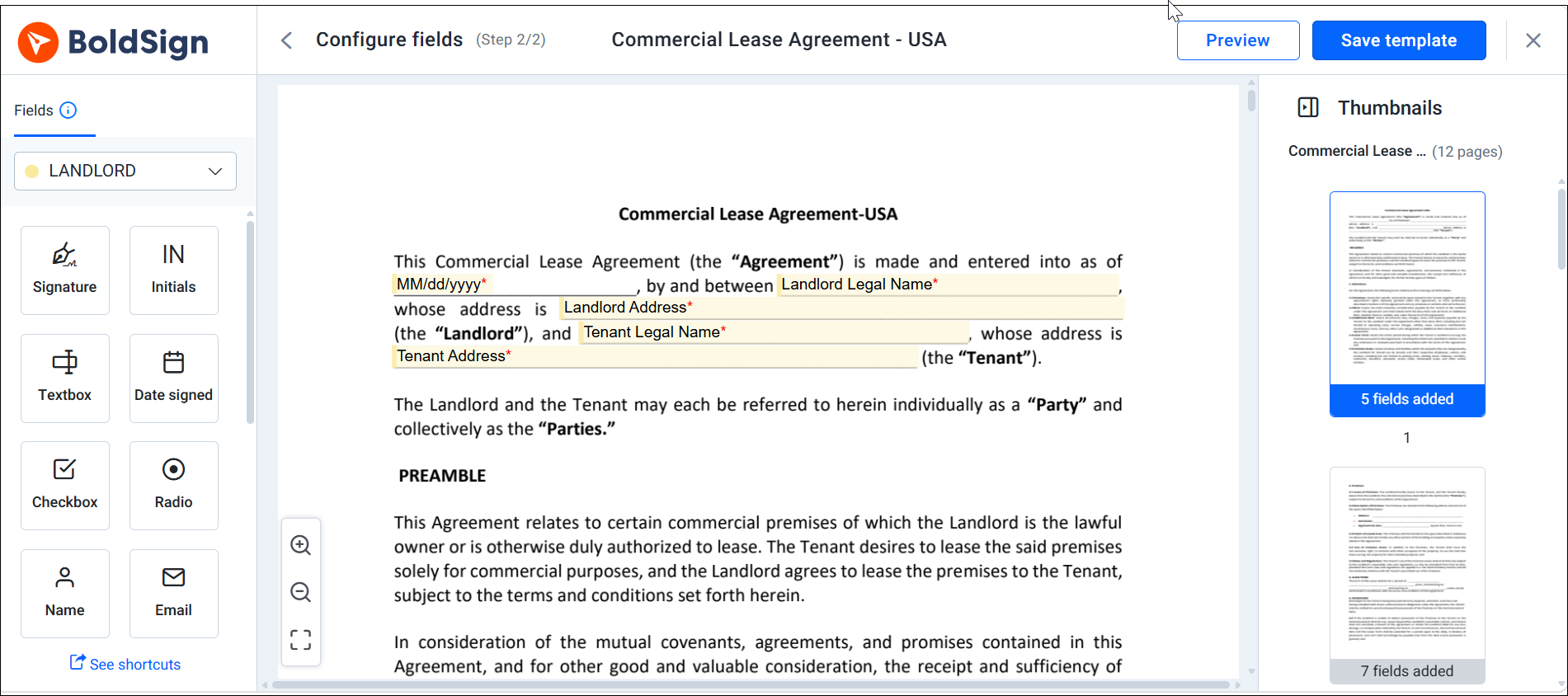
Save it. Click Save Template. It’ll show up under My Templates from now on.
Use it every time a renewal comes up. Hover over the template and click Use, or find it through Create New, then Browse Templates. Fill in the tenant’s name and email, update the rent and dates, and send. Everything else about the layout stays exactly as you set it up.
Once this exists, the next renewal isn’t a document project anymore. It’s a five-minute update. If you’re ready to set one up, you can create a reusable lease renewal template in BoldSign with the document you already have.
Send it, then let reminders do the chasing
Turn on reminders when you send the document, not after you notice nobody’s signed it yet. Once the reminders are running, they keep going until the tenant signs, and then they stop on their own. That’s the part that makes people actually trust the automation: nobody gets an email nagging them after they’ve already signed.
BoldSign’s default setup for automated reminders sends one reminder every three days, up to three reminders by default. You can configure the system to send up to five reminders or send a manual reminder anytime if the document is urgent.
Turn on expiration alerts too. They notify the tenant one day before the document expires, helping prevent renewals from expiring unsigned. After the document expires, both the sender and signer are notified. Automatic reminders are included with every plan, including the free plan.
The other piece is being able to see where a document stands. If you can tell it’s been opened but not signed for four days, that’s a very different follow-up call than one to a tenant who hasn’t even opened the email yet.
Keep proof, not just a signed file
Document tracking and keeping proof aren’t the same thing, even though they get lumped together. Tracking tells you where a document is right now. The audit trail is what you’ll actually need a year from now if anyone questions what was agreed to.
A BoldSign audit trail includes the document’s ID, title, and status, along with when it was sent and completed. It logs every signer’s name, email, IP address, and device, plus every action taken, viewing, signing, and completion, each with its own timestamp. It also records how each signer was verified and whether they agreed to sign electronically.
That record becomes downloadable once everyone’s signed, and you can keep it attached to the signed document or download it separately. A year later, “was it signed” is rarely the real question. It’s which version got agreed to, and whether the tenant actually consented to signing that way. A signed PDF sitting in a shared folder doesn’t answer that. A timestamped record does.
If renewals run inside your own app
If tenants already sign in through a portal you built, don’t send them out to their email to sign a renewal. Embedded signing keeps the whole thing inside your app, so the tenant reviews and signs without leaving the screen they were already on, which is usually where people give up halfway through.
The setup is fairly simple: pull the document from a stored template through the API, prefill it with the tenant, property, and rent details you already have on file, and show the signing screen inside your app. This walkthrough on embedded lease signing for real estate apps covers the details, and the eSignature API docs have what your developers will need for the template and signing link setup.
The short version
The document itself was never the hard part. What actually costs you time is starting late, rebuilding the same form every cycle, and not being able to show exactly what was agreed to later. Fix the timing, build the template once with the roles and fields already in place, and let reminders handle the follow-up.
Start your free trial and turn your next round of lease renewals into something you fill in, not something you rebuild.
Frequently asked questions
What is a lease renewal agreement?
It's a short document that continues a tenancy past the original lease's end date, usually with an updated rent amount and a new term length. Instead of rewriting the whole lease, it points back to the original and states what's changed.
Is a lease renewal the same as a lease extension?
No, not quite. An extension just moves the end date and keeps everything else the same. A renewal is treated as a new agreement, which is why it's the better fit when you're raising the rent or changing other terms, not just buying more time.
Can a landlord raise the rent as part of a lease renewal?
Yes, in most cases, but how much and how it has to be communicated depends on local law. Some cities cap the increase or require extra notice for it, so check your state and city rules before you put a number in the document.
Is an online lease renewal agreement legally binding?
Yes. Under the federal ESIGN Act, an electronic signature can't be denied legal effect just because it's electronic. What actually protects you in a dispute is having a full record of who signed, when, and how, which is what an audit trail provides.
What happens if a tenant stays after the lease expires without signing a renewal?
It depends on your state. In some places, an unrenewed lease automatically converts to month-to-month. In others, if you keep accepting rent after the end date, that can be treated as an implied renewal even without a signed document, so it's worth confirming your local rule rather than assuming.
Can I use the same lease renewal template for every tenant?
Yes, that's the point of building one. The template holds the layout and the signature fields tied to roles like "Landlord" and "Tenant" rather than to specific people, so you just swap in each tenant's name, email, and updated terms and send it.
How much notice does a landlord need to give before a lease renewal?
It depends on your state and city, but 30 to 90 days before the lease ends is the common range. Sending it closer to 90 days gives the tenant more time to actually decide, rather than scrambling.

Preethi Loganathan
Preethi is a Digital Marketing Executive at BoldSign who develops precise, research-driven content on eSignatures, compliance, and digital signing workflows. She works closely with product and engineering teams to ensure every article is accurate, validated, and aligned with industry best practices. Connect with her on LinkedIn.
More posts by Preethi Loganathan