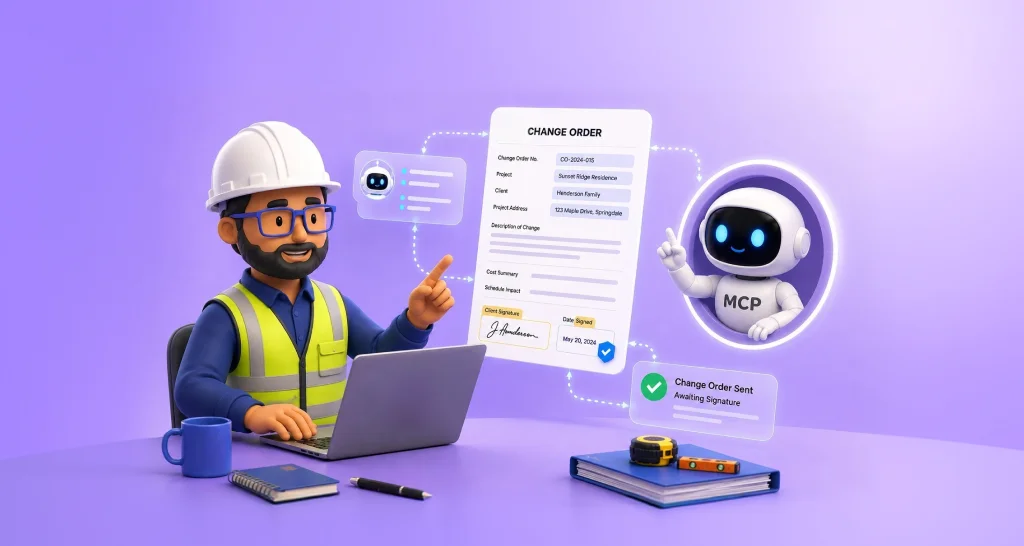
What Is a Change Order and How an AI Agent Gets One Signed in Minutes
 Meikanda Nayanar 8 min read
 TL;DR: A change order is a formal amendment to a construction contract that records changes in scope, cost, and schedule. Without one, contractors risk disputes and unpaid work. With an AI agent powered by BoldSign MCP, a change order can be described in a chat and signed by email in minutes instead of weeks.
If you’ve ever heard “that will cost extra” halfway through a renovation, you’ve experienced the exact situation change orders were created to solve. A change order is the document that updates a construction contract when work changes, whether that’s an upgraded material, unexpected repairs, or a new client request.
This guide walks through what one covers, why the wait for a signature is the real bottleneck, and how an AI agent closes that gap.
Key takeaways
- A complete change order answers six questions: which contract, what changed, what it costs, how the schedule shifts, who requested it, and who must sign. A blank field is worth asking about before work starts.
- Unsigned change orders are a common source of payment disputes, because verbal approval rarely holds up once the invoice arrives.
- The real delay is not producing the document, it is the days or weeks spent waiting for someone to approve and sign it.
- The agent that closes that gap works inside strict limits: it sends a locked, contractor-approved template and never touches price, payment, or personal information, which is what makes a money conversation safe to run in a chat.
What a change order actually is
Think about ordering a pizza. You agree on a large pepperoni for $20. Then you call back and ask for extra cheese and a second pizza. The order has changed, so the price changes too. If nobody writes that down, you end up arguing at the door about the bill.
Construction works the same way, with much bigger numbers. A contractor and a homeowner sign a contract for a kitchen remodel. Halfway through, the homeowner wants nicer tile on the balcony. Or the crew opens a wall and finds rotten wood that has to be replaced. The original contract no longer describes the real job.
A change order is the document that fixes that mismatch. It is usually one page. It says what changed, what the new cost is, and how the finish date moves. Once both sides sign it, it becomes part of the contract.
Changes like these are common, and few construction projects finish exactly as originally planned. Change orders are not necessarily a sign of mistakes or project issues. They’re a standard part of construction and provide a formal way to document changes in scope, cost, or schedule.
What is written on a change order
Formats differ between contractors, but a complete change order almost always answers six questions:
- Which contract does this change? The project name, address, and the original agreement it amends.
- What is the change? A plain description of the work being added, removed, or done differently.
- What does it cost? The new amount, and whether that is a fixed price, an allowance, or time and materials.
- What does it do to the schedule? Usually a number of extra days, and a revised completion date.
- Who asked for it, and why? A client request, a design change, or a site condition nobody could see until the wall came down.
- Who has to sign? Signature and date lines for every party whose approval the contract requires.
If one of those is blank when a change order reaches you, that is the moment to ask about it. Questions are cheap before the work starts and expensive after it finishes.
Why one page decides who gets paid
Here is the part people outside construction rarely hear. If a contractor does extra work without a signed change order, they can be refused payment for it.
A verbal yes on a phone call feels like agreement, but months later, when the invoice arrives, memories differ. Disagreements over changed scope are one of the most common causes of construction disputes. So the signed page is not paperwork for its own sake. It is the proof.
It protects the client too. A signed change order is the only place the new price is fixed in writing before the work happens, which is what stops a surprise line item from appearing on the final invoice.
The real problem is the wait, not the document
Writing the change order rarely takes more than a few minutes. What takes days is getting someone to actually open, read, and sign it.
A typical week looks like this. The client says yes on Tuesday. The PDF goes out Wednesday. It is opened Friday. It is signed sometime the next week, if the email does not get buried.
While the contractor waits, there are only two choices, and both cost money. Option one is to pause the crew and absorb the delay, paying for people and equipment that are standing still. Option two is to start on a verbal yes and carry the risk of never being paid for the work.
Approval delays, not the work itself, are a well-documented drag on construction schedules. By generating and sending a signing request as soon as the change is described, an AI agent can shrink the time between agreement and signature from weeks to minutes.
What changes when the signature request happens inside a chat
The client opens a chat, describes the change in ordinary words, and a signing request lands in their inbox. Nothing is printed, scanned, or downloaded. The whole exchange takes about as long as sending a few text messages.
The agent asks for four things and nothing else:
- The project. Something plain, like “the Maple Street kitchen remodel.”
- The change. A few words, like “the balcony tile upgrade.”
- A name.
- An email address.
It then prepares the change order from a locked, contractor-approved BoldSign template and sends a real signing request. The client reviews and signs it from their inbox. Either side can ask the chat for the status afterward.
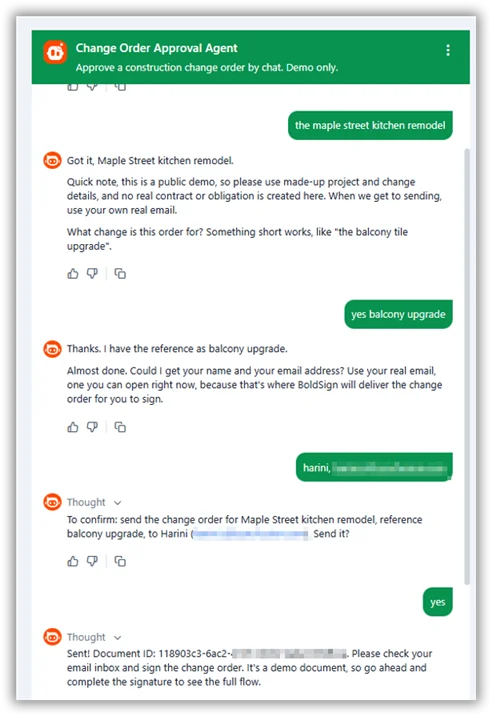
Change order approval agent conversation
Try the live change order demo. Use a made-up project and change, but your own real email address, because receiving and signing the document is the whole point. CubeFlakes Construction is fictional and no real contract is created.
The example above showed the client using a chat to start and sign a change order. That’s the client-facing version. Contractors can use the same AI workflow from their side without waiting for the client to open a chat.
Using the same system, a contractor can initiate the process directly from Claude or any assistant that supports MCP. A request such as “send the Hendersons a change order for the rot repair on the Maple Street job” produces a summary for review, sends the document for signature, and notifies the contractor when it has been signed.
No trip to the office and no lost email thread. In a trade where the person approving paperwork is often standing on a ladder or moving between job sites, chat is not a gimmick. It is an interface that matches how the work actually happens.
The change order agent is one of several in the series. The same BoldSign MCP server also powers lease signing, insurance claim, and patient check-in agents. You can see them all on the AI eSignature agents page.
What the agent will never do, and why that matters
A conversation about money in the middle of a project is exactly where trust breaks and where scammers operate. The limits are the most important feature, not a shortcoming.
- It never touches the price. Cost, scope, and dates come from the contractor’s prepared document. Ask the agent for a discount and it will politely point you to your project manager.
- It never asks for payment. No deposits, wire transfers, gift cards, or processing fees. These are payment patterns the FTC warns consumers about across contractor and home improvement fraud, so the agent treats payment-related requests in a signing chat as a warning sign, not something it is allowed to fulfill.
- It never asks for sensitive personal data. Social Security numbers, government IDs, and bank details have no place in a signing conversation, so they are structurally excluded. The only four things it ever asks for are the project, the change, a name, and an email address.
- It does not give legal advice. Questions about liens, permits, building codes, and contract rights go to a human who is accountable for the answer. License checks go to your state licensing board.
Why the signed file still holds up months later
Speed only helps if the result is solid. Three things make it so.
Editing it breaks the seal. The completed change order carries a cryptographic, tamper-evident seal. If someone alters a line item afterward, standard PDF readers show that the file was changed.
The timeline is recorded for you. Sent, viewed, and signed are each timestamped separately. When someone later asks when the client approved the work, the audit trail already has the answer.
The legal footing is well established. Electronic signatures on change orders are enforceable under the US ESIGN Act and UETA, and recognized under the EU’s eIDAS Regulation. If you ever have to prove one, this guide to producing electronic signature evidence for litigation or arbitration covers what a court or an arbitrator will ask for.
The agent also cannot invent its own form. One locked template, one confirmation summary before anything is sent. That is the guardrail pattern described in Who’s Liable When an AI Agent Sends the Wrong Contract? And because the signer’s identity check is often the last human checkpoint in an AI-driven flow, Is the Right Person Signing? matters more here, not less.
A change order was never the complicated part. The wait between a decision and a signature is. Close that gap and the paperwork stops being the bottleneck.
Try it, or build your own
- Try the live change order demo, signed in your own inbox, in minutes.
- See all AI eSignature agents, one MCP server, many workflows.
- Explore BoldSign for Construction, change orders, work orders, subcontractor agreements, lien waivers, and closeout forms included.
- Build your own agent on the same BoldSign MCP server.
- Start free with a BoldSign API sandbox, no credit card required.
Frequently asked questions
What is a change order in simple terms?
A formal amendment to a construction contract, used whenever the job changes from what was originally agreed. It states the new scope, cost, and schedule, and once both sides sign it, it becomes part of the contract, like a signed receipt for anything added to the original deal.
Who has to sign a change order?
Normally the contractor and the client, which may be a homeowner, a property owner, or a general contractor above a subcontractor. Some contracts also require an architect or a lender to approve. It takes effect only once every required party has signed.
Can a construction change order be signed electronically?
Yes. Electronically signed change orders are legally binding under the US ESIGN Act and UETA, and recognized under the EU's eIDAS Regulation, provided the signature carries an audit trail and a tamper-evident seal.
Why do unsigned change orders cause payment disputes?
Because the change order is the written proof that both sides agreed to the changed scope and price. Work performed on a verbal go-ahead is routinely denied payment, and disputes over changed scope are a common source of construction litigation.
How long does change order approval usually take?
In a paper or email process, days to weeks, since each step, drafting, sending, opening, signing, waits for someone to have time for it. In a chat-based flow, minutes, since the document is generated from a locked template and signed straight from an inbox.
Can an AI agent change the cost or schedule on a change order?
Not in this design. The agent sends a locked, contractor-approved template for signature. Cost, scope, and schedule come from the contractor's prepared document, and the agent cannot state, estimate, or negotiate them.
What information does the AI change order agent ask for?
Four things: the project name, a short description of the change, your name, and your email address. It is built to refuse Social Security numbers, government IDs, bank details, and any form of payment.
Is it safe to approve a change order in a chat?
The safety comes from the limits. The agent never requests money, never quotes a price, and never collects financial or identity documents. The signature itself happens in a genuine signing request delivered to your own email, not inside the chat window.
Meikanda Nayanar
A veteran product manager at BoldSign, boasting a decade-long journey as a .NET developer. With a rich history of leading product development across diverse technologies like Windows Forms, WPF, UWP, Xamarin.Forms, Flutter, and MAUI, Meikandan brings a unique blend of technical expertise and strategic insight to the table. Connect with him on LinkedIn.
More posts by Meikanda Nayanar