What Is an AI eSignature Agent and How Do You Build One?
 Meikanda Nayanar 9 min read
 TL;DR: An AI eSignature agent gathers information during a conversation, selects the correct template, populates it with the required details, and sends it for signature, so the document reaches the customer in the same conversation instead of waiting for someone to prepare it. The signer still signs it themselves.
A customer calls to say their car was damaged in a car park and needs to file a claim. Normally, a claims handler takes down the details, finds the right claim form, works out which fields it needs, fills it in from what the customer told them, and sends it out for the customer to sign, since many insurers require a signed claim form before they’ll process it.
An AI eSignature agent can handle that paperwork automatically. Instead of the claim sitting in a queue until someone finds time to prepare it, the agent can prepare and send the document during the same conversation, so it does not take the week that a chain of handoffs like this usually adds.
This guide covers what an agent like that can and cannot do, what it takes to build one safely, and why documents sent by an AI agent remain subject to the same signing, audit, and compliance requirements as any other BoldSign document.
Key takeaways
- An AI eSignature agent prepares and sends documents inside a conversation; it never signs anything. Only the intended signer can do that.
- The agent’s tool list caps what actions are possible, while your written instructions cap what it is allowed to ask for, and together they keep the workflow safe.
- Most of the delay in a typical signature request comes from handoffs between people, not from the act of signing.
- BoldSign MCP provides tools for sending and managing documents, and for retrieving template, contact, user, and team details.
- An agent-sent document follows the same BoldSign signing process because a person still reviews and signs it.
What makes up an AI eSignature agent?
To perform this claims workflow, the agent relies on a combination of tools and instructions. BoldSign MCP exposes 14 tools across five categories: documents, templates, contacts, users, and teams. A claims-style agent like the one described here only needs four of those tools. Limiting access to only the tools required for the workflow makes the agent easier to understand, manage, and trust.
| The question it answers | Tool | What it returns |
| Which template should be used? | list_templates | The templates available in your BoldSign account, allowing the agent to select the correct one (for example, "Auto Claim" instead of "Home Claim"). |
| What information does the template require? | get_template_properties | Returns details of the selected template, including its recipient roles and form fields, so the agent can understand the template structure before sending a document. |
| How do I create and send the document once I have all the required information? | send_document_from_template | Creates a document from the selected template, populates its fields with the collected values, and sends it to the specified recipient(s) for signature. |
| What is the document's current status? | get_document_properties | Returns the document's details, status, and related metadata, allowing the agent to determine whether it is pending, completed, declined, or in another state. |
| Which user response maps to which template field? | None. Your written instructions. | No tool provides this mapping. You must explicitly define it in your agent instructions. |
If the agent behaves oddly, check that last row first. A missing mapping instruction will not stop the agent from running. Instead, it may cause the agent to place answers in the wrong fields.
Why does one signature still take a week?
The document is rarely the slow part. Preparing a claim form takes a few minutes. The delay lives in the handoffs around it.
A customer explains the problem on Monday. A support agent writes it down and passes it to whoever owns the form. That person opens the template on Tuesday, retypes the details, and sends it Wednesday. The customer opens the email on Thursday, cannot find the reference number the form requires, and replies with a question. Someone responds on Friday, and the document gets signed the following Monday.
Nothing in that week was difficult. Every step waited on a person becoming available.
That leaves two poor options. You can add people to shorten each wait, which raises costs without removing any handoff. Or you can move the process into a self-service portal and ask the customer to complete the required forms themselves.
An AI eSignature agent removes those handoffs altogether. Instead of collecting information in one place and preparing the document in another, it prepares and sends the document within the same conversation where the information is gathered.
How to build an AI eSignature agent in three steps
1. Connect the BoldSign MCP server to your agent.
The BoldSign MCP Server documentation includes setup instructions for supported clients such as Claude, GitHub Copilot, Cursor, Windsurf, and other MCP-compatible tools.
2. Enable the required tools.
For this claims workflow, only four tools are needed: list_templates, get_template_properties, send_document_from_template, and get_document_properties. Together, these tools allow the agent to select a template, understand its fields, send documents for signature, and track their status.
3. Write the mapping instructions.
This is the step that determines whether the agent works reliably, yet it is often the step that receives the least attention.
The reason is simple: tools provide information, but they do not define the conversation. For example, the get_template_properties tool can return details about a template’s roles and form fields. Your instructions determine what questions the agent asks, what information it collects, and how each response is mapped to a specific field.
So, state the mapping directly:
“Ask for the client’s full name and map it to claimant_name. Ask for the policy number and map it to policy_number. Only ask for fields marked as required.”
That pattern, “ask for X and map it to field Y,” is what turns template fields into a working conversation. Leave it out, and the agent may ask for the wrong information, skip a required field, or place correct answers in the wrong fields.
For a full walkthrough, see Build an AI Agent That Sends Contracts: BoldSign MCP + Claude API.
How BoldSign MCP fits into the workflow
With those three steps in place, the client’s experience can remain entirely within a conversation.
The same set of tools can support many different workflows. What changes from one use case to another are the template being used and the instructions that guide the conversation. For example, an insurance claims agent and a contract-sending agent may use the same tools, but they collect different information and populate different templates.
It’s also worth noting that BoldSign MCP is not a replacement for the BoldSign API. Instead, it provides a standardized way for AI agents to access BoldSign capabilities as part of a conversation. Documents, templates, signatures, audit trails, and compliance features still come from BoldSign.
For a working example, see the AI Warranty Claim Agent demo, which uses BoldSign MCP to collect claim details and send a document for signature from within a chat. The claim details are fictional, and the agent is connected to a demo workspace.
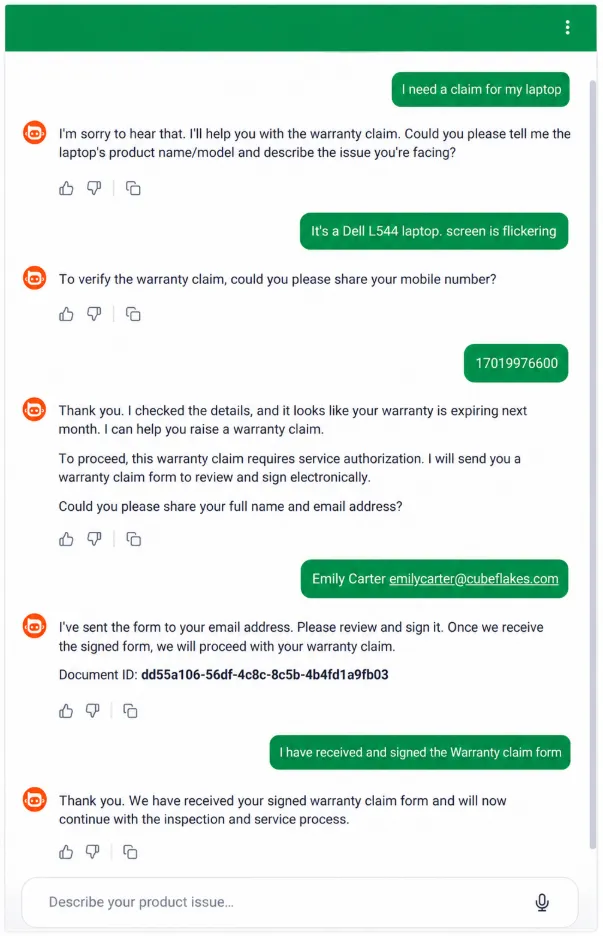
AI Warranty Claim Agent collecting claim details and sending a document for signature.
What the agent will never do
At this point, you might wonder what stops the agent from asking for too much information or taking actions it should not.
The answer is that the agent operates within boundaries that you define.
The first boundary is its tool list. In this workflow, the agent can only select a template, read its fields, send a document, and check its status. If a capability is not available in one of those tools, the agent cannot perform it.
The second boundary is its instructions. These instructions tell the agent what information to collect, how to map responses to template fields, and what information it should never request. For example, you might instruct the agent to collect a claimant’s name and policy number, but never ask for bank account details or other sensitive identifiers.
Together, those boundaries keep the workflow predictable:
- The agent can send documents, but it cannot sign them.
- The agent can use templates, but it cannot modify them.
- The agent can ask approved questions, but it should not request unnecessary information.
- The agent can collect information for the workflow, but it should decline details it was not instructed to gather.
In short, the tools define what the agent can do, while the instructions define what it should do. That combination keeps the conversation focused and the workflow under your control.
Are agent-sent documents legally valid?
Yes, and the reason is simple: the agent never signs anything. A person does.
The agent’s role is limited to preparing the document workflow. It selects the appropriate template, collects the required information, and sends the document for signature. The recipient then reviews the document and applies their own signature, just as they would if the document had been sent by a colleague. The final result is a standard BoldSign electronic signature applied by the signer, so its legal standing remains the same.
The following factors support that validity:
- Audit trails record who sent the document, when it was opened, and when it was signed. An agent-initiated document is tracked in the same way as a document sent manually. Audit records are also tamper-evident, helping demonstrate document integrity.
- Electronic signature laws and regulations such as ESIGN and UETA in the United States and eIDAS in the European Union provide the legal framework that recognizes electronic signatures.
An AI eSignature agent is simply another way to initiate a document workflow in BoldSign, alongside the web application, APIs, and embedded signing experiences. The agent helps prepare and deliver the document, but the signing responsibility always remains with the intended signer.
Final thoughts
If there’s one thing to take away from this article, it’s that an AI eSignature agent isn’t there to replace the person signing the document. It’s there to remove the manual work that happens before the document ever reaches them.
Instead of collecting information in one place, retyping it in another, and waiting for someone to send the next email, the agent handles those steps as part of the conversation. The customer provides the details, the agent prepares the document, and the customer signs it.
The same approach can work for claims, contracts, onboarding forms, approvals, and other document-driven processes. The tools stay largely the same. What changes are the template and the instructions that tell the agent what information to collect and how to map it to the document.
In other words, the challenge is rarely connecting the tools. It’s defining the workflow clearly enough for the agent to follow it.
Ready to build your own AI eSignature agent? Start with a free BoldSign developer sandbox account, then explore the BoldSign MCP Server to connect an agent to your own BoldSign templates or try the live AI Warranty Claim Agent demo to see the complete workflow in action.
You can also explore additional implementations on the AI eSignature Agents page, where you’ll find demos for a variety of document-driven workflows built on the same foundation.
Frequently asked questions
What is an AI eSignature agent?
An AI agent that prepares and sends a document for signature from within a conversation. It selects the appropriate template, collects the information defined in its instructions, maps the answers to template fields, and sends the document for signature.
Is an AI eSignature agent the same thing as an eSignature API?
No. An API is the interface your code calls. An agent is a conversational layer sitting above it that decides which call to make and what to ask for first. The agent uses the API rather than replacing it.
Does the agent automatically know what questions to ask?
No. The tool returns raw field data. The agent asks the right questions and maps answers to the right fields because of instructions you write, not because the tool infers a conversation on its own.
How long does it take to build an AI eSignature agent?
Connecting the MCP server and enabling the tools takes minutes. Writing and testing the mapping instructions is the real work, and it scales with how many fields your template has. Budget an hour or two for a first working agent.
Are documents sent by an AI agent legally binding?
Yes, on the same basis as any other BoldSign document. The agent prepares and delivers; the signer signs. The legal footing for electronic signatures is well established under ESIGN and UETA in the United States and eIDAS in the European Union.
Does using an agent weaken the audit trail?
No. The audit trail captures the send, the open, and the signature regardless of what triggered the request. An agent-initiated document carries the same record as one sent manually from the BoldSign app.
Can the agent sign on my client's behalf if it already has all their details?
No, and this is a deliberate limit rather than a missing feature. The agent has no signing capability at all. Having every field filled in changes nothing about who is permitted to sign.
What stops the agent from collecting sensitive data?
You do, in two places. The tools define what actions the agent can perform, while your instructions define what information it should collect. For example, you can explicitly instruct the agent to collect a claimant's name and policy number, but to decline requests involving Social Security Numbers, bank account details, or other sensitive information. Together, these boundaries help keep the conversation focused on the intended workflow.
Meikanda Nayanar
A veteran product manager at BoldSign, boasting a decade-long journey as a .NET developer. With a rich history of leading product development across diverse technologies like Windows Forms, WPF, UWP, Xamarin.Forms, Flutter, and MAUI, Meikandan brings a unique blend of technical expertise and strategic insight to the table. Connect with him on LinkedIn.
More posts by Meikanda Nayanar