Schedule Contract Delivery with BoldSign API Integration
In contract-driven workflows, timing isn’t just important; it’s critical. Whether you’re sending agreements after a proposal is approved, a payment is processed, or a project milestone is reached, delivering contracts at the right moment ensures smooth operations and professional communication.
With the scheduled send feature in BoldSign, you can automate contract request timing. Instead of relying on manual reminders or last-minute actions, you define exactly when a document should be sent, and BoldSign takes care of the rest. This eliminates the risk of delays, forgotten follow-ups, or premature deliveries.
By removing manual steps, you reduce errors and free up your team to focus on strategic work. The result? A more reliable, efficient, and scalable contract workflow.
Scheduled sending is especially useful when:
- Contracts need to go out during non-working hours or across time zones.
- Legal or compliance requirements dictate specific delivery windows.
- Teams want to align document delivery with automated business processes.
How to schedule contracts with the BoldSign API
To schedule a document, set the scheduledSendTime property in your API request. This value must be:
- In Unix Timestamp format (e.g., 1744279200).
- At least 30 minutes ahead of the current time.
- Before the document’s expiry date.
Once scheduled, the document will appear in your BoldSign dashboard with the status “Scheduled to be sent,” along with the selected date and time.
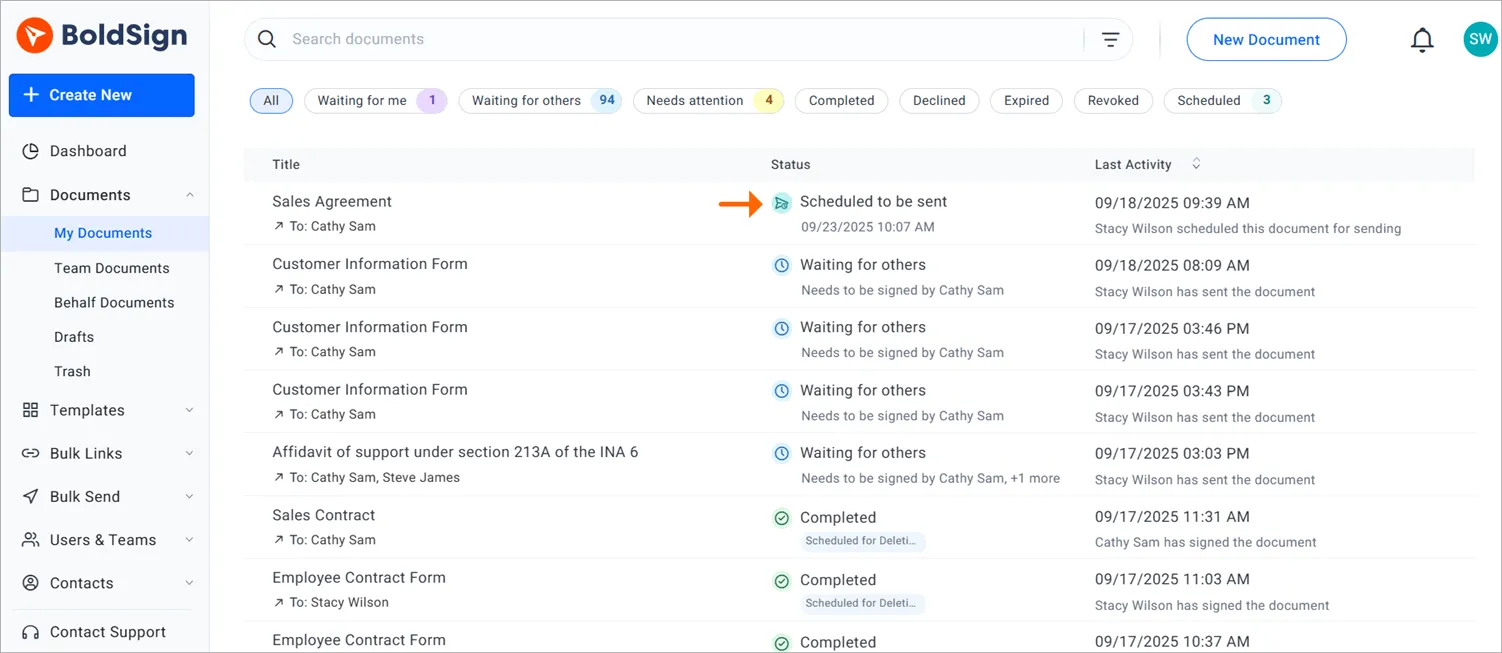
Scheduled to be sent
Code examples
Here are sample implementations in various programming languages to help you get started:
curl -X POST 'https://api.boldsign.com/v1/document/send' \
  -H 'accept: application/json' \
  -H 'X-API-KEY: YOUR_API_KEY' \
  -H 'Content-Type: multipart/form-data' \
  -F 'Message=Please sign this document' \
  -F 'Title=Agreement' \
  -F 'scheduledSendTime=1745107200' \
  -F 'Signers={
    "name": "David",
    "emailAddress": "david@example.com",
    "signerType": "Signer",
    "deliveryMode": "Email",
    "formFields": [{
      "id": "sign1",
      "name": "Signature",
      "fieldType": "Signature",
      "pageNumber": 1,
      "bounds": {
        "x": 100,
        "y": 100,
        "width": 100,
        "height": 50
      },
      "isRequired": true
    }],
    "locale": "EN"
  }' \
  -F 'Files=@/path/to/your/document.pdf'
// Initialize API client with your BoldSign API key
var apiClient = new ApiClient("https://api.boldsign.com", "YOUR_API_KEY");
var documentClient = new DocumentClient(apiClient);

// Prepare the document file
var documentFile = new DocumentFilePath
{
    ContentType = "application/pdf",
    FilePath = "path/to/your/document.pdf"
};

var filesToUpload = new List { documentFile };

// Define the signature field
var signatureField = new FormField(
    id: "sign1",
    isRequired: true,
    type: FieldType.Signature,
    pageNumber: 1,
    bounds: new Rectangle(x: 100, y: 100, width: 100, height: 50)
);

var formFields = new List { signatureField };

// Create signer details
var signer = new DocumentSigner(
    signerName: "David",
    signerType: SignerType.Signer,
    signerEmail: "david@cubeflakes.com",
    formFields: formFields,
    locale: Locales.EN
);

var signers = new List { signer };

// Create the send request with scheduled time
var sendForSign = new SendForSign
{
    Message = "Please sign this document.",
    Title = "Agreement",
    Signers = signers,
    Files = filesToUpload,
    ScheduledSendTime = 1745107200 // Unix timestamp for scheduled delivery
};

// Send the document
var documentCreated = documentClient.SendDocument(sendForSign);
import boldsign

# Configure the API client with your API key
configuration = boldsign.Configuration(api_key="YOUR_API_KEY")

with boldsign.ApiClient(configuration) as api_client:
    document_api = boldsign.DocumentApi(api_client)

    # Define the signature field
    signature_field = boldsign.FormField(
        fieldType="Signature",
        pageNumber=1,
        bounds=boldsign.Rectangle(x=100, y=100, width=100, height=50)
    )

    # Create signer details
    signer = boldsign.DocumentSigner(
        name="David",
        emailAddress="hankwhite@cubeflakes.com",
        signerType="Signer",
        formFields=[signature_field]
    )

    # Prepare the document for sending
    send_for_sign = boldsign.SendForSign(
        title="Agreement",
        signers=[signer],
        files=["path/to/your/document.pdf"],
        scheduledSendTime=1745107200  # Unix timestamp for scheduled delivery
    )

    # Send the document
    response = document_api.send_document(send_for_sign=send_for_sign)
<?php
require_once "vendor/autoload.php";

use BoldSign\Configuration;
use BoldSign\Api\DocumentApi;
use BoldSign\Model\FormField;
use BoldSign\Model\Rectangle;
use BoldSign\Model\DocumentSigner;
use BoldSign\Model\SendForSign;
use BoldSign\Model\FileInfo;

// Initialize configuration with your API key
$config = new Configuration();
$config->setApiKey('YOUR_API_KEY');

// Create the Document API client
$documentApi = new DocumentApi($config);

// Define the signature field
$formField = new FormField();
$formField->setFieldType('Signature');
$formField->setPageNumber(1);
$formField->setBounds(new Rectangle([100, 100, 100, 50]));

// Create the signer
$documentSigner = new DocumentSigner();
$documentSigner->setName("David");
$documentSigner->setEmailAddress("david@cubeflakes.com");
$documentSigner->setSignerType("Signer");
$documentSigner->setFormFields([$formField]);

// Prepare the file
$file = new FileInfo();
$file->setFilePath('YOUR_FILE_PATH'); // e.g., '/path/to/document.pdf'
$file->setContentType('application/pdf');

// Create the SendForSign request
$sendForSign = new SendForSign();
$sendForSign->setTitle('Agreement');
$sendForSign->setMessage('Please sign this document.');
$sendForSign->setSigners([$documentSigner]);
$sendForSign->setFiles([$file]);
$sendForSign->setScheduledSendTime(1745107200); // Unix timestamp

// Send the document
$documentCreated = $documentApi->sendDocument($sendForSign);
?>
import com.boldsign.ApiClient;
import com.boldsign.Configuration;
import com.boldsign.api.DocumentApi;
import com.boldsign.model.*;

import java.io.File;
import java.util.Arrays;

public class BoldSignScheduler {
    public static void main(String[] args) {
        // Initialize API client
        ApiClient client = Configuration.getDefaultApiClient();
        client.setApiKey("YOUR_API_KEY");

        DocumentApi documentApi = new DocumentApi(client);

        // Define signature field
        FormField signatureField = new FormField();
        signatureField.setFieldType(FormField.FieldTypeEnum.SIGNATURE);
        signatureField.setPageNumber(1);
        signatureField.setBounds(new Rectangle().x(100f).y(100f).width(100f).height(50f));

        // Create signer
        DocumentSigner signer = new DocumentSigner();
        signer.setName("David");
        signer.setEmailAddress("david@cubeflakes.com");
        signer.setSignerType(DocumentSigner.SignerTypeEnum.SIGNER);
        signer.setFormFields(Arrays.asList(signatureField));

        // Prepare document
        FileInfo fileInfo = new FileInfo();
        fileInfo.setFilePath("YOUR_FILE_PATH"); // e.g., "/path/to/document.pdf"
        fileInfo.setContentType("application/pdf");

        // Create SendForSign request
        SendForSign sendForSign = new SendForSign();
        sendForSign.setTitle("Document SDK API");
        sendForSign.setMessage("Please sign this document.");
        sendForSign.setSigners(Arrays.asList(signer));
        sendForSign.setFiles(Arrays.asList(fileInfo));
        sendForSign.setScheduledSendTime(1745107200); // Unix timestamp

        // Send the document
        DocumentCreated documentCreated = documentApi.sendDocument(sendForSign);

        // Output document ID or status
        System.out.println("Document scheduled successfully. ID: " + documentCreated.getDocumentId());
    }
}
import { DocumentApi, DocumentSigner, FormField, Rectangle, SendForSign, FileInfo } from "boldsign";
import * as fs from "fs";

// Initialize the Document API and set your API key
const documentApi = new DocumentApi();
documentApi.setApiKey("YOUR_API_KEY");

// Define the signature field
const bounds = new Rectangle();
bounds.x = 100;
bounds.y = 100;
bounds.width = 100;
bounds.height = 50;

const formField = new FormField();
formField.fieldType = FormField.FieldTypeEnum.Signature;
formField.pageNumber = 1;
formField.bounds = bounds;

// Create signer details
const documentSigner = new DocumentSigner();
documentSigner.name = "David";
documentSigner.emailAddress = "david@cubeflakes.com";
documentSigner.signerType = DocumentSigner.SignerTypeEnum.Signer;
documentSigner.formFields = [formField];

// Prepare the file
const fileStream = fs.createReadStream("path/to/your/document.pdf");
const fileInfo = new FileInfo();
fileInfo.fileName = "document.pdf";
fileInfo.fileData = fileStream;
fileInfo.contentType = "application/pdf";

// Create the SendForSign request
const sendForSign = new SendForSign();
sendForSign.title = "Agreement";
sendForSign.message = "Please sign this document.";
sendForSign.signers = [documentSigner];
sendForSign.files = [fileInfo];
sendForSign.scheduledSendTime = 1745107200; // Unix timestamp

// Send the document
documentApi.sendDocument(sendForSign).then((response) => {
  console.log("Document scheduled successfully:", response.documentId);
}).catch((error) => {
  console.error("Error scheduling document:", error);
});
Configuration tips before you run the code
Before running the code samples, make sure to update two key values:
Replace your API key
Every API call requires authentication. In each code snippet, you’ll see a placeholder like YOUR_API_KEY. Replace this with your actual API key from your BoldSign dashboard.
You can find your API key by logging into your BoldSign account and navigating to Settings > API Keys.
Set a valid scheduled send time
The scheduledSendTime property must be provided in Unix timestamp format, which is the number of seconds since January 1, 1970 (UTC). This tells BoldSign exactly when to send the document.
To generate a valid timestamp:
- Make sure it’s at least 30 minutes ahead of the current time.
- Ensure it’s before the document’s expiry date.
You can generate a Unix timestamp using online tools like Epoch Converter or any timestamp converter to match your desired date and time.
You can also generate a Unix timestamp in code.
Here’s how to generate a timestamp 1 hour from now:
| Language | Code |
|---|---|
| Python | future_time = int(time.time()) + 3600 |
| JavaScript | const futureTime = Math.floor(Date.now() / 1000) + 3600; |
| .NET | var futureTime = DateTimeOffset.UtcNow.ToUnixTimeSeconds() + 3600; |
After the code runs, the document will automatically be scheduled to be sent at the specified time.
Conclusion
Scheduling contracts via BoldSign API empowers teams to work smarter, not harder. By automating document delivery, you reduce friction, improve turnaround times, and ensure your business stays ahead of the curve.
Ready to streamline your contract workflow? Sign up for a free sandbox account to explore and test all the features at no cost. Explore the BoldSign API Documentation for detailed guides, code samples, and integration tips.
We’d love to hear from you! Share your feedback in the comments below. For a personalized experience, you can schedule a demo or reach out to our support team through the support portal for assistance.
Frequently asked questions
What is a Unix timestamp and why is it required for scheduling?
A Unix timestamp is the number of seconds since January 1, 1970 (UTC). BoldSign uses this format to precisely schedule when a document should be sent. It ensures consistency across time zones and systems.
How far in advance can I schedule a document?
A Unix timestamp is the number of seconds since January 1, 1970 (UTC). BoldSign uses this format to precisely schedule when a document should be sent. It ensures consistency across time zones and systems.
Can I cancel or reschedule a scheduled document?
You can cancel or reschedule a scheduled document using the <strong>BoldSign Web app.</strong> However, cancellation <strong>is not supported via the API.</strong> To reschedule a document through the API, you can use the Edit Document endpoint (PUT /v1-beta/document/edit) and set ScheduledSendTime.
Will the signer be notified immediately after the scheduled time?
Yes. Once the scheduled time arrives, BoldSign automatically sends the document to the signer via email. The status will update to “Sent” in your dashboard.
Can I use templates with scheduled delivery?
Yes. You can schedule documents created from templates by setting scheduledSendTime in your API request, just like with standard documents.
Can I test scheduled sending in BoldSign before going live?
Yes. You can test scheduled sending by directing contracts to test email addresses you control, allowing you to verify delivery and signing flows without sending to actual clients.
What happens if the scheduled time is invalid or too close to the current time?
The API will return an error. Make sure scheduledSendTime is at least 30 minutes ahead and formatted correctly as a Unix timestamp.

Evans Omondi Otieno
Evans Omondi Otieno is a customer support representative and writer at BoldSign, specializing in creating clear, insightful content to help users navigate eSignature solutions. As a blog author, Evans writes well-researched articles that simplify technical concepts, helping businesses and professionals understand how to use BoldSign effectively. With expertise in technical support and content creation, he ensures users have a seamless experience and gain valuable knowledge from his articles. Connect with him on LinkedIn.
More posts by Evans Omondi Otieno