Reusable Signing Links: When to Use Them and What to Check First
 Preethi Loganathan 9 min read
 TL;DR: A reusable signing link lets anyone sign their own copy of a document using the same link, making it ideal for self-service forms like onboarding, waivers, and memberships. Before using it, review verification, limits, expiration, and audit trail options, and compare it with bulk send or embedded signing to ensure it fits your workflow.
Ask anyone who has sent the same NDA, waiver, or policy acknowledgment to fifty people, one at a time, and they will tell you where it falls apart. Names get typed wrong, links land in the wrong inbox, and half the recipients never open the email.
A reusable signing link solves a narrower problem than most teams realize. It is one link, shared once, that lets each person who opens it enter their own name and email and sign their own copy of the document. You do not preload a recipient list, and you do not need to know in advance how many people will use it.
That makes it useful for a specific kind of signing job: high-volume, self-service, and often anonymous until the moment someone signs. It is a poor fit for other jobs, like a negotiated contract with one counterparty or a document that has to move through people in a set order.
This guide walks through when a reusable link is the right call, when a different send method serves you better, and what security and legal basics to check before you roll one out to a team, a customer base, or the public.
Key takeaways
- A reusable signing link works best when the signer list is unknown, self-service, or unlimited, not when you already have a fixed set of names.
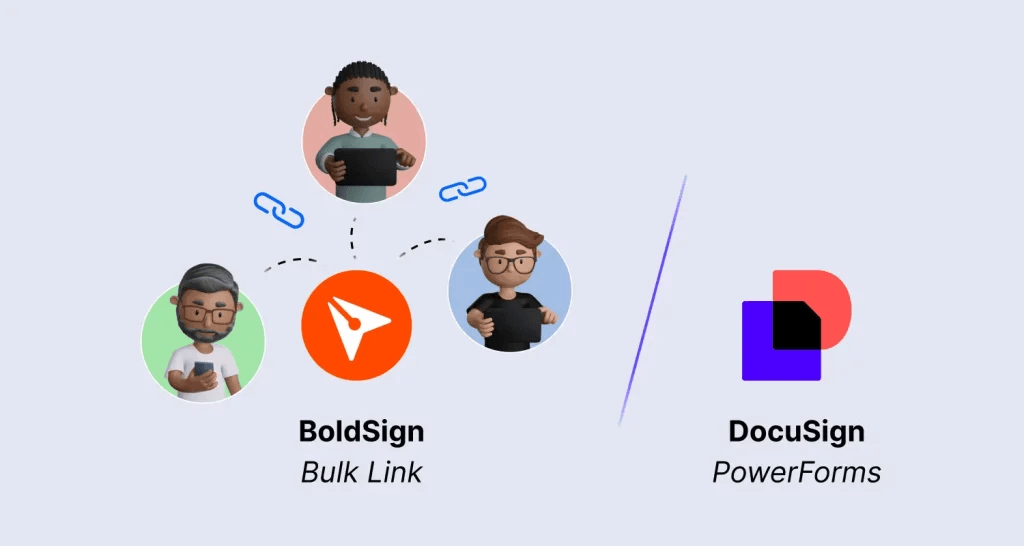
- Bulk send and reusable links solve related but different problems: known recipients with personalization versus unknown recipients with self-service access.
- Access controls like email verification, response limits, expiration dates, and identity verification are what actually make a public link safe to use.
- A signed document collected through a reusable link carries the same legal footing as any other electronic signature, provided consent and recordkeeping are handled correctly.
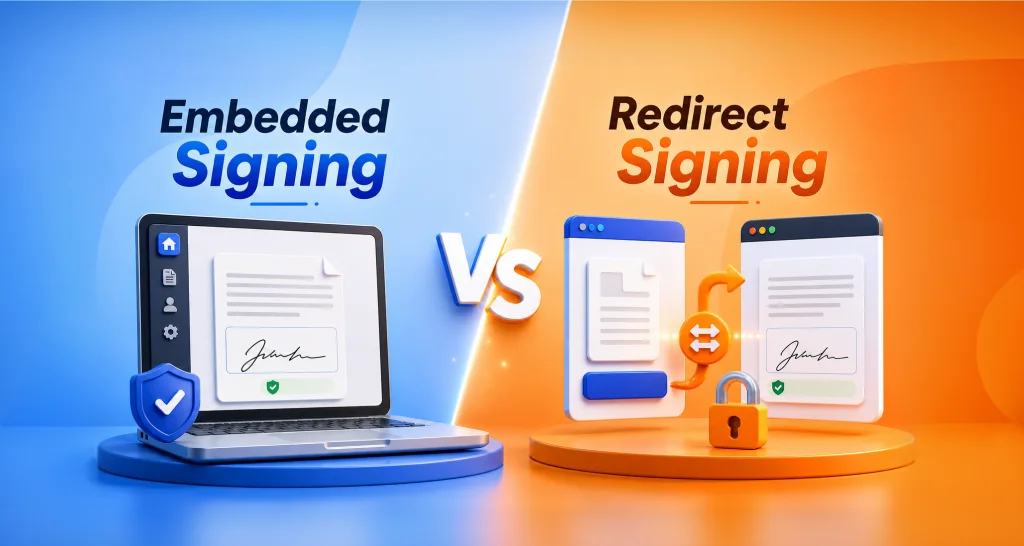
- Embedded signing is a different tool for a different job: it keeps signing inside your own app instead of sending people to a public link.
What a reusable signing link actually does
The mechanics are simple. A sender prepares a document or a template, generates one link, and shares it by email, text, social post, or a website embed. Anyone who opens the link enters their name and email, optionally passes an email check, then reviews and signs their own version of the document.
Nobody’s copy affects anyone else’s. Each signer gets an independent signing session, and the sender ends up with one signed document per person who completed the process, alongside a record of who signed and when.
Where a reusable link earns its place
This approach fits workflows where the reader is unknown ahead of time or where asking the sender to enter every name manually would be wasted effort:
- HR onboarding packets for new hires who join on a rolling basis, not in one batch.
- Waivers and consent forms for events, activities, or programs with variable attendance.
- Volunteer and membership sign-ups for nonprofits and community organizations.
- Policy acknowledgments that need to reach an entire department or a public list.
- Intake and registration forms for onboarding flows in real estate, education, or SaaS products.
In each case, the sender’s job is preparing one accurate document once. The signer’s job is completing it once. Nobody has to manage a growing spreadsheet of names just to keep the process moving.
When should you use a different signing method?
A reusable link struggles the moment your workflow depends on knowing exactly who is signing, in what order, or with what personal detail already filled in.
If you already have a defined list of recipients, a strict signing order, or fields that need to be personalized per person (a specific salary, a specific address, a specific account number), a bulk send or an individual signing request will serve you better than a public link.
A one-off, heavily negotiated agreement between two known parties almost never belongs on a public link either. It needs the tracking and control of a direct, named request.
Reusable link, bulk send, or a one-off signing link
These three options often get treated as interchangeable, and that is where teams pick the wrong one.
| Reusable (bulk) link | Bulk send | One-off signing link | |
| Who the signers are | Unknown or self-service | Known, on a CSV list | One named recipient |
| Personalization per signer | Minimal, same document for all | High, fields prefilled per row | Full |
| Setup effort | One link, share anywhere | Upload a list, review previews | Send individually |
| Best for | Public or high-volume collection | Defined groups needing personalized copies | Single, tracked agreements |
It is worth separating a reusable link from another feature that shares similar language: a signing link generated for one specific recipient on a document already sent, used to remind them to complete it. That kind of link points to a single person’s existing signature request.
It is not a public, reusable link that any number of strangers can use. Confusing the two can lead a team to expect broader self-service access than the feature actually gives them.
Reusable link vs embedded signing
A reusable link is meant to be shared and clicked, wherever the signer happens to be: email, text, a social post, or a page on your website. Embedded signing takes a different approach. It puts the signing session inside your own application or product, usually through an iframe, so the signer never leaves your interface.
The tradeoff comes down to who handles identity and where the experience lives. With a public link, the platform’s own verification options do that work. With embedded signing, your application confirms who the signer is before it requests a signing session, and the experience stays inside your branding rather than a shared, external page.
Both models can come from the same underlying platform, so the choice is about the workflow, not about switching tools. Pick a reusable link for reach and simple distribution; pick embedded signing when the signing moment needs to feel like part of your product.
Security and access controls to check before rollout
Because anyone with the URL can technically reach a reusable link, the access controls around it matter more than they would for a link sent to one named person.
Before rolling one out, check for signer authentication and identity verification options for higher-risk documents, email verification so only addresses matching a pattern (like a company domain) can proceed, a response limit and an expiration date so the link cannot be used indefinitely or beyond a set number of signers, and an audit trail that records who accessed the link, when, and what they signed.
These checks typically live directly on the link itself, including government ID and selfie-based identity verification for documents where signer identity carries real risk. The decision is which controls to turn on, not whether the option exists. Higher-stakes documents, like consent forms tied to sensitive data, deserve the stronger identity checks; lower-stakes internal acknowledgments often do not need them.
Legal validity and recordkeeping basics
In the United States, electronic signatures collected this way are not automatically invalid just because they came through a public link. The ESIGN Act’s general rule says a signature or contract cannot be denied legal effect solely because it is in electronic form.
Most states apply the same principle through their own adoption of the Uniform Electronic Transactions Act. Cornell Law’s overview of electronic signatures walks through the statutory language behind that rule.
That legal floor does not remove the need for good process. Teams still need clear evidence of signer intent, a way to attribute the signature to the right person, and a retention plan for completed documents and their audit trails. A public link with weak verification can still produce a valid signature, but it gives you less to point to later if a signature is ever disputed.
A quick buyer checklist
If you are evaluating tools for this workflow, look past the marketing copy and check for a specific set of capabilities:
- Support for building the link from a reusable template, so fields and roles stay consistent across every use.
- Prefill support for fields that are the same for every signer, with the rest left open for each person to complete.
- A no-code website embed option, if you plan to place the link on a page rather than only sharing it directly.
- Configurable verification, response limits, and expiration, not just a bare link with no controls.
- Link management: the ability to deactivate, edit, or extend a link after it is live, without starting over.
That combination is what separates a genuinely reusable, self-service link from a workaround built on a shared document that nobody actually controls.
How reusable signing links work in BoldSign
BoldSign is built to handle every workflow in this guide from one account, which is the practical advantage over piecing together separate tools for links, bulk sends, and templates. This workflow starts with a document or a template, since building the link from an existing template keeps fields and roles consistent across every signer.
From there, you create the bulk link, configure fields, verification, and response limits, and share the resulting URL by email, text, or a website embed.
As responses come in, BoldSign lets you track them and download signed copies individually or in bulk from the same place, with an audit trail attached to every signature. If your recipient list later becomes fixed and known, the same account handles that with bulk send, so switching workflows does not mean switching platforms.
How to create a reusable signing link in BoldSign
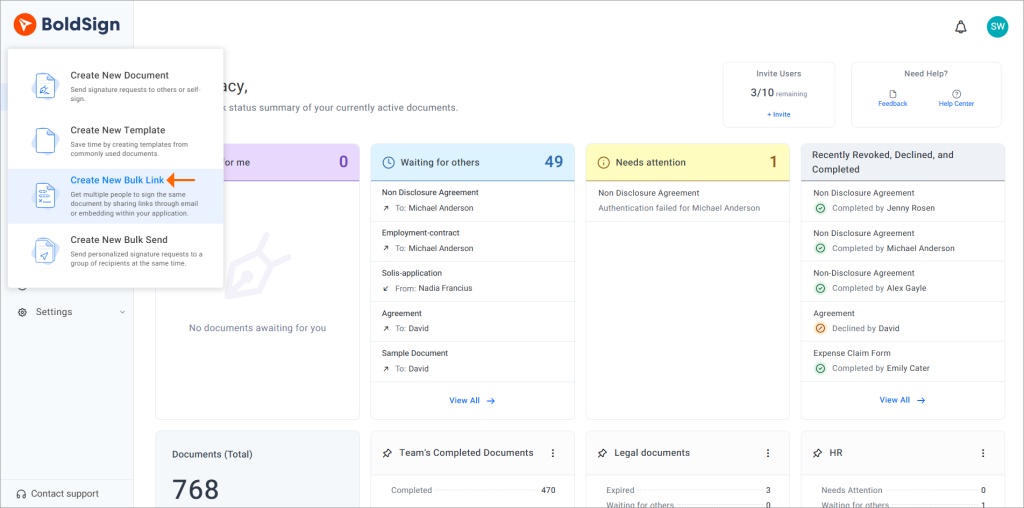
Step 1: Create a Bulk Link
Open Create New in BoldSign and select Create New Bulk Link to begin.
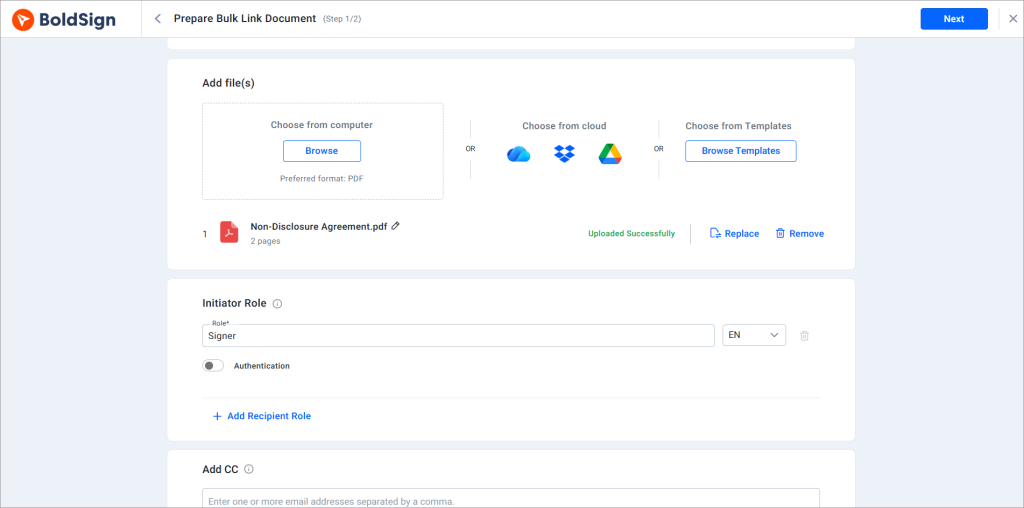
Step 2: Add your document
Upload a document or choose a saved BoldSign template to reuse existing fields and signer roles.
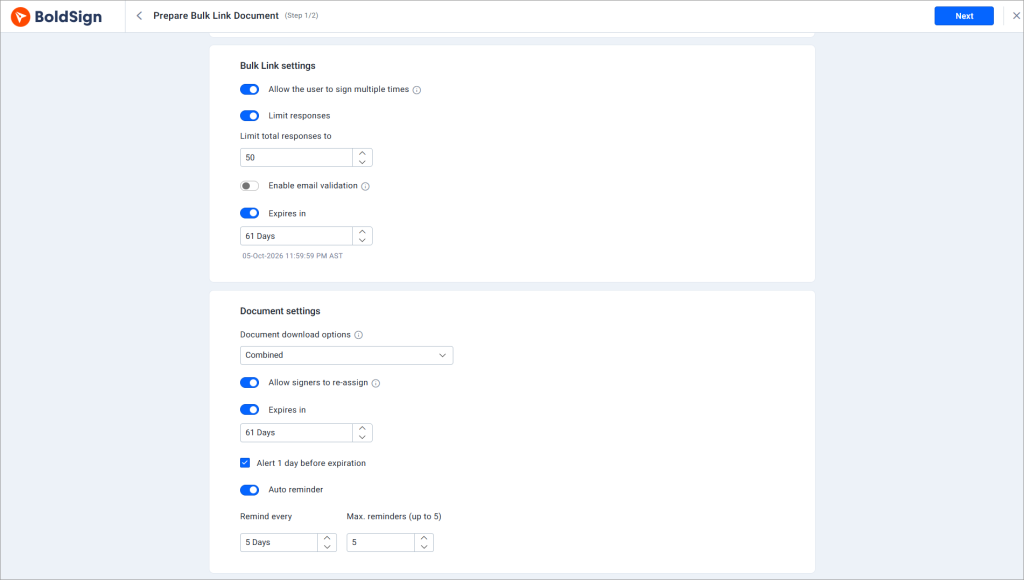
Step 3: Configure link settings
Set email validation, response limits, expiration, and repeat-signing permissions to control how the link is used.
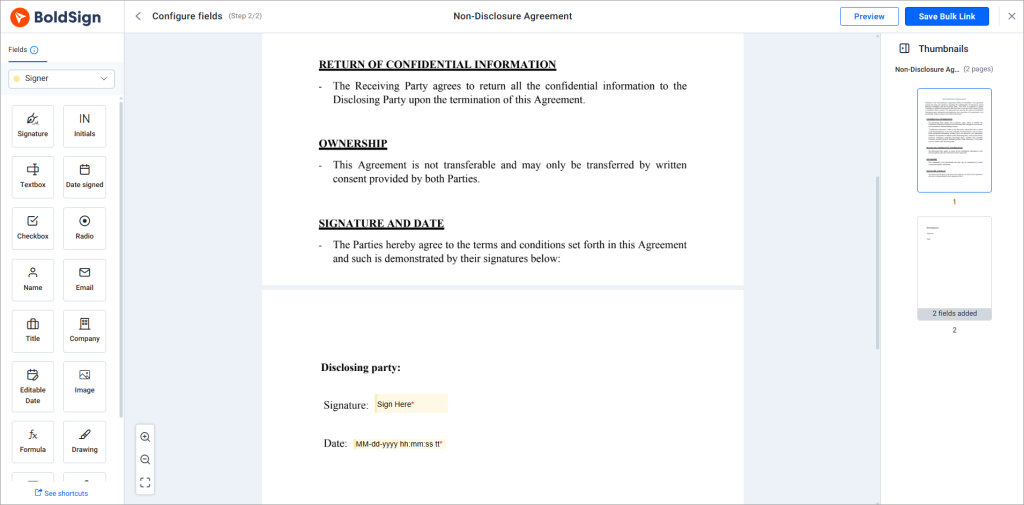
Step 4: Add signing fields
Place signature, name, date, checkbox, and other required fields on the document.
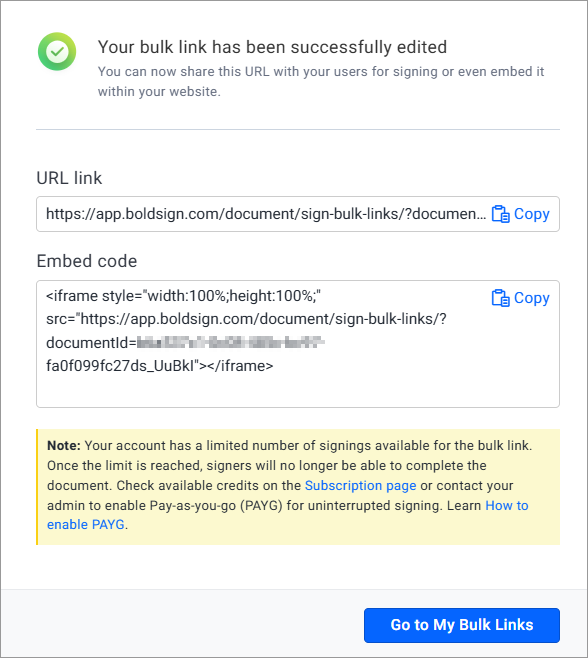
Step 5: Create and share the link
Generate your BoldSign Bulk Link and share it through email, messaging apps, or your website.
Step 6: Track responses
View each response, download signed documents, and review audit trails from your BoldSign account.
Cutting down on signer drop-off
A public link is effective only when signers complete the process. To improve completion rates:
- Keep the form short: Include only the fields and information you genuinely need.
- Limit required fields: Avoid making optional details mandatory, as lengthy forms can discourage signers.
- Set clear expectations: Explain what the document is about and what the signer is agreeing to before they begin.
- Optimize for mobile devices: Test the full signing experience on a phone, since many recipients may access the public link from one.
- Confirm successful completion: Display a short, specific follow-up message after signing so users know their response was submitted successfully.
- Choose the right workflow: If you already have a recipient list, compare BoldSign Bulk Links with Bulk Send before deciding which option best suits your needs.
Conclusion
Reusable signing links are built for one kind of signing job: high-volume, self-service, and often anonymous until the click. Bulk send and one-off links are built for jobs where you already know who is signing and what they need to see.
Most teams eventually need more than one of these. That is the case for a platform like BoldSign, which covers reusable links, bulk send, templates, and embedded signing under one account instead of a separate tool for each.
Pick based on how certain you are about your signer list and how much control the document needs. Start a free trial with BoldSign to test the right workflow against your own documents.
Frequently asked questions
What is a reusable signing link?
It is a single link that any number of people can use to sign their own independent copy of a document. The sender does not add names in advance, and each signer completes the process on their own.
How is a reusable signing link different from bulk send?
A reusable link works for unknown or self-service signers who use the same URL. Bulk send works for a known recipient list, with fields personalized for each person. BoldSign supports both Bulk Links and Bulk Send to fit these different workflows.
Can anyone with the link sign the document?
By default, yes, since the link is public. You can narrow that with email verification, a domain-matching pattern, a response limit, an expiration date, or stronger identity verification for sensitive documents.
Are reusable signing links legally binding?
Signatures collected this way generally carry the same legal footing as other electronic signatures under the ESIGN Act and UETA, provided the process captures clear signer intent and the completed documents are retained properly. Legal validity still depends on how the workflow is set up, not just the format.
Can I embed a signing link on my website?
Yes, a reusable link can typically be added to a webpage without custom code. If you need the signing session to live entirely inside your own application or brand experience, embedded signing is the better fit. BoldSign supports embedded signing for these workflows.
How do I limit who can access a signing link?
Use email verification or a domain-matching rule, set a response limit and an expiration date, and add identity verification for documents where signer identity carries more risk. BoldSign provides Bulk Link access controls and signer identity verification to help secure your signing workflow.
Can I prefill fields in a reusable signing link?
Yes, when the link is built from a template with fields already configured. Shared fields can be prefilled for every signer, while person-specific fields are left for each signer to complete.
When should I use embedded signing instead of a public link?
Use embedded signing when the signer is already inside your product and you want the signing step to stay there, and when your own application will handle identity verification before the signing session starts.
Do reusable signing links support audit trails?
Yes. Each session is typically tracked with a record of who accessed the link, when, and what they signed, which supports both internal tracking and dispute resolution later.
Preethi Loganathan
Preethi is a Digital Marketing Executive at BoldSign who develops precise, research-driven content on eSignatures, compliance, and digital signing workflows. She works closely with product and engineering teams to ensure every article is accurate, validated, and aligned with industry best practices. Connect with her on LinkedIn.
More posts by Preethi Loganathan