Embedded Signing vs Redirect Signing: Which Is Right for Your Business
TL;DR: In‑app embedded signing keeps users inside your app for a seamless, branded experience, while redirect signing opens the signing page in a new tab for faster and simpler implementation, so choose based on your user flow and setup effort.
Digital signing is no longer just about collecting a signature. It is about how smoothly users get to the signing step and finish it. When integrating eSignature workflows into your product or business process, one decision shapes the whole experience: should signers complete the document inside your app, or should you open the signing link in a new tab or window?
This guide breaks down embedded signing vs redirect signing, with practical use cases and a simple checklist to help you choose the right approach for your workflow.
What is embedded signing in BoldSign?
Embedded signing in BoldSign means generating a signer‑specific embedded signing link and launching the signing experience directly from your application. There are two distinct patterns that often get confused:
- In app embedded signing means you load the embedded signing page inside your product UI using an iframe on web or a WebView on mobile.
- Redirect based signing means you open the same embedded signing link outside your app, typically in a new tab or window, and optionally send the signer back to your app after signing.
“Important: Embedded signing does not automatically disable email invitations. If you want signers to sign documents only through your embedded flow, disable email invitations and notifications in the send request by setting DisableEmails property to true, so signers do not receive email links that bypass your embedded experience.”
What does “In‑App Embedded Signing” mean?
In-app embedded signing means the signing interface is loaded inside your application UI using an iframe or WebView. The user never leaves your application.
User flow
- The user clicks Start signing in your application.
- Your app loads the embedded signing link inside an iframe or WebView.
- The signer completes signing on the embedded page.
- Your app detects completion and moves the user to the next step in the workflow.
Pros
- Seamless signing experience that stays inside your app
- More control over the surrounding app UI and branding consistency
- Keeps users in a guided flow, which can reduce drop off
Cons
- Requires UI embedding work on web or mobile
- More implementation effort, since you manage both the API setup and frontend integration
When is in‑app embedded signing the best choice?
Use in‑app embedded signing when:
- You are building SaaS applications with logged‑in users.
- Signing is part of internal portals such as HR, procurement, finance, operations, or approval systems.
- You manage employee onboarding or compliance workflows.
- Your experience is multi‑step, and signing is one step, not the destination.
- You want stronger UI control, branding consistency, and reduced drop‑off.
Examples:
Embedded signing interface in an iFrame (Generated from API endpoint: GET/v1/document/getEmbeddedSignLink)
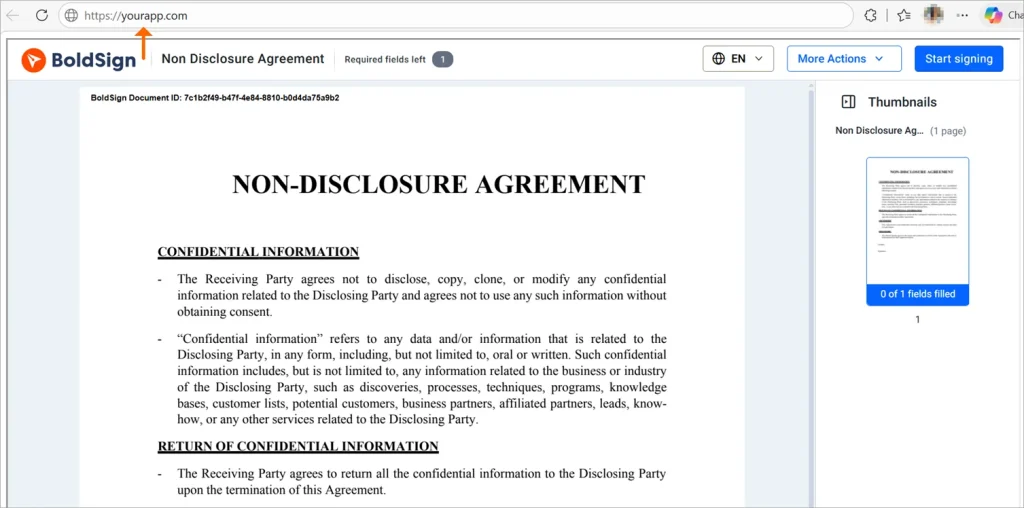
This example shows a signer completing a document through an embedded signing link generated programmatically using the API.
Embedded signing link (Generated from Bulk link)
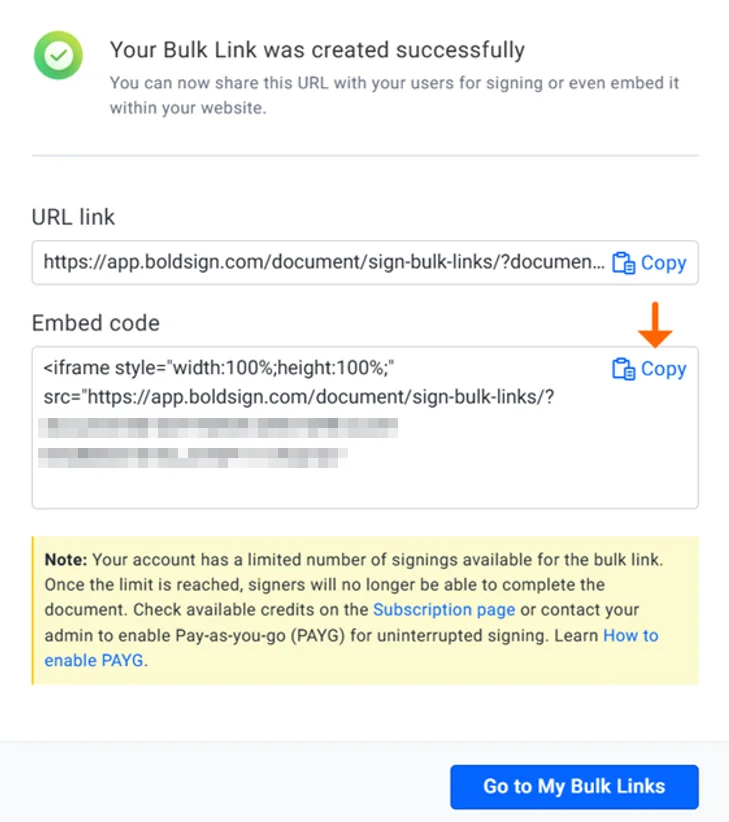
This example shows a signing link along with its embedded code, generated from a Bulk Link, which can be embedded in your application.
What does “Redirect‑Based Embedded Signing” mean?
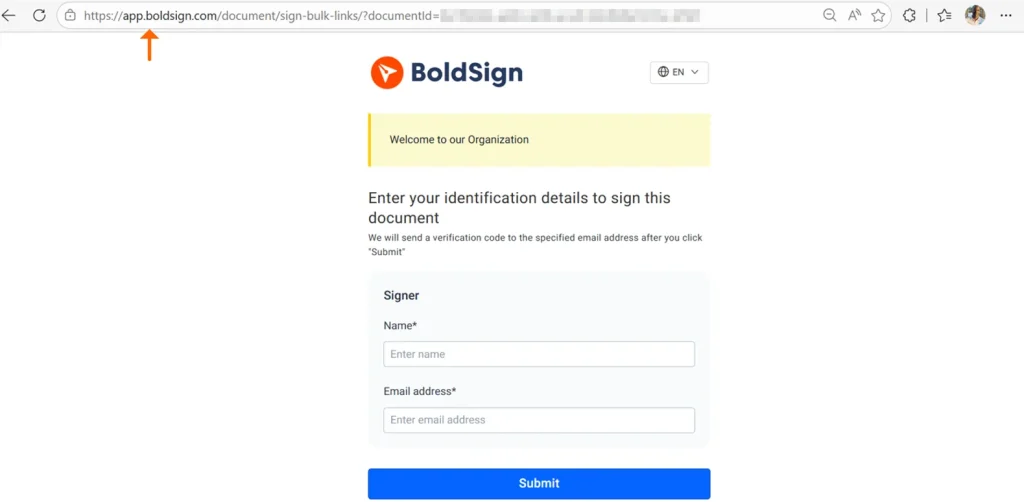
Redirect based signing launches the signing experience outside your application, typically in a new browser tab or window. After signing, users can be redirected back to your application using a configured redirect URL.
User flow
- The user initiates the signing process from your application or another entry point where the signing link is shared.
- The signing link opens in a new browser tab or window.
- The signer reviews and completes the document on the hosted signing page.
- If a redirect URL is configured, the signer is redirected back to your application after completion.
Pros
- Fastest and simplest implementation path.
- No iframe or WebView embedding required.
- Works well across devices and platforms.
Cons
- Users leave your application during signing.
- Less control over the hosted signing page UI compared to in-app embedding.
When is redirect signing the better option?
Use redirect signing when:
- Signers are external users such as customers, vendors, or partners.
- Signing is one‑time or occasional, not part of a recurring workflow.
- You are building mobile‑first flows where redirects are more reliable than embedded views.
- You need a fast rollout with minimal UI integration.
- You are creating demos, proofs of concept, or quick integrations.
Examples:
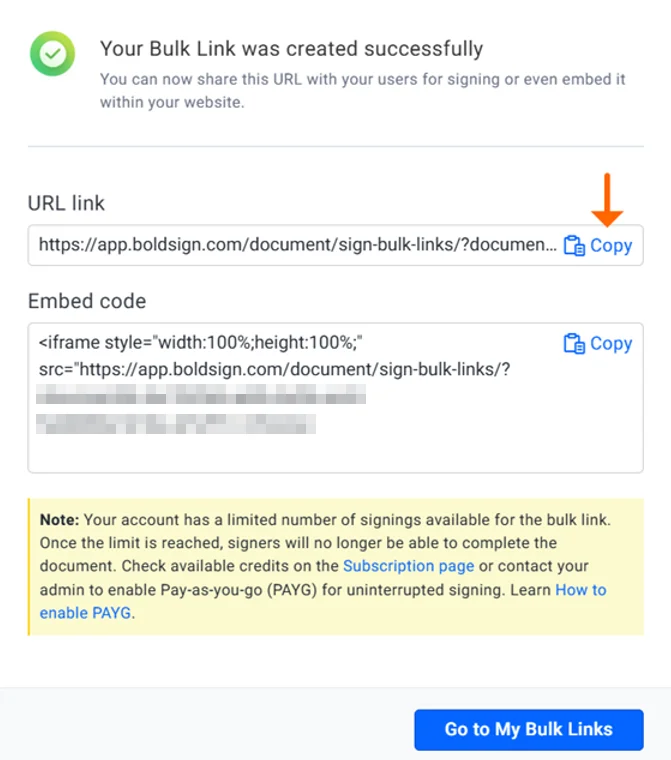
Redirect signing link (Generate from Bulk link)
Embedded signing vs redirect signing: Side by side comparison
Here is a comparison of embedded vs redirect signing workflows:
| Factor | In app embedded signing | Redirect based signing |
| Signing experience | Inside your app UI | Hosted signing page in a new tab or window |
| Implementation effort | Higher, includes UI embedding | Lower, generate link and open it |
| Branding control | More control over the surrounding app experience | Less control while user is on the hosted page |
| Navigation flow | User stays in your product | User leaves and can return via redirect URL if configured |
| Ideal for | SaaS apps, internal workflows, guided journeys | External signers, quick rollout, one off contracts |
Checklist: How do you decide between in‑app and redirect signing?
Choose in app embedded signing if:
- Users are authenticated in your app.
- Signing is one step in a longer guided workflow.
- You want the signing experience to feel native to your product.
- You need tighter control over the surrounding UI and navigation.
- You can invest in frontend embedding and completion handling.
Choose redirect-based signing if:
- Signers are external, one time, or not logged in.
- You want the quickest launch with minimal UI work.
- You are optimizing for broad device compatibility.
- You are fine with signers completing signing on a hosted page.
- You mainly need a clean start to finish signing path with a return step.
What implementation details should you plan for?
Common implementation details include:
1.Completion handling
Decide how your app will know signing is complete. Common approaches include returning the user to your app and then checking document status, or using webhook events to update your system when the document is completed.
2.Redirect URL behavior
If you use redirect based signing, confirm how redirect URLs are configured for your embedded signing link, so you can route users to the correct next screen.
3.Email invitations and notifications
If your embedded flow should be the only signing path, disable email invitations and notifications in the send request by setting DisableEmails to true, so signers do not receive email links that bypass your embedded experience.
Why use BoldSign for embedded signing?
BoldSign’s embedded signing provides:
- Secure, signer‑specific, time‑limited links
- Multiple launch options (iframe, popup, redirect)
- Full API control over notifications and access
- Scalable and reliable signing for production workloads
By embedding signing directly into your application, businesses reduce friction, improve completion rates, and maintain complete control over the user journey.
Final takeaway: Embedded or redirect signing?
Embedded signing is not about choosing complexity. It is about choosing the experience that best matches your users and workflow.
- Choose in app embedded signing when you want a cohesive product experience and signing is part of a guided journey.
- Choose redirect based signing when you want the simplest rollout for external signers and broad device compatibility.
Ready to build seamless signing into your application? Sign up for BoldSign today and transform how your users sign documents.
Get started with BoldSign’s Embedded Signing APIs to deliver a smooth, secure, and intuitive signing experience.
Need assistance? Contact our support team via the support portal or schedule a personalized demo.
Frequently asked questions
What is Embedded Signing?
Embedded signing allows users to review and sign documents directly within your application using an iframe or open window.
What is Redirect Signing?
Redirect signing sends users to a signing page hosted by the e‑signature provider. After completing the signing process, users are redirected back to your application via a redirect URL.
What is the main difference between embedded signing and redirect signing?
Embedded signing keeps users inside your app while Redirect signing temporarily navigates users to the host page.
Does BoldSign support both embedded and redirect signing?
Yes. BoldSign supports both in-app embedded signing and redirect-based embedded signing using secure signing links. This flexibility allows businesses to design workflows that best fit their user experience and technical needs.
Which API endpoint is used to generate an embedded signing link?
BoldSign provides the following API endpoint to generate embedded signing links: GET /v1/document/getEmbeddedSignLink.
Can users be redirected back to my application after signing?
Yes. embedded signing supports redirect URLs, allowing users to be automatically redirected back to your application after completing the signing process.
Which option is better for SaaS applications?
In-app embedded signing is usually the better choice for SaaS platforms, especially when users are already authenticated and signing is part of a larger, multi-step workflow within the product.
Is embedded signing secure?
Yes. Ensure signing links are shared only with authorized recipients and remain private.
Do both methods support mobile devices?
Yes. Both embedded and redirect signing are mobile‑friendly and work across modern browsers and devices.

Evans Omondi Otieno
Evans Omondi Otieno is a customer support representative and writer at BoldSign, specializing in creating clear, insightful content to help users navigate eSignature solutions. As a blog author, Evans writes well-researched articles that simplify technical concepts, helping businesses and professionals understand how to use BoldSign effectively. With expertise in technical support and content creation, he ensures users have a seamless experience and gain valuable knowledge from his articles. Connect with him on LinkedIn.
More posts by Evans Omondi Otieno