Enhance the Embedded Document Signing Experience with BoldSign
In this blog post, we’ll delve into the concept of embedded signing and explore how BoldSign can enhance the document signing experience within your application.
What Is Embedded Signing?
In BoldSign, embedded signing is the process of loading a document within your application and allowing the users of your application to sign it there. So, the entire document signing process will happen within your application.
Benefits of Embedded Signing
It is much more convenient for users to be able to sign documents from within the application they are already using, rather than having to switch to a separate e-signature application. This can save them time and effort.
When users sign documents from within their applications, they can be confident that the documents are being signed securely. This is because the applications are typically integrated with e-signature providers that use industry-standard security protocols.
How to Embed a Document in Your App
With BoldSign API, you can implement the embedded document signing experience by following the below simple steps.
1. Send Document for Signing
Initiate the process by sending the document to the designated signer. You can send document using the send API in return you will get a document ID.
Note: If signers are expected to complete the signing process within your application using embedded signing, set DisableEmails to true when sending the document. This prevents BoldSign from sending separate signing invitation emails and ensures signers complete the entire signing experience within your application.
curl -X 'POST' \ 'https://api.boldsign.com/v1/document/send' \
     -H 'accept: application/json' \
     -H 'X-API-KEY: {your API key}' \
     -H 'Content-Type: multipart/form-data' \
     -F 'DisableEmails=true' \
     -F 'Message=' \
     -F 'Signers={
        "name": "Hanky",
        "emailAddress": "hankyWhites@cubeflakes.com",
        "signerType": "Signer",
        "formFields": [
           {
                "id": "string",
                "name": "string",
                "fieldType": "Signature",
                "pageNumber": 1,
                "bounds": {
                  "x": 50,
                  "y": 50,
                  "width": 125,
                  "height": 30
                   },
      "isRequired": true
    }
  ],
  "locale": "EN"
}' \
  -F 'Files=@{your file}' \
  -F 'Title=Contract Form' \
2. Generate Embedded Signing URL
Utilize the obtained document ID and signer email address to generate the embedded signing link using the Get Embedded Signing Link API. This link is a crucial component in embedding the signing process within your application.
curl -X GET ' https://api.boldsign.com/v1/document/getEmbeddedSignLink?documentId=17882g56-xxxx-xxxx-xxxx-ce5737751234&signerEmail=alexgayle@cubeflakes.com'\
-H 'X-API-KEY: {use your API-KEY here}'
3. Integrate the Link in Your Application
Seamlessly integrate the generated signing link into your application’s interface using an iFrame element. This approach empowers users to sign the document directly within your app, enhancing their overall experience.
<iframe src="https://app.boldsign.com/document/sign/?documentId=17882f5a-xxxx-xxxx-xxxx-ce5737756339s_dyU07s_hkU07;dfeab145-xxxx-xxxx-xxxx-d705b85823c8" style="width:100%;height:100%"/>
Alternatively, you can choose to redirect users to the signing link to complete the signing process and then redirect them to your application by giving a redirect URL.
curl -X GET ' https://api.boldsign.com/v1/document/getEmbeddedSignLink?documentId=17882g56-xxxx-xxxx-xxxx-ce5737751234&signerEmail=alexgayle@cubeflakes.com&redirectUrl=https://www.syncfusion.com'
-H 'X-API-KEY: {use your API-KEY here}'
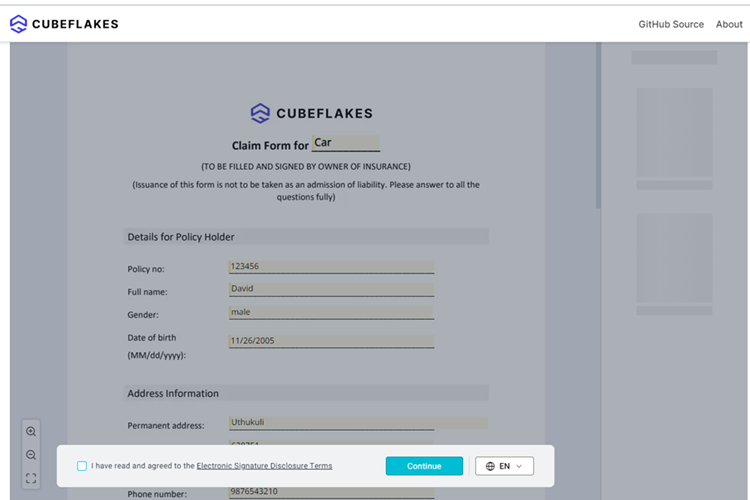
Document embedded inside an application
Conclusion
By integrating document signing directly into your application, you can provide a seamless signing experience without requiring users to switch between platforms. BoldSign helps you embed signing workflows, streamline document completion, and maintain a consistent user experience throughout the process.
Ready to get started? Create a free BoldSign account and explore embedded signing capabilities in your own application. If you have questions or need assistance, contact our support team or schedule a personalized demo to learn how BoldSign can fit your document workflows.

Gopinath Kannusamy
Gopinath is a passionate software developer with 2 years of experience at BoldSign. He is an avid writer and enjoys sharing his insights on technology and development. In his free time, he enjoys exploring new technologies and learning new things. Connect with him on LinkedIn.
More posts by Gopinath Kannusamy