Best Embedded Signing API for In-App Contract Signing
TL;DR: Embedded eSignature gets complicated fast. The right API lets you go live quickly, keeps the entire signing experience inside your app, and removes unnecessary friction.
If you have ever tried to add in-app contract signing to your product, you probably started with a simple thought. “How hard could this be?”
You are adding a signing feature. You create a document, assign a signer, send it for signing, and let them complete the signing process inside your app. On the surface, it feels like something you can ship in a sprint or two and move on.
But once implementation begins, or even as you start planning it in detail, things begin to shift quickly.
What seems like a small feature turns into something much larger:
- Complex API integrations you did not plan for
- Broken user flows when people get redirected out of your app
- Questions about legal validity, audit trails, and data protection requirements you are not fully prepared to answer
- Growing edge cases like multiple signers, signing order, and mobile issues
And then it becomes clear. This is not just a feature. It is a moment in your product where trust matters. The real challenge is not building it. It is building it without slowing everything else down.
Why embedded eSignature gets complicated so quickly
The process sounds simple:
- Create a document
- Send it for signing
- Let the signer complete the signing process
- Store the signed document
But each of these steps hides more complexity than you expect. Because you are not just building a feature. You are trying to create a smooth signing experience.
That means:
- No redirects that confuse users
- No extra steps that slow them down
- No friction between opening and completing a signature
Because the moment something feels off:
- Users hesitate
- Deals take longer
- Your product feels less reliable
Solving this well is not just implementation. It directly impacts user trust and conversion.
The 5 frustrations most teams run into
1. “This should not be taking this long”
You allocated two weeks for implementation. You’re now in week six. What happened?
The documentation looked clear. The sample code worked in the sandbox. But once you started connecting it to your actual product:
- Webhook configuration turned into a multi-day debugging session
- Authentication flows didn’t match your existing user management
- Error handling required custom logic you weren’t expecting
- Mobile rendering broke in ways the docs never mentioned
What you feel is frustration and lost momentum. You didn’t want to become an eSignature expert. You just wanted to ship the feature and move on to what actually differentiates your product.
The cost: Every week spent debugging embedded signing is a week not spent building your core value proposition.
2. The experience feels disconnected
Your app feels polished and consistent.
Then users click “Sign Document” and suddenly:
- The interface looks different
- The flow feels unfamiliar
- It no longer feels like your product
What you feel is discomfort. “This does not feel like us.” Users feel it too. Even small inconsistencies reduce trust.
The reality: In SaaS products, experience consistency isn’t a nice-to-have. It’s a trust signal. A disconnected signing experience makes your entire product feel less professional.
3. “Are we doing this right?”
When contracts are involved, the stakes go up. You’re not just handling user data, you’re handling legally binding agreements.
Questions start creeping in:
- Are signatures legally enforceable under the ESIGN Act and other applicable laws?
- Where’s the tamper-proof audit trail?
- What about GDPR for our European customers?
- How do we prove signer identity if challenged?
What you feel is uncertainty. Because it’s not just about functional code. It’s about legal defensibility. If a contract dispute arises three years from now, can you prove the signature was legitimate?
The stakes: Most engineering teams are not equipped to build secure, legally enforceable eSignature workflows from scratch.
4. Growth starts getting expensive
At first, the pricing looked reasonable.
But as your product scales:
- Per-document costs multiply faster than you projected
- You hit pricing tier cliffs that double your per-unit cost
- Usage-based billing becomes unpredictable as customer behavior varies
What you feel is hesitation. A feature meant to help growth starts creating friction instead.
5. Simple use cases become complex
Version 1 is simple: one signer, one document, done. But customers immediately start asking for more:
- Multiple signers — “Can our vendor and our legal team both sign?”
- Signing order — “Legal needs to review before the client signs.”
- Template-based documents — “We send the same NDA frequently. Can we reuse a template instead of recreating it every time?”
What you feel is pressure. “This is getting complex faster than expected.”
Each new requirement means revisiting your implementation. What started as a clean, simple feature becomes a sprawling workflow engine you’re now maintaining.
The trap: Building today’s use case feels fast, until tomorrow’s use case requires a rewrite. The best APIs anticipate growth without forcing you to over-engineer upfront.
What actually makes a great embedded eSignature API
After going through these challenges, your priorities change. You are not looking for more features. You are looking for simplicity.
It should feel easy
You should be able to:
- Upload or create a document without friction
- Add signers and define their roles clearly
- Send the document for signing
- Generate an embedded signing link within minutes
This lets your team spend time building instead of troubleshooting.
The signing experience should feel invisible
The best signing experience is one users don’t consciously notice. They just open, sign, and finish.
What invisible means:
- No redirects: The signing interface loads inside an iframe or modal in your app
- Your branding: Colors, logos, and UI elements match your product
- Seamless transitions: Users can complete signing without leaving your product experience
- Mobile-optimized: Touch-friendly signature capture works on any device without pinch-zoom workarounds
Real-world impact: Embedded signing can help reduce friction compared to redirect-based flows, since every context switch creates an opportunity for users to drop off.
It should handle real workflows
As your product grows, complexity increases.
The API should support that without adding extra work. So, you can reduce the amount of custom workflow logic your team needs to build and maintain.
Pricing should support growth
Costs should be predictable and scalable. So, you can grow without constantly worrying about usage or billing spikes.
You should be able to ship fast
Speed matters more than feature lists.
Faster implementation means:
- Faster value for users
- Faster product iteration
- Less pressure on your team
Where BoldSign makes a difference
Most teams eventually realize they don’t just need an API. They need an API that gets out of their way. They need something that removes friction. That is where BoldSign makes an impact.
What BoldSign does differently
Embedded signing in minutes, not days
Generate a fully functional embedded signing link with a single API call.
var apiClient = new ApiClient("https://api.boldsign.com", "Your_API_Key");

var documentClient = new DocumentClient(apiClient);

var embeddedSigningLink = documentClient.GetEmbeddedSignLink("YOUR_DOCUMENT_ID", "alexgayle@cubeflakes.com");
var signLink = embeddedSigningLink.SignLink;
That’s it. You can load this signing link directly inside your app, typically using an iframe, to present the signing experience. It stays within your interface, follows your branding, and works smoothly across devices.
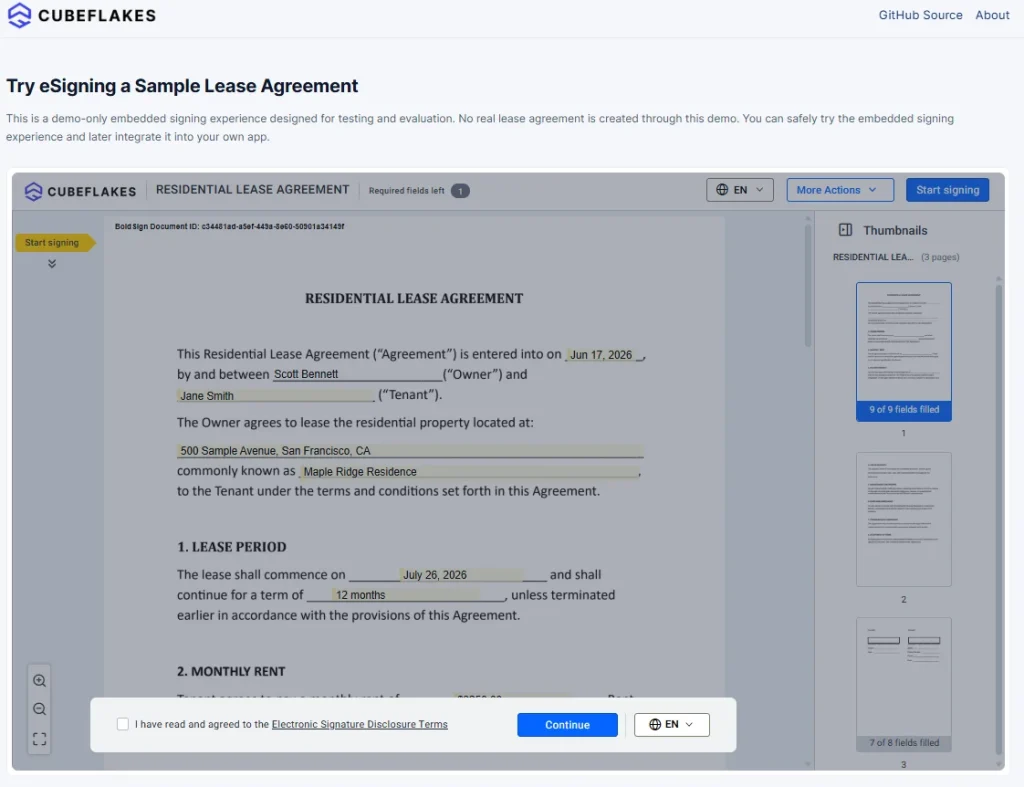
Experience embedded signing in a complete lease signing flow.
Real workflows without custom logic
Need signing order, multiple signers, or templates? Built-in support is available.
You configure it in the API request. You don’t build a workflow engine.
Legally valid. Fully secure. Always compliant
BoldSign supports standards and regulations such as SOC 2, GDPR, HIPAA, PCI DSS, the ESIGN Act, and eIDAS.
Every signed document includes:
- A detailed audit trail with timestamps, signer IP address, and activity logs
- A complete record of the signing process
You do not have to handle this from scratch.
Pricing that scales with you
- Usage-based pricing designed to support different signing volumes
- API plans are available for embedded eSignature integrations
- Custom pricing options are available for specific business needs
SDKs that actually save time
Official SDKs for .NET, Node.js, Python, PHP, and Java, not just REST documentation.
The real impact: What customers actually say
The difference isn’t abstract. Here’s what teams share about their experiences after implementing BoldSign:
“Streamlined Signatures with Seamless Portal Integration”
“I love the embedded sign feature in BoldSign because it allows me to embed it directly into my client portal, providing our clients with a very seamless experience. The embedded sign feature really stands out for me and is probably the best. Additionally, BoldSign has a really good API which is a big plus. The initial setup was pretty easy, not as difficult as I thought it’d be.”
— Alan P., Chief Executive Officer | Small Business
Source: G2 Review, May 2026
“Branded Embedded Signing Is a Game Changer”
“Being able to add and customize the embedded signing experience to match my own brand is a real game changer. The ability to keep everything within our product experience has completely transformed how our customers interact with contracts.”
— Chirag M., Founding Principal Engineer | Small Business
Source: G2 Review, April 2026
Notice the common themes:
- “Not as difficult as I thought it’d be” — Fast implementation
- “Seamless experience” — True embedded signing, not redirects
- “Really good API” — Developer-friendly integration
- “Game changer” — Brand customization that actually works
It’s the difference between: “We’re still working on the signing integration…” and “It’s live, it’s working, and we’re moving on to the next feature.”
Why simplicity wins
It’s tempting to choose the API with the longest feature list.
But in reality:
- The best API is the one that removes friction
- The one that helps you move faster
- The one your users never consciously notice
Because when the experience is right:
- Signing feels effortless
- Users trust your product more
- Deals close faster
- Your team focuses on building, not debugging eSignature workflows
Final thoughts: What matters most
In-app contract signing is not just another feature.
It is a moment where users decide whether to trust your product.
The right API makes everything easier:
- For developers who want to ship quickly
- For businesses that need predictable growth
- For users who expect a seamless experience
The real question is not whether you can build it. It is how smoothly and quickly you can deliver it.
Ready to see the difference?
If you want embedded signing that works without slowing your team down, BoldSign is worth exploring.
- Go live faster
- Keep users inside your app
- Scale without added complexity
- Test your integration safely with a sandbox environment before going live
Try BoldSign now or book a demo to see it in action
Frequently asked questions
What is embedded eSignature, and how is it different from email-based signing?
Embedded eSignature lets users review and sign inside your app or website, typically through an iFrame or an embedded signing link. Email-based signing sends the signer out of your product to an email invitation and link.
Who is responsible for signer authentication in embedded signing?
In embedded workflows, your app may handle part of the signer authentication flow before launching the signing session, and additional identity verification options are also available through BoldSign depending on the workflow.
What should an audit trail include for embedded signing?
Look for records such as signer actions, timestamps, and key document events captured in the audit trail to help prove what happened.
How do embedded signing links work?
Typically, you generate a secure, time-sensitive signing URL and load it in your app, then handle a redirect or callback when signing finishes.
Do I need webhooks, or can I just poll the API?
Webhooks are usually better for reliability and speed because your system gets notified when something changes. Polling can work for low volume, but it is easy to miss timing and create extra load.
Can embedded signing be “white labeled” inside my product?
Yes, through branding options such as your logo, colors, and related customization around the embedded experience.
What should I test in a sandbox before going live?
At minimum, test signer identity and access flow, link expiration and replay prevention, multi-signer routing, webhook delivery and retries, completed PDF retrieval and audit trail export, and error handling for abandoned signers.

Evans Omondi Otieno
Evans Omondi Otieno is a customer support representative and writer at BoldSign, specializing in creating clear, insightful content to help users navigate eSignature solutions. As a blog author, Evans writes well-researched articles that simplify technical concepts, helping businesses and professionals understand how to use BoldSign effectively. With expertise in technical support and content creation, he ensures users have a seamless experience and gain valuable knowledge from his articles. Connect with him on LinkedIn.
More posts by Evans Omondi Otieno