ASP.NET Core Rate Limiting: Built-In Middleware, Policies, and Production Tips
 BoldSign Team 15 min read
 TL;DR: ASP.NET Core has included rate-limiting middleware since .NET 7. It is part of the shared framework, so no third-party package is required for single-instance deployments. Define a policy with AddRateLimiter, enforce it with UseRateLimiter, and choose from four algorithms: fixed window, sliding window, token bucket, or concurrency. State lives in memory per instance, and this is not a substitute for DDoS protection.
One noisy caller degrades an API for everyone else using it: a partner integration polling a status endpoint every second, a retry loop that never backs off, a customer running a large batch import at the worst moment. None are attacks, and all of them spend capacity that should be serving real requests. The abusive versions, credential stuffing or scraping, are the same problem with worse intent.
The cost lands twice. Redundant traffic slows every other caller, and if you pay for compute or per request to call someone else’s API, it shows up on the bill. Rate limiting sets a ceiling: no more than X requests from one caller in a given window. It doesn’t fix bad behavior. It contains it while you deal with the cause.
This guide covers wiring the middleware into Program.cs, choosing among the four built-in algorithms, partitioning limits per IP, user, tenant, or API key, returning a 429 that clients can act on, and the production details most tutorials skip, including what to do when your own app is the one calling a rate-limited API such as BoldSign’s.
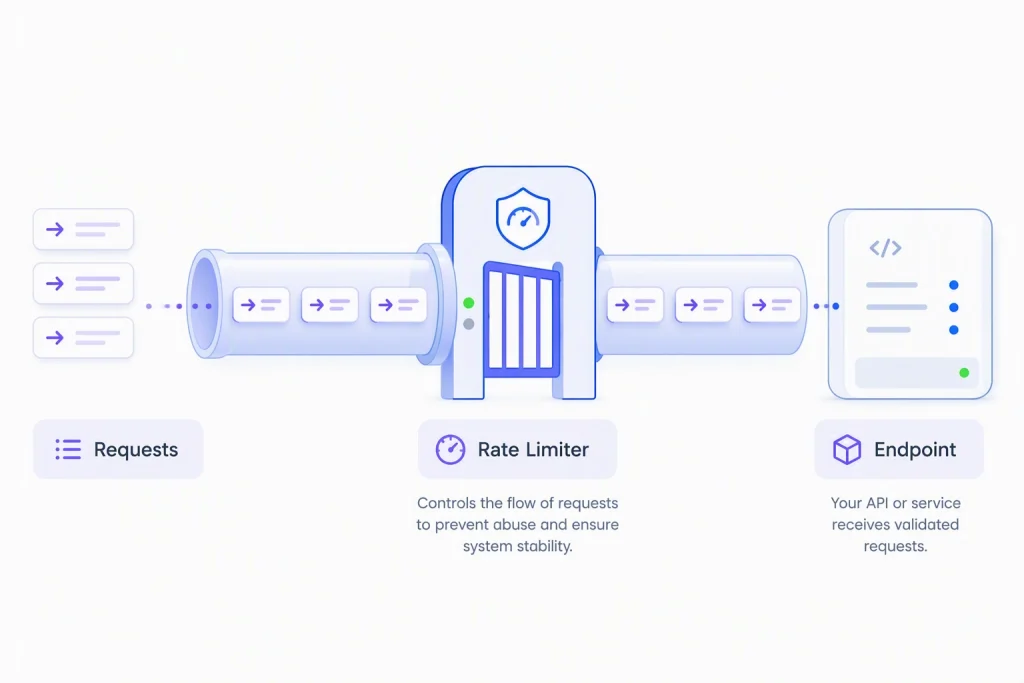
Requests passing through a rate-limiter gate before reaching the endpoint.
Key takeaways
The six things worth remembering if you read nothing else:
- Rate limiting has been built into ASP.NET Core since .NET 7, with no extra package required for single-instance deployments.
- The four algorithms each solve a different problem. Choose based on endpoint cost and traffic pattern.
- A configured global limiter applies to every request unless an endpoint opts out with [DisableRateLimiting]. Global limiting must be configured explicitly (AddRateLimiter alone does not impose a default limit).
- Partition limits by a trusted, verified identity such as a user, tenant, or authenticated API key. Partitioning on raw client IP addresses can introduce abuse and scalability risks.
- Your own app can be the noisy caller when it calls a third-party API without an outbound limit.
- Rate limiting reduces everyday abuse, but isn’t a substitute for DDoS protection.
What ASP.NET Core gives you out of the box
ASP.NET Core includes built-in rate limiting, so you can protect APIs from excessive traffic without adding a third-party package. For most applications, you can define limits, apply them to specific endpoints or the entire app, and start throttling requests with just a few lines of configuration.
The middleware works with Controllers, Razor Pages, routable Razor components in server-side Blazor, and Minimal APIs. For a single application instance, it stores rate-limiting state in memory and doesn’t require Redis or another external cache.
ASP.NET Core provides four built-in algorithms:
- Fixed window for simple request quotas
- Sliding window for smoother traffic control
- Token bucket for handling bursty clients
- Concurrency for limiting expensive in-flight operations
While the built-in middleware is suitable for many production scenarios, Microsoft’s rate limiting middleware documentation recommends load testing before deployment to ensure your limits behave as expected under real traffic patterns. Tools such as Apache JMeter and Azure Load Testing can help validate your configuration.
Core setup in Program.cs
Two calls do the work: AddRateLimiter defines the rule, UseRateLimiter enforces it.
using Microsoft.AspNetCore.RateLimiting;
using System.Threading.RateLimiting;
var builder = WebApplication.CreateBuilder(args);
builder.Services.AddRateLimiter(options =>
{
    options.RejectionStatusCode = StatusCodes.Status429TooManyRequests;
    options.AddFixedWindowLimiter("fixed", opt =>
    {
        opt.PermitLimit = 100;
        opt.Window = TimeSpan.FromMinutes(1);
        opt.QueueLimit = 0;
    });
});
var app = builder.Build();
app.UseRateLimiter();
app.MapGet("/api/documents", () => Results.Ok(new { message = "ok" }))
   .RequireRateLimiting("fixed");
app.Run();
Set RejectionStatusCode explicitly. The default 503 indicates temporary service unavailability, while 429 clearly tells the client to slow down.
RequireRateLimiting(“fixed”) attaches the rule to one endpoint, a group, or a page. When you use endpoint-specific rate limiting, including RequireRateLimiting or [EnableRateLimiting], call UseRateLimiter after UseRouting. In this Minimal API example, routing is configured automatically by ASP.NET Core, so an explicit UseRouting() call is not required.
QueueLimit is set to 0 here so requests beyond the limit are rejected immediately with a 429 response. For most APIs, this is preferable to making callers wait. A small queue can be useful for absorbing short traffic bursts, but large queues often increase latency and resource usage without improving overall throughput. Use queuing sparingly and only when brief delays are acceptable.
Global limiter vs. endpoint policy
A named policy checks only the endpoints you attach it to. A global limiter, set through options.GlobalLimiter, checks every request. The two do not replace each other: the global limiter runs first, and an endpoint carrying a named policy is checked against both. That makes a global limiter the right place for a broad baseline, with named policies adding stricter rules on expensive or sensitive endpoints.
options.GlobalLimiter = PartitionedRateLimiter.Create(context =>
    RateLimitPartition.GetFixedWindowLimiter(
        partitionKey: context.User.Identity?.Name ?? "anonymous",
        factory: _ => new FixedWindowRateLimiterOptions
        {
            PermitLimit = 200,
            Window = TimeSpan.FromMinutes(1),
            AutoReplenishment = true
        }));
To exempt an endpoint entirely, such as an internal health check, use DisableRateLimiting() or [DisableRateLimiting]. This overrides both named and global limiters and is the only way for an endpoint to bypass a global rate-limiting policy. A public webhook receiver is different: it can still receive abusive traffic, so give it its own policy and verify the payload signature rather than exempting it.
Choosing the right algorithm
Each algorithm counts differently, so the right choice depends on the endpoint’s cost and traffic shape.
| Algorithm | Best fit | Trade-off |
| Fixed window | Simple quotas on low-stakes endpoints | Can allow double the intended rate at the reset |
| Sliding window | Traffic where the boundary burst is a problem | More bookkeeping to reduce that burst |
| Token bucket | Bursty but well-behaved clients (webhooks, batch jobs) | Needs tuning of bucket size and refill rate |
| Concurrency | Expensive endpoints where in-flight work is the real cost | No natural Retry-After estimate |
How expensive an endpoint is matters as much as how much traffic it gets: a cached lookup and a report generator should not share a rule.
Fixed window limiter
The simplest of the four: count requests in a window, then reset the count all at once.
     builder.Services.AddRateLimiter(_ => _
    .AddFixedWindowLimiter(policyName: "fixed", options =>
    {
        options.PermitLimit = 100;
        options.Window = TimeSpan.FromSeconds(30);
        options.QueueProcessingOrder = QueueProcessingOrder.OldestFirst;
        options.QueueLimit = 10;
    }));
The window runs from when that partition’s limiter is first created, not from a clock boundary, so different callers sit on windows offset from each other. The reset is what allows the boundary burst: a client can send a full batch just before the window closes and another immediately after, briefly reaching nearly double the intended rate. If occasional bursts around the reset boundary are acceptable, fixed window is often the most practical choice for enforcing request quotas.
Sliding window limiter
A smoother version of fixed window, for traffic where the reset burst is a real problem.
     builder.Services.AddRateLimiter(_ => _
    .AddSlidingWindowLimiter(policyName: "sliding", options =>
    {
        options.PermitLimit = 100;
        options.Window = TimeSpan.FromSeconds(30);
        options.SegmentsPerWindow = 3;
        options.QueueProcessingOrder = QueueProcessingOrder.OldestFirst;
        options.QueueLimit = 10;
    }));
It splits the window into segments and rolls the oldest off gradually, so permits return a few at a time rather than all at once. This reduces the boundary burst rather than removing it. Reach for it when fixed window proves too coarse.
Token bucket limiter
Built for clients that are naturally bursty but well behaved overall, such as webhook consumers and batch jobs.
     builder.Services.AddRateLimiter(_ => _
    .AddTokenBucketLimiter(policyName: "token", options =>
    {
        options.TokenLimit = 100;
        options.TokensPerPeriod = 20;
        options.ReplenishmentPeriod = TimeSpan.FromSeconds(10);
        options.AutoReplenishment = true;
        options.QueueProcessingOrder = QueueProcessingOrder.OldestFirst;
        options.QueueLimit = 2;
    }));
Tokens refill on a schedule up to a ceiling, and each request spends one. A quiet client saves tokens and spends them in a burst; a busy one empties the bucket and waits. Like fixed and sliding window, it can estimate a meaningful Retry-After.
Concurrency limiter
The odd one out: it caps requests being handled at once, not requests over time.
     builder.Services.AddRateLimiter(_ => _
    .AddConcurrencyLimiter(policyName: "concurrency", options =>
    {
        options.PermitLimit = 10;
        options.QueueProcessingOrder = QueueProcessingOrder.OldestFirst;
        options.QueueLimit = 5;
    }));
Each request holds a permit until it finishes, so ten slow report generations saturate the limit while ten fast lookups barely register. Use it where the real constraint is CPU-intensive work, memory, database connections, or downstream service capacity. With no time window to reference, it can’t tell a rejected caller when to retry.
Partitioning by IP, user, tenant, or API key
A single shared rule lets one heavy caller use up the allowance meant for everyone. PartitionedRateLimiter splits traffic into independent buckets by key, so each caller gets its own quota.
options.GlobalLimiter = PartitionedRateLimiter.Create(httpContext =>
{
    // Authenticated users get their own generous bucket.
    // API keys must first be validated and mapped to an authenticated principal
    // so that User.Identity.Name is available here.
    var user = httpContext.User.Identity?.Name;
    if (!string.IsNullOrEmpty(user))
    {
        return RateLimitPartition.GetTokenBucketLimiter(
            partitionKey: $"user:{user}",
            factory: _ => new TokenBucketRateLimiterOptions
            {
                TokenLimit = 300,
                TokensPerPeriod = 300,
                ReplenishmentPeriod = TimeSpan.FromMinutes(1),
                AutoReplenishment = true
            });
    }

    // Everything unauthenticated shares a tighter pool.
    return RateLimitPartition.GetFixedWindowLimiter(
        partitionKey: "anonymous",
        factory: _ => new FixedWindowRateLimiterOptions
        {
            PermitLimit = 30,
            Window = TimeSpan.FromMinutes(1),
            AutoReplenishment = true
        });
});
Prefer a stable, verified identity such as an authenticated user or tenant ID over an unverified API key header, which a caller can spoof or rotate. Run authentication middleware before rate limiting so identity is available when the key is chosen.
Per-IP partitioning deserves a warning. Microsoft’s documentation notes that creating partitions from user input leaves an app open to denial-of-service attacks, and calls out client IP addresses specifically, since an attacker using source address spoofing can force your app to create partition after partition until memory becomes the problem. The documented advice is to avoid partitioning on any unvalidated request-derived input, not just IP, but raw headers, User-Agent, and similar values. If you must derive a partition key from request data, read it from a trusted proxy header, validate it, and bound the cardinality of partitions you track.
Returning useful 429 responses
OnRejected controls both the status code and the Retry-After header the caller receives.
options.OnRejected = async (context, cancellationToken) =>
{
    if (context.Lease.TryGetMetadata(MetadataName.RetryAfter, out var retryAfter))
    {
        context.HttpContext.Response.Headers.RetryAfter =
            ((int)retryAfter.TotalSeconds).ToString();
    }
    context.HttpContext.Response.StatusCode = StatusCodes.Status429TooManyRequests;
    await context.HttpContext.Response.WriteAsync(
        "Rate limit exceeded. Please retry after the indicated delay.", cancellationToken);
};
Fixed window, sliding window, and token bucket limiters estimate this through the lease’s RetryAfter metadata. A well-behaved client reads it and waits, rather than retrying straight into another rejection. Microsoft’s rate limiting samples show fuller variations, including logging and configuration-driven limits.
Production tips that most tutorials skip
The middleware setup is the easy part; these details surface once real traffic hits it.
- Load test with bursty traffic. A rule that looks fine against a steady trickle can behave very differently under real load. Microsoft recommends stress testing before deployment.
- Don’t mistake it for DDoS protection. Rate limiting helps control abusive clients and traffic spikes, but it cannot stop a large-scale distributed attack. For that, use dedicated protections such as a web application firewall (WAF), CDN, or DDoS mitigation service.
- Watch the built-in metrics. The middleware publishes rejection and queue metrics under Microsoft.AspNetCore.RateLimiting, but nothing exports them on its own. Configure a collector or exporter, such as OpenTelemetry, so tuning is driven by data.
- Push limits to the gateway where it fits. If you’re already using a gateway such as YARP, you can enforce per-route rate-limiting policies there instead of in every downstream application. Note that YARP uses the same in-memory ASP.NET Core middleware, so multiple YARP processes still have separate counters. A truly shared limit requires a single central enforcement point or a distributed limiter backed by shared state such as Redis.
- Isolate expensive endpoints. Give bulk exports and report generation their own policy rather than sharing with cheap reads.
- Plan for scale-out early. State is per instance, so three replicas with a 100-per-minute rule can permit up to 300. A truly shared limit requires either a single central enforcement point or a distributed limiter backed by shared state such as Redis; running multiple gateway or application instances does not automatically consolidate the counters.
Handling third-party API limits from ASP.NET Core
Everything above protects your API from other people’s traffic. The same problem runs in reverse: your app is a caller too, and providers expect a limit to be respected. BoldSign’s eSignature API is a useful example because it publishes its exact rate limits, response headers, and guidance for handling rate-limited requests.
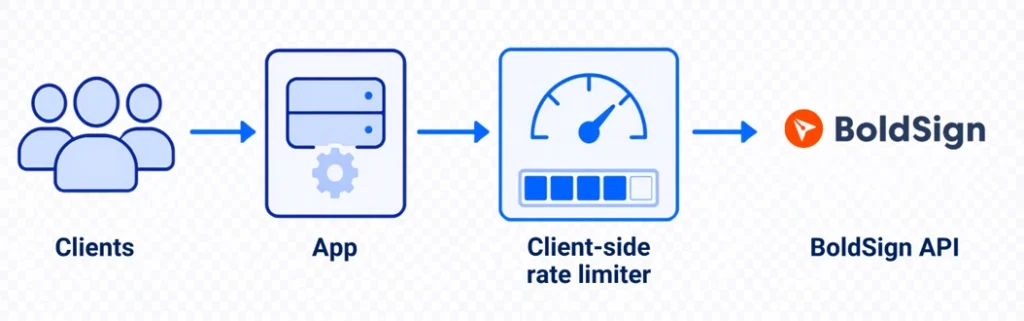
Outbound calls to the BoldSign API passing through a client-side rate limiter.
BoldSign’s rate limit documentation is explicit about its limits and headers. API key and OAuth calls follow the same system, and limits apply at the account level rather than per OAuth app or per user: 2,000 requests an hour in production, 50 an hour in sandbox. Past that, calls return 429 with a message. Track usage through the X-Rate-Limit-Limit, X-Rate-Limit-Remaining, and X-Rate-Limit-Reset response headers.
The authoritative BoldSign developer guide on managing API rate limits recommends keeping an internal limit below that ceiling, prioritizing essential calls, and spreading requests across the window rather than firing them in a batch.
The other lever is fewer calls: polling a document’s status on a timer spends your hourly budget whether or not anything changed. BoldSign webhooks push an HTTP POST to your endpoint the moment a document event occurs, removing most of that polling. They don’t remove reconciliation entirely: BoldSign retries failed deliveries with backoff and supports manual resends, so an event can arrive more than once, and repeated failures can disable the endpoint. Acknowledge with a 200 quickly, do the heavy work afterwards, store processed event IDs to ignore duplicates, verify the X-BoldSign-Signature value before trusting a payload, and keep an occasional reconciliation job as a backstop.
A practical BoldSign example for .NET teams
Consider a document-status sync service. Inbound requests are covered by the policies above; outbound calls to BoldSign need their own ceiling, which the same System.Threading.RateLimiting primitives provide. Register one bucket for the whole process, then inject it:
// Roughly 720 calls an hour, well inside BoldSign's 2,000/hour account limit,
// leaving room for the rest of the app.
builder.Services.AddSingleton(_ =>
    new TokenBucketRateLimiter(new TokenBucketRateLimiterOptions
    {
        TokenLimit = 10,
        TokensPerPeriod = 2,
        ReplenishmentPeriod = TimeSpan.FromSeconds(10),
        AutoReplenishment = true,
        QueueLimit = 0
    }));
public class BoldSignStatusSyncService
{
    private readonly DocumentClient _documentClient;
    private readonly RateLimiter _outboundLimiter;
    private readonly ILogger _logger;

    public BoldSignStatusSyncService(DocumentClient documentClient,
        RateLimiter outboundLimiter,
        ILogger logger)
    {
        _documentClient = documentClient;
        _outboundLimiter = outboundLimiter;
        _logger = logger;
    }

    public async Task TrySyncStatusAsync(string documentId,
        CancellationToken cancellationToken = default)
    {
        using var lease = await _outboundLimiter.AcquireAsync(1, cancellationToken);
        if (!lease.IsAcquired)
        {
            _logger.LogWarning("Local throttle refused a BoldSign call for {DocumentId}. The caller must retry later.",
                documentId);
            return false;
        }
        try
        {
            var properties = await _documentClient.GetPropertiesAsync(documentId);
            // Persist properties.Status here.
            return true;
        }
        catch (ApiException ex) when (ex.ErrorCode == StatusCodes.Status429TooManyRequests)
        {
            // Returning false signals the caller to retry later.
            // The caller is responsible for implementing a backoff policy,
            // for example exponential backoff with jitter, before retrying.
            // Check the X-Rate-Limit-Reset header in the response for when
            // the account window resets.
            _logger.LogWarning(ex, "BoldSign returned 429 for {DocumentId}. The caller must retry later.",
                documentId);
            return false;
        }
    }
}
Two details carry the weight. The limiter is injected, not created in the constructor. Creating it inline, or registering it as scoped or transient, gives each instance its own bucket and effectively multiplies your real ceiling.
QueueLimit is set to 0 so calls that exceed the local budget are rejected immediately. With a queue, AcquireAsync will wait for a permit up to the queue’s capacity. If the queue is full, it returns immediately with IsAcquired = false.
One caveat: the cancellationToken is passed to AcquireAsync so that queued waits can be cancelled, but the current BoldSign .NET SDK’s GetPropertiesAsync does not accept a cancellation token. If cancellation matters for your scenario, wrap the SDK call with a timeout or check the token manually after it returns.
This local limiter reduces the risk of exceeding BoldSign’s rate limits, but it only tracks usage within the current process. It has no visibility into other application instances, services, API keys, or restarts, which reset the bucket. Two instances mean two buckets and can permit up to twice the configured local limit, so a true shared limit requires a distributed store such as Redis or enforcement at the gateway. Regardless of local throttling, always handle the provider’s own 429 responses. ASP.NET Core applications targeting .NET 7 or later already include System.Threading.RateLimiting as part of the shared framework; no extra package is needed. Other application types, including net6.0, netstandard2.0, and .NET Framework 4.6.2 or later, must add the System.Threading.RateLimiting NuGet package explicitly.
The BoldSign .NET SDK provides the DocumentClient used in this example and a WebhookUtility.ValidateSignature helper for webhook signature validation. If you’re getting started, the Getting started guide covers authentication, and the API Explorer lets you test requests in a sandbox directly from your browser.
Try it against real limits: Create a free API sandbox, run your ASP.NET Core client through the .NET SDK, and watch what happens when the 50-per-hour sandbox ceiling is reached. A sandbox is a cheaper place to find a missing backoff policy than production.
Common mistakes and troubleshooting
Most of these only show up under real traffic, which is why they’re easy to ship by accident.
- One shared bucket for every client. Split by API key, user, or tenant so your best-behaved caller doesn’t inherit your worst one’s quota.
- Over-limiting login and callback endpoints. A strict sign-in limit can lock out a whole office behind one NAT address; a tight callback limit drops events you needed. Both need their own policy: tighter partitioning on login, generous limits plus signature verification on callbacks.
- Leaving the rejection status at the default. A 503 tells clients your service is broken; set 429 so retry logic works.
- Ignoring Retry-After on outbound calls. Respect Retry-After when the provider supplies it, and wait rather than retrying into another rejection. BoldSign documents X-Rate-Limit-Limit, X-Rate-Limit-Remaining, and X-Rate-Limit-Reset; check the provider’s documentation to confirm which headers are available.
- Polling where a webhook exists. Every needless check spends part of the provider’s quota and your own budget.
- Assuming limits hold across instances. Counters are per process; test with more than one replica running.
- Shipping without burst testing. Validate with a load profile that looks like your real traffic, including the spikes.
Rate limiting is not just middleware: it is traffic policy
The mechanics are simple once set up: AddRateLimiter, four algorithms, partitioning, OnRejected. What matters is the thinking behind them, which traffic gets priority, what a fair share looks like, and what happens when your app is the caller. Done well, you get steadier latency under load, fair usage across tenants, and integrations that degrade gracefully instead of failing.
If you are integrating eSignature workflows, the BoldSign eSignature API documents its limits, headers, and webhook events openly, which makes the backoff and webhook handling described here straightforward to build.
Try it yourself: create a free BoldSign sandbox account and test your application’s retry, backoff, and webhook handling against real API limits before moving to production.
Frequently asked questions
How do I implement rate limiting in ASP.NET Core?
Register a policy with AddRateLimiter, call UseRateLimiter to enforce it, then attach it with RequireRateLimiting or \[EnableRateLimiting\].
Does ASP.NET Core have built-in rate limiting?
Yes, since .NET 7, with four algorithms, no third-party package for a single instance.
Which algorithm should I use?
It depends on endpoint cost and traffic shape: fixed window for simple quotas, sliding window for boundary bursts, token bucket for bursty clients, concurrency for expensive endpoints.
What is the difference between fixed window and sliding window rate limiting?
Fixed window resets its whole count each interval, letting a client burst across the boundary. Sliding window divides the interval into segments and expires them one at a time, so permits return gradually.
How do I return 429 Too Many Requests in ASP.NET Core?
Set options.RejectionStatusCode to 429, the default is 503, or use OnRejected for full control including a Retry-After header.
Can I apply rate limiting per user or per API key?
Yes, with PartitionedRateLimiter, keyed on a verified identity, not a raw header.
What is PartitionedRateLimiter in .NET?
A limiter that maps each request to a partition key and applies a separate limiter per key, so one caller's usage doesn't eat another's allowance.
How do I add a global rate limiter in ASP.NET Core?
Set options.GlobalLimiter inside AddRateLimiter. It runs on every request ahead of any named policy, unless the endpoint opts out with \[DisableRateLimiting\].
Is rate limiting enough for DDoS protection?
No, a large-scale attack needs a dedicated mitigation service or firewall.
How should an ASP.NET Core app handle third-party API rate limits?
Cap outbound calls under the provider's limit, catch its 429s, respect Retry-After when the provider supplies it, and prefer webhooks over polling.

BoldSign Team
The official team behind BoldSign—the simple, secure eSignature solution trusted by businesses worldwide. Our platform helps individuals and teams create, sign, and manage documents effortlessly while maintaining full compliance. Experience BoldSign yourself with a free trial or request a personalized demo to see it in action.
More posts by BoldSign Team