BoldSign Electronic Signature Free Trial FAQs
BoldSign offers a 30-day free trial with access to the features included in the selected trial plan, with no credit card required. After the trial, users can switch to the ongoing Essential free plan, which includes up to 25 envelopes per month for eligible business-email accounts. Unlike a time-limited trial, the free plan does not expire and can be used for continued eSignature needs.
The BoldSign free trial is designed to give individuals and businesses a thorough look at our eSignature platform, enabling them to fully utilize and understand its capabilities before committing. With access to features available under the selected trial plan for 30 days, users can explore the powerful tools and functionalities that BoldSign offers.
In this blog, we will address common questions about the BoldSign free trial to help you maximize your trial experience.
1. Do I need a credit card to sign up?
No, you do not need a credit card to sign up for the 30-day free trial.
2. What is included in the BoldSign 30-day free trial?
The 30-day trial includes full eSignature feature access and allows 25 eSignature documents when signing up with a business email address. Limits differ for signups using public email domains such as Gmail, Hotmail, Outlook, or Yahoo, which receive 5 eSignature documents. No credit card is required to start.
| Trial plan | eSignature documents | Users | API documents | Bulk documents | Signers per document |
|---|---|---|---|---|---|
| Enterprise API Trial | 50 | 10 | 50 | 10 | 15 |
| Premium Trial | 50 | 100 | 0 | 10 | 15 |
| Growth and Business Trial | 50 | 10 | 0 | 10 | 15 |
| Essential Trial* | 25 | 1 | 0 | 0 | 15 |
*The Free Trial includes 25 eSignature documents when signing up with a business email address. Users signing up with public email domains such as Gmail, Hotmail, Outlook, or Yahoo receive 5 eSignature documents.
3. What happens at the end of my trial?
At the end of your trial, you will need to subscribe to a paid plan to continue using BoldSign. If you do not subscribe to a plan, your documents and account data will be automatically deleted after six months. To avoid this, you can either subscribe to a paid plan or switch to an Essential plan, which will have fewer features.
4. How much does BoldSign cost after the trial?
BoldSign offers various subscription plans, including an Essential free plan. For detailed pricing information, please refer to our pricing page on the BoldSign website.
5. What types of documents can be signed electronically?
Electronic signatures can be used for various documents, including contracts, agreements, forms, financial documents, HR documents, real estate documents, government forms, and compliance documents. BoldSign supports various document formats, including PDF, JPG, PNG, DOCX, Excel (.xlsx) and PowerPoint (.pptx). The preferred format is PDF. Each document can have up to 1,000 pages and must not exceed 25 MB in size.
6. How do I upgrade my 30-day free trial to a paid plan?
To upgrade your free trial to a paid plan, follow these steps:
- Log into your BoldSign account and expand the Settings menu.
- Choose Subscription to navigate to the Subscription page.
- Click Upgrade from the Overview section to move to the Change plan page.
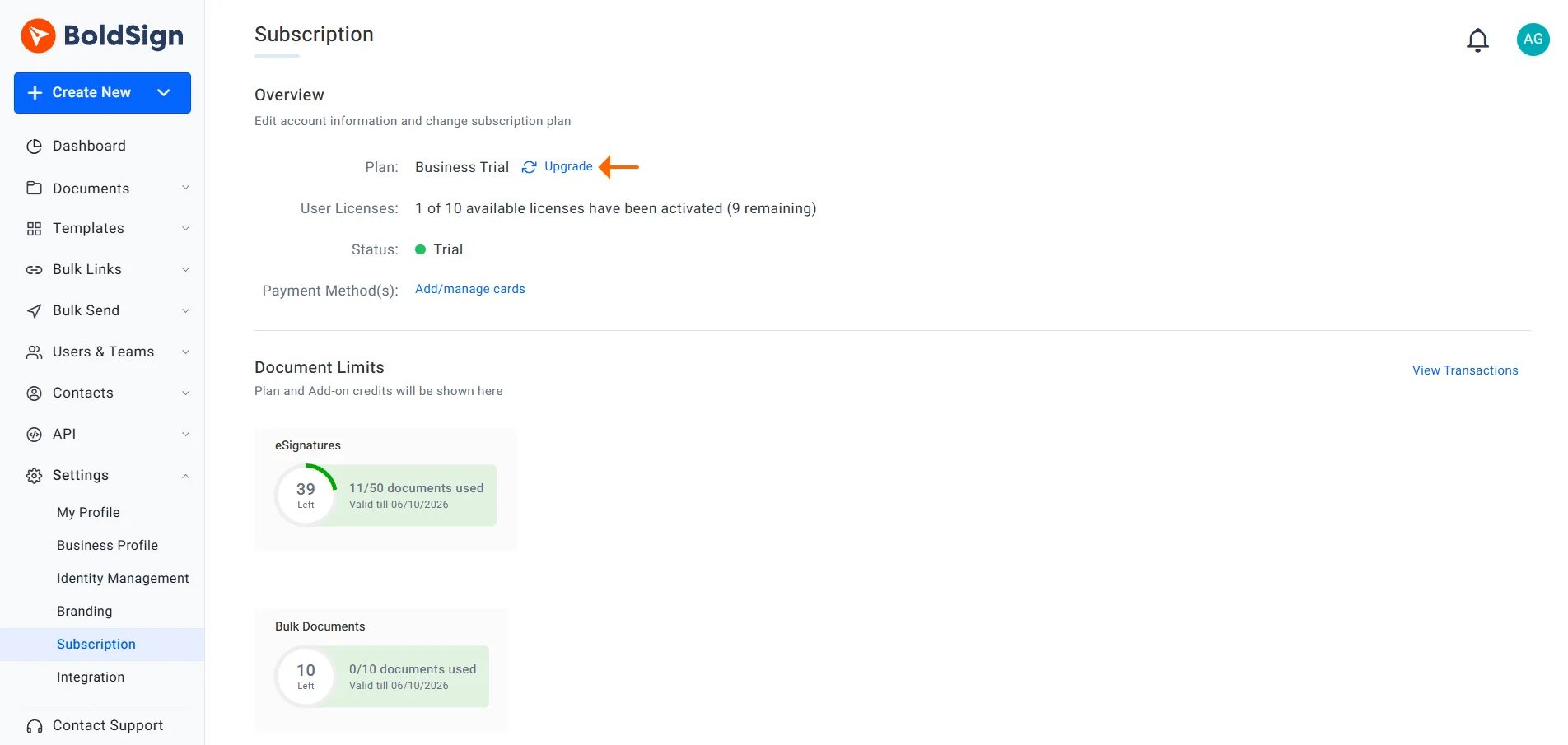
Change plan
- Choose your desired plan and complete the payment process.
Learn more about changing your subscription.
7. Is data secure during the trial period?
Yes, your data is secure during the trial period. The security measures are the same as those provided for the paid plan, so you can expect the same level of protection with advanced encryption, secure data centers, and compliance with industry standards throughout the free trial.
8. Can I invite and add team members during the trial period?
Yes. You can invite team members up to the user limit for your trial plan, shown in the table above
9. Can I customize the branding during the trial period?
Yes, you can customize the branding during the trial period to match your organization’s identity. Specify your brand name, logo, From name in emails, background design, and button color themes. Learn more about creating your brand.
10. How do I upload and send a document for signing?
To upload and send a document for signing, log into your BoldSign account, click Create New, and select Create New Document. Upload your file, fill in the recipient details, configure the required form fields, and send the document out for signature.
11. How can I create and use templates?
Templates are created similarly to regular documents, but instead of associating form fields with recipients, you associate fields with roles. To create a template, click the Create New button, and select Create New Template. Upload your document, add roles, configure the fields, and save it for future use.
Refer to this blog for more detailed instructions on creating a template.
12. Can I add multiple signers to a single document?
Yes, you can add multiple signers to a single document and assign different roles and form fields to each signer.
13. How do I track the status of sent documents?
You can track the status of sent documents from the BoldSign dashboard or from the My Documents page. You can view the progress of each document, see which signers have completed their part, and send reminders if necessary.
14. Do my signers need a BoldSign account to sign documents?
No, signers do not need a BoldSign account to sign documents. They can complete the signing process via the link provided in the email invitation, SMS or WhatsApp.
15. Will my data be retained if I decide to upgrade after the trial period?
Yes, if you upgrade to a paid plan before the trial period ends, all your data will be saved, and you can continue using BoldSign without any interruptions.
16. Where can I find tutorials or guides on using BoldSign?
Please check out these BoldSign guides: help articles, videos, and detailed documentation.
17. Do you know of any eSignature services with a free trial or demo?
BoldSign offers a 30-day free trial with access to the features included in the selected trial plan, with no credit card required. You can also request a live demo. After the trial, eligible users can switch to the free Essential plan, with limits based on the email domain used during signup.
18. What is the difference between the BoldSign free trial and the free plan?
The free trial lasts 30 days and includes the features and usage limits of the selected trial plan. The Essential free plan does not expire and provides limited features and document allowances based on the email domain used during signup. After the trial, users must manually switch to the Essential plan or upgrade to a paid plan.
19. Can I cancel my BoldSign trial plan at any time without charges?
Yes, users can cancel the BoldSign eSignature free Trial plan at any time without incurring any charges.
20. Is customer support available to assist me during my BoldSign Trial?
Yes, we provide extensive customer support regardless of whether you’re on a purchased plan, a trial, or using the free plan.
21. Can I use the BoldSign trial plan for personal use, or is it intended for business purposes only?
Yes, you can use the Trial plan for personal use. It is not intended exclusively for business purposes.
22. Are there any specific system requirements or compatibility issues I should be aware of before signing up for the trial?
There are no specific system requirements or compatibility issues. Any modern browser is sufficient to access the BoldSign eSignature platform effectively.
23. Is there a limit to the number of documents I can send and sign during the trial period?
The document limit depends on the selected trial plan. Growth, Business, Premium, and Enterprise API trials include up to 50 eSignature documents, while Essential trial limits vary based on the email domain used during signup.
Conclusion
Thanks for reading this blog. The BoldSign free trial is a valuable opportunity to explore all the features and benefits of our eSignature platform without any initial financial commitment. By understanding the various aspects of the free trial through these FAQs, you can make the most of your 30-day experience and see how BoldSign can meet your electronic signature needs.
Please share your thoughts and comments in the section below. If you want to know more or have questions about the BoldSign eSignature platform, please schedule a personalized demo or contact our support team via our support portal for assistance.

Rayronald Ochola Otieno
Rayronald Ochola Otieno is a content specialist at BoldSign, specializing in video content and help articles within the eSignature domain. As a blog author, he creates well-researched, insightful content that simplifies complex eSignature topics like digital signatures, compliance, and workflow automation for businesses and professionals. With expertise in creating educational videos and articles, Ray helps users understand and adopt secure, efficient signing solutions. Beyond writing and video creation, Ray enjoys exploring new technologies, reading about the latest industry trends, and continually refining his skills.
More posts by Rayronald Ochola Otieno