How to Create a Secure Digital Signature for Banking With ID Verification
TL;DR: Verifying signer identity in banking requires more than collecting a signature. A digital signature for banking is most effective when combined with identity verification, especially for high-risk workflows such as account opening, loan origination, beneficiary changes, and wire authorizations. These processes often require additional verification to confirm the signer is who they claim to be. The right approach is to match authentication strength to document risk and maintain evidence that can stand up to audits, disputes, and regulatory reviews.
The loan package is signed. Funding is ready to move forward. Then someone asks a simple question: how do you know the person who signed was the borrower? That is the gap that trips up banking rollouts, and it rarely shows up until an auditor, or a fraud case, forces it.
The signature alone doesn’t answer that. What happened before the signature does.
By the end of this guide, you’ll understand where impersonation risk appears in banking signing workflows, how identity verification helps reduce it, and what evidence supports signer identity during audits, reviews, and disputes.
Key takeaways
- A signed document with no identity check behind it proves intent, not identity. In banking, that’s the exposure regulators and fraud teams care about.
- Servicing requests, beneficiary changes, and wire authorizations are the highest-fraud, lowest-scrutiny documents in most banks’ queues, precisely because they feel routine.
- BoldSign’s identity verification uses government ID and live selfie matching on a pay-as-you-go basis, allowing banks to apply stronger verification only where document risk justifies it.
- The audit trail, completion certificate, and compliance posture (SOC 2, GDPR, HIPAA, PCI DSS) are what turn a signed file into evidence you can produce to an examiner.
- “Digital signature” and “eSignature with ID verification” get confused constantly, and in some countries they’re legally two different products. Get that sorted before you buy anything.
Where banking eSignature gets exposed to fraud
The failures aren’t really about the signature. They’re about what happens, or doesn’t happen, right before it.
Account opening. Identity gets checked once, in the onboarding application. Then the signature card, disclosures, and W-9 go out as a plain email link with no further check. If someone else has the applicant’s inbox, they can complete the whole package. Months later, an auditor asks how signer identity was established at the moment of signing, and the honest answer is “we sent an email.”
Loan origination. A loan package usually has a borrower, sometimes a co-borrower, sometimes a guarantor. One authentication method gets applied to all of them because that was the fastest way to launch. The guarantor, who often has the weakest existing relationship with the bank and carries real financial exposure, gets treated the same as a co-borrower whose identity was already proofed last week.
Servicing and maintenance. Beneficiary changes, address changes, and wire authorizations are where impersonation pays off, and they’re routinely the lowest-scrutiny requests in the queue because they feel administrative rather than risky. The FFIEC’s 2021 authentication guidance notes that authentication controls should be aligned to risk rather than applied uniformly across all activities. The challenge is that many organizations still apply the same authentication method across every workflow, even when some requests carry substantially higher fraud risk than others.
The cost isn’t abstract. A request gets flagged, an ops analyst calls the customer to confirm manually, funding slips a day, and compliance ends up running a workaround in a spreadsheet that nobody officially owns.
As more account-opening, lending, and servicing workflows move online, financial institutions continue to face growing challenges around remote identity verification and fraud prevention. Strong authentication controls help organizations verify customer identity without relying on in-person interactions while reducing the risk of unauthorized access and fraudulent transactions.
One thing worth clearing up before you go further. “Digital signature” and “eSignature with identity verification” aren’t the same thing, and in some countries they’re regulated as two entirely separate products. Certificate-based digital signatures are often used for statutory or government filings, while identity verification focuses on confirming that the person signing a document is who they claim to be. That’s an important distinction in banking. If your goal is to verify the identity of someone signing a loan document, account-opening package, or servicing request, identity verification is the control that matters.
The fix: verify identity before the click that matters, sized to the risk
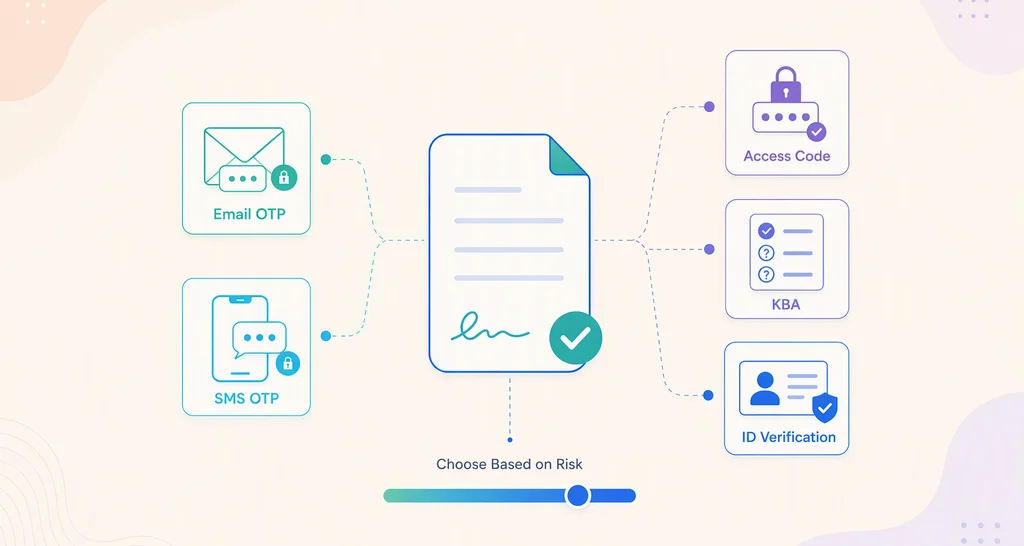
The useful question isn’t “which authentication method is most secure.” It’s: what would a successful impersonation cost here, who can reverse it, and how recently was this person’s identity proofed in this relationship?
A low-stakes disclosure and a beneficiary change don’t carry the same risk, so they shouldn’t be protected with the same level of authentication. NIST SP 800-63-4 treats identity proofing and authentication strength as separate controls that should be selected based on risk rather than applied uniformly across every transaction. The goal is to match verification strength to the potential impact of a fraudulent or unauthorized action rather than applying a single method to every document.
BoldSign builds this in, at a straightforward per-verification cost
This is exactly the gap BoldSign’s identity verification is built to close. It’s powered by Stripe Identity: the signer uploads a government-issued ID (passport, driver’s license, or national ID card), takes a live selfie from their device camera, and the two get matched before the signer can even open the document. The sender decides which signers on a document need it, so a guarantor can be required to verify while an already-proofed co-borrower signs with a lighter method on the same package.
Here’s the part that usually gets buried in vendor comparisons: cost. BoldSign runs identity verification on a pay-as-you-go basis at $2 per verification attempt. A charge applies each time a signer attempts identity verification, whether the verification succeeds or fails. Any retry attempt is also charged at $2. There’s no separate premium tier you have to buy into first, beyond having a Business, Premium, or Enterprise API plan. For banks applying identity verification to account opening, guarantor agreements, and beneficiary changes, pay-as-you-go pricing can help align verification costs with document risk rather than applying higher-cost controls to every document.
For banks evaluating identity verification providers, flexibility matters as much as cost. Platforms such as Docusign offer identity verification as well, typically priced around $2.40 to $2.50 per verification attempt as of mid-2026, close to BoldSign’s rate. However, it is worth confirming whether billing is charged per attempt or per successful verification on any platform you evaluate, since that detail can significantly affect the real cost when a signer requires multiple attempts.
Because BoldSign supports per-signer identity verification, banks can apply additional verification to borrowers, guarantors, beneficiaries, or other higher-risk participants without requiring the same authentication process for every recipient.
Not every document needs the $2 check, and BoldSign’s per-signer setting is what makes that a real choice instead of an all-or-nothing switch:
| Banking document | Risk level | Setting to use in BoldSign |
|---|---|---|
| Rate/fee disclosures, e-statement consent, internal credit approvals | Low | Email OTP |
| Joint account paperwork, servicing forms for existing, already-proofed customers | Moderate | SMS OTP or Access Code |
| New account opening, loan packages, guarantor agreements, beneficiary changes, wire authorizations | Elevated | Identity Verification (government ID + selfie) |
| US signers who can't complete a document upload (no camera, accessibility) | Elevated, no-upload fallback | Knowledge-based authentication |
Assign these per signer on a template so the decision travels with the document type instead of getting re-made by whoever hits send that day.
The security stack behind every signature
Identity verification answers one question: who signed the document. The next question is equally important: can you prove it later? That’s where audit trails, compliance controls, and document evidence become part of the workflow.
Compliance posture. BoldSign is SOC 2, GDPR, HIPAA, and PCI DSS compliant, and supports legal validity under the ESIGN Act, UETA, and eIDAS. Under ESIGN and UETA, a signature holds up when four conditions are met: intent to sign, consent to do business electronically, the signature is logically tied to the record, and the record is retained and accessible.
Audit trail and completion certificate. Every document carries a detailed log of who did what and when: views, authentication method used, consent to the electronic signature disclosure with a timestamp, and completion status. That log, plus a tamper-evident completion certificate, is what you hand an examiner or produce in a dispute instead of saying “trust us.”
Evidence you can retrieve when needed. For documents that used identity verification, BoldSign’s verification report and image APIs let you retrieve the verification result and the signer’s uploaded ID image programmatically, restricted to the sender, whether the check passed or failed. That means the evidence lands in the loan or account file itself, not scattered across email threads and screenshots.
Where your data lives. BoldSign runs dedicated data centers across the US, EU, Canada, and Australia, so regional data residency requirements aren’t an afterthought bolted on later.
Turning on identity verification
Identity verification is configured per signer, allowing banks to apply stronger authentication only where document risk justifies it. Authentication requirements can also be standardized through templates so they remain consistent across account-opening, lending, servicing, and other high-risk workflows.
Key configuration options include:
- Configure identity verification at the signer level rather than applying it to every recipient.
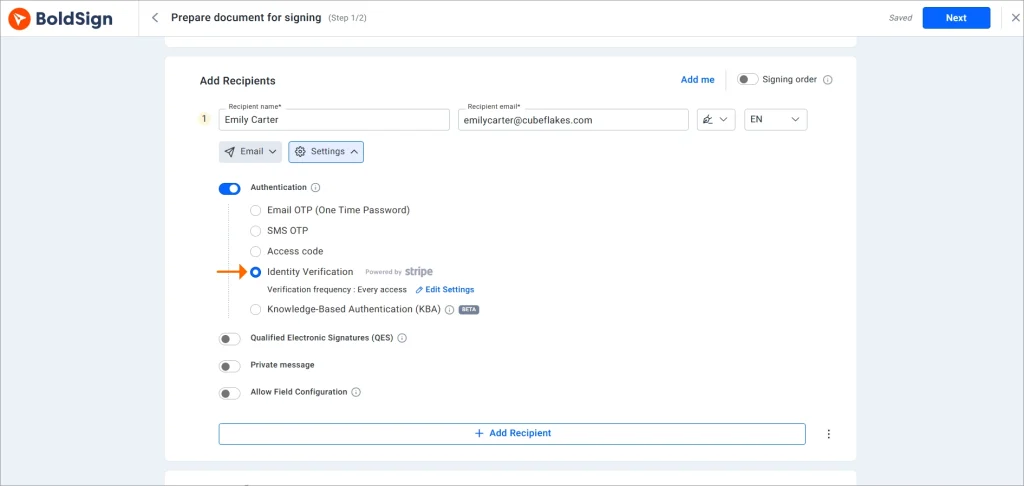
Enable ID verification for a signer
- Define verification frequency based on document access and risk requirements.
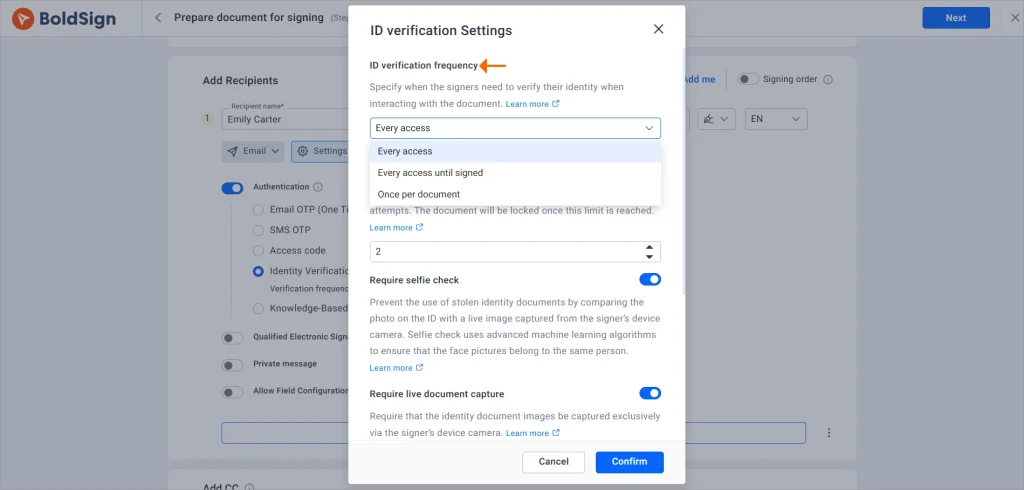
Set ID verification frequency
- Set retry limits and name-matching tolerance to align with internal policies.
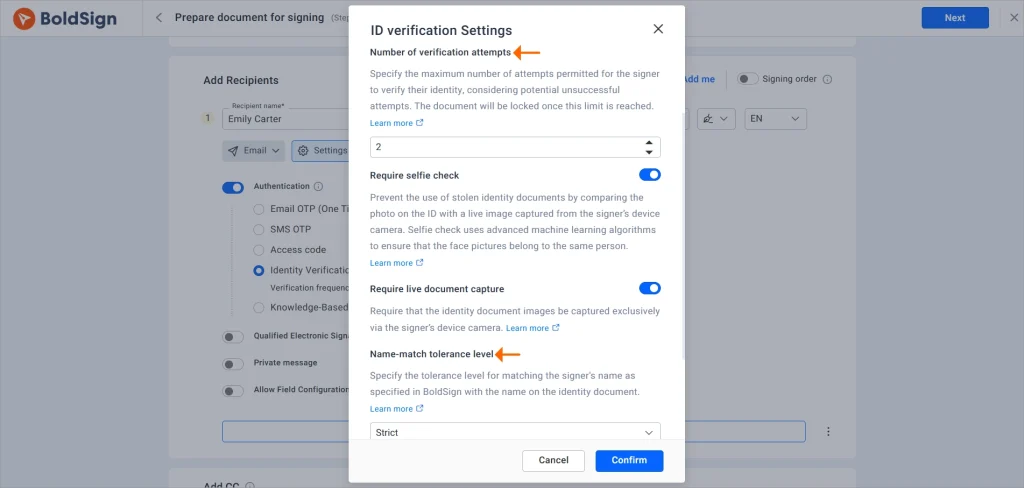
Set retry limits and name match tolerance
- Manually review failed identity verifications and approve, reject, or reset them as needed.
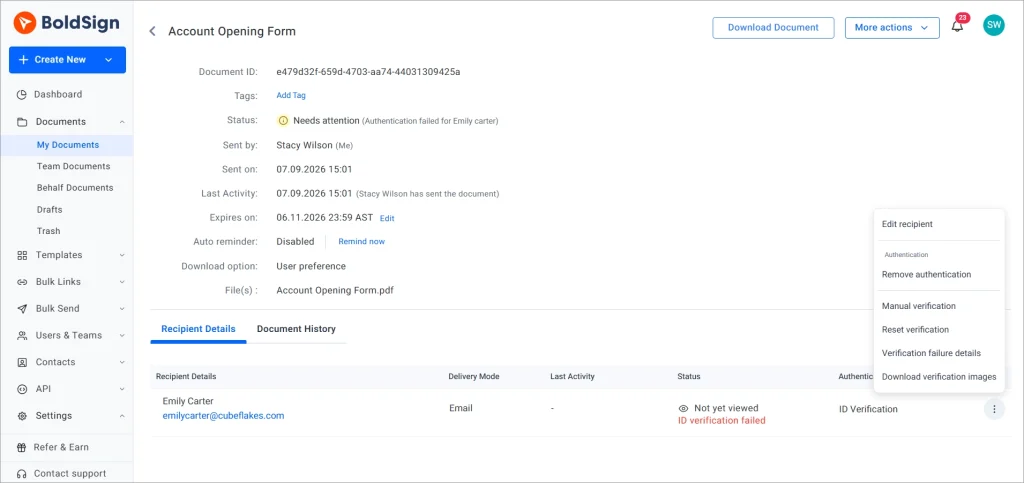
Resolve failed ID verification requests
- Include authentication settings in templates to ensure consistency across document types.
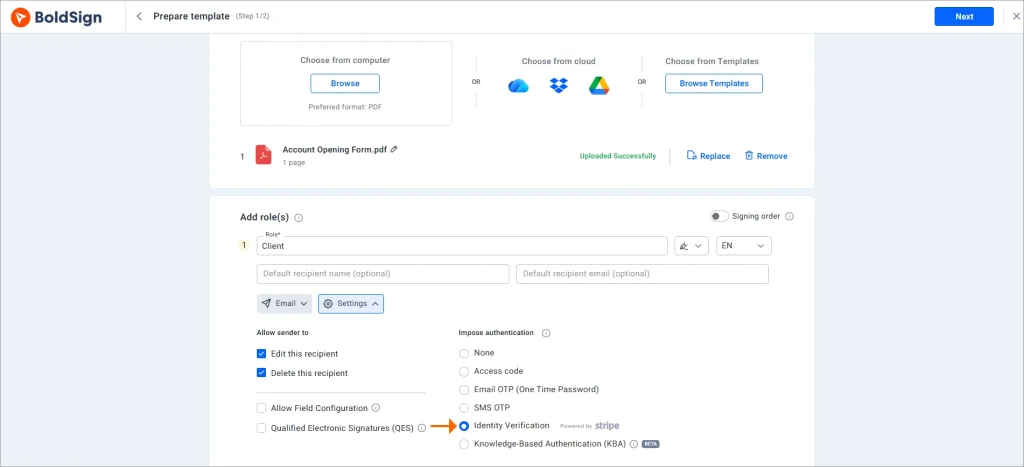
Enable ID verification for templates
- Test workflows before deployment using BoldSign’s sandbox environment.
For detailed setup instructions and configuration steps, refer to the BoldSign Identity Verification documentation.
When a signer can’t complete ID verification: KBA
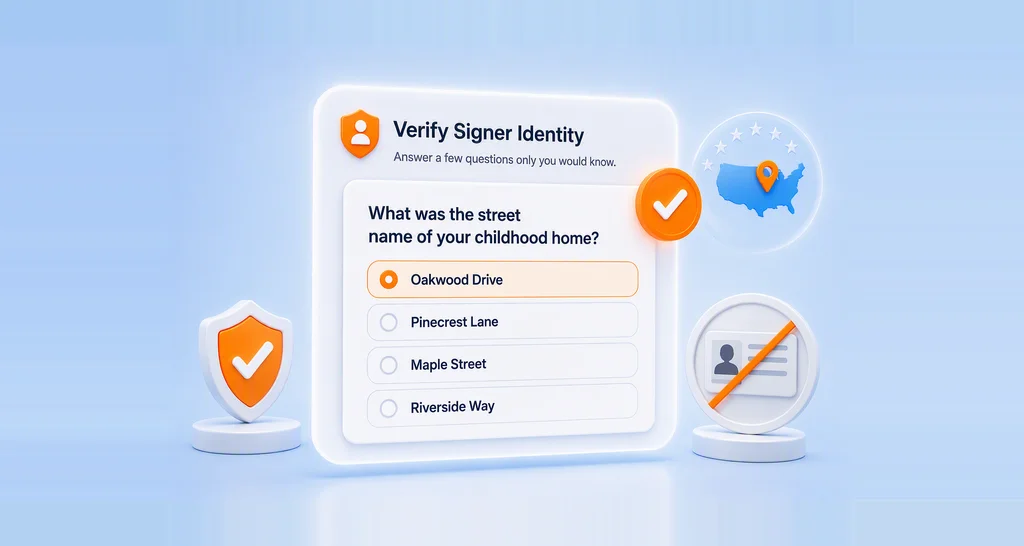
Sometimes a document upload isn’t practical, an older customer on a desktop with no working camera, for instance. For US-based signers, BoldSign also offers knowledge-based authentication, which verifies identity through security questions generated from public-record data instead of a document upload. It’s a narrower tool (US signers only, and it can’t be combined with other methods for the same signer), but it’s there as a fallback rather than a compromise on assurance.
When identity verification is not enough
Identity verification helps confirm who is signing a document, but it does not replace notarization requirements. Certain lending, mortgage, and real-estate transactions may still require remote online notarization (RON), traditional notarization, or other execution requirements depending on jurisdiction and document type. Banks should evaluate notarization requirements separately from signer authentication because the two controls address different risks.
What identity verification doesn’t replace: your CIP program
One assumption worth correcting early. A bank’s Customer Identification Program (CIP) requires risk-based procedures for verifying customer identity and maintaining records of those verification efforts. Identity verification during a signing session can support those efforts by generating evidence such as ID images, verification results, and timestamps. However, it should be treated as one control within the broader customer verification and compliance process rather than a complete replacement for those procedures.
An ID check inside a signing session is a control on that session. It produces artifacts, an ID image, a pass or fail result, a timestamp, that can feed your CIP record. It doesn’t supply the program, the procedures, or the ongoing AML obligations sitting around it. Turning on identity verification and calling CIP satisfied is the version of this that gets flagged in an exam.
Before you go live
- Start by confirming which document types need identity verification versus a lighter method like Email OTP or Access Code, since not every document needs the $2 check.
- Set frequency, retry count, and name-match tolerance deliberately per document type, not on the platform default.
- Name an owner for manual review of failed verifications, and make sure that decision gets logged somewhere.
- Confirm your electronic signature disclosure consent setting matches what your compliance team requires.
- Pull verification evidence into your loan or account file via the API rather than leaving it sitting in the platform alone.
- If you operate in a market with a separate PKI/DSC certificate requirement for statutory filings, keep that process distinct from your customer-facing signing workflow.
The part worth remembering
The signature was never the weak point. What happens right before someone reaches it is. Match identity verification to the level of risk, maintain evidence that can withstand audits and reviews, and make sure signer identity is established before the document is signed rather than questioned afterward.
When identity verification, audit trails, and document controls work together, banking teams can reduce impersonation risk without creating unnecessary friction for customers.
Start a free trial or request a demo to see how BoldSign helps banks implement a secure digital signature for banking, complete with identity verification, audit trails, and compliance-ready evidence.
Frequently asked questions
Is a digital signature the same as eSignature with ID verification?
No. A digital signature and identity verification solve different problems. A digital signature helps protect the integrity of a document and detect tampering after signing. Identity verification helps confirm that the signer is who they claim to be before they can access or sign the document. In many banking workflows, both may be important, but they serve different purposes.
How much does BoldSign's identity verification cost?
BoldSign's identity verification is charged on a pay-as-you-go basis at $2 per verification attempt. A charge applies each time a signer attempts identity verification, whether the verification passes or fails. If the signer retries the verification process, each retry attempt is also charged at $2. The feature is available on Business, Premium, and Enterprise API plans.
Does ID verification at signing satisfy CIP or KYC requirements on its own?
No. Identity verification during signing helps verify a signer's identity and provides supporting evidence, such as verification results and timestamps. However, it does not replace a bank's broader CIP, KYC, compliance, or risk-management procedures.
Can I require identity verification for only some signers on a document?
Yes. BoldSign allows authentication methods to be configured per signer. This means one signer can complete identity verification while another uses a different authentication method based on the document's risk requirements.
What happens if a signer fails identity verification during a digital signature for banking workflow?
If verification fails, the signer can retry within the configured retry limit. If all attempts are exhausted, the sender can review the verification result, reset verification for another attempt, or take appropriate follow-up action based on the organization's process.
Is knowledge-based authentication available outside the US?
No. Knowledge-based authentication (KBA) in BoldSign is available only for U.S.-based recipients because it relies on public-record data used to generate verification questions. KBA can be used as an alternative authentication method when a signer cannot complete document-based identity verification.
How can I create a secure digital signature for my documents?
Use a platform like BoldSign that pairs your signature with a tamper-evident audit trail and completion certificate. For higher-risk documents, add identity verification (government ID + live selfie) so the signature is tied to a verified identity, not just an email click. This is backed by SOC 2, GDPR, HIPAA, and PCI DSS compliance, giving you a signature that holds up under audit or dispute.

Rayronald Ochola Otieno
Rayronald Ochola Otieno is a content specialist at BoldSign, specializing in video content and help articles within the eSignature domain. As a blog author, he creates well-researched, insightful content that simplifies complex eSignature topics like digital signatures, compliance, and workflow automation for businesses and professionals. With expertise in creating educational videos and articles, Ray helps users understand and adopt secure, efficient signing solutions. Beyond writing and video creation, Ray enjoys exploring new technologies, reading about the latest industry trends, and continually refining his skills.
More posts by Rayronald Ochola Otieno