Webinar Recap: Managing Documents on the Go with the BoldSign Mobile App
TL;DR: This webinar shows how the BoldSign Mobile App enables users to send, sign, track, and manage documents on the go without needing access to a desktop.
In this session, Jayavigneshwaran, Senior Product Manager at BoldSign, demonstrated how businesses can eliminate signing delays and stay productive by handling the entire eSignature workflow directly from mobile devices. Instead of waiting to access a laptop or switching between tools, users can send documents, complete signatures, track status, and manage workflows anytime, anywhere.
If you missed the live session or would like to watch it again, the recording is embedded on this page and is also available on our YouTube channel.
Webinar recap
The webinar opened with a real-world scenario many professionals face: needing to sign or send a document urgently while away from their desk. Traditional workflows often lead to delays, missed opportunities, and manual follow-ups.
Jayavigneshwaran introduced the BoldSign Mobile App and explained how it brings complete eSignature functionality to mobile devices, enabling users to handle document workflows without interruptions.
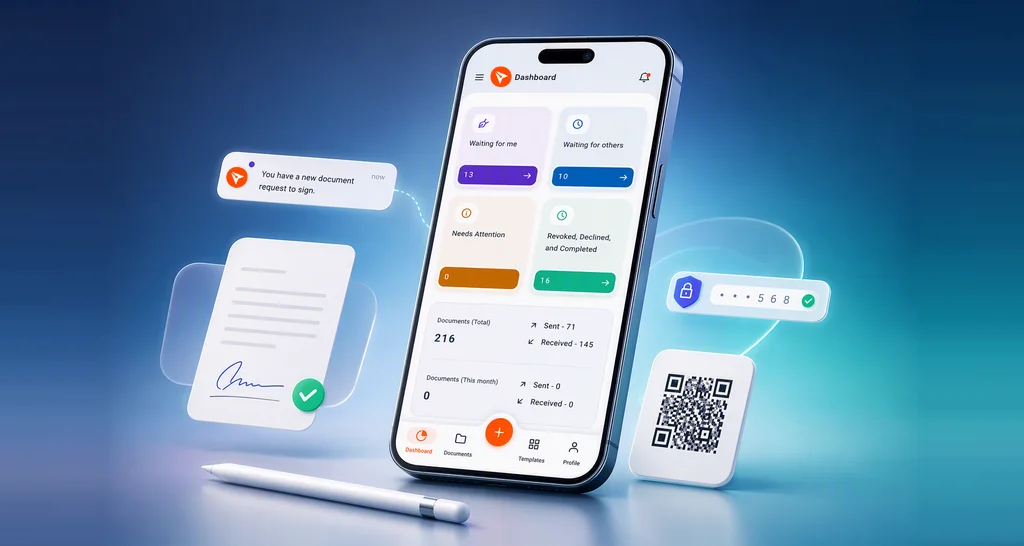
The session began with a walkthrough of installing and setting up the app, followed by a live demo of the dashboard and navigation. The demo demonstrated how users can send documents using templates, add recipients, review form fields, and complete the process in just a few steps.
The webinar then highlighted mobile signing, where users can review documents, fill required fields, and sign within the app. The experience is optimized for mobile, with support for drawing, uploading, or selecting signatures, along with guided navigation through required fields.
Next, the session covered real-time tracking and notifications. Users receive updates through push notifications, in-app alerts, and email notifications, ensuring they never miss any document activity. The demo also showed how users can access document history, track status, and download completed documents and audit trails directly from the app.
Finally, the webinar explored advanced features such as document management actions (sending reminders, revoking requests, tagging), template management, AI-powered form field generation, and enhanced tablet and iPad experience.
Send, sign, and manage documents on mobile
Timestamps
[00:00] Welcome and session introduction
[00:07] Why mobile document workflows matter
[00:24] Business benefits of the BoldSign mobile app
[01:04] Presenter introduction
[01:27] Poll: how teams handle signing away from their desks
[02:16] Session agenda and workflow overview
[02:35] Installing the BoldSign mobile app
[03:15] App overview and mobile experience
[03:41] Logging into the mobile app
[04:22] Dashboard overview and navigation
[04:44] Sending documents for signature from mobile
[04:52] Sending documents using templates
[05:23] Selecting templates and adding recipients
[05:53] Reviewing and editing document fields
[06:18] Adding additional form fields
[06:40] Sending the document for signature
[07:12] Signing documents using the mobile app
[07:39] Deep linking support from email and apps
[08:02] Accessing documents waiting for signature
[08:23] Reviewing and navigating documents
[08:37] Completing the signing workflow
[09:04] Drawing and managing signatures
[09:27] Completing the signing process
[09:56] Downloading completed documents
[10:01] Downloading audit trails
[10:27] Saving documents locally on mobile devices
[11:37] Real-time notifications overview
[12:03] Push, email, and in-app notifications
[12:36] Handling notifications from the home screen
[13:08] Viewing in-app notifications
[13:29] Email notification workflow
[13:47] Customizing notification preferences
[14:15] Managing documents from mobile
[14:26] Filtering, searching, and tagging documents
[14:51] Sending reminders to recipients
[15:29] Declining signature requests
[16:18] Recap of core mobile features
[16:36] Additional mobile app capabilities
[16:55] AI-powered document workflows
[17:00] Auto-generating form fields with AI
[17:20] Natural language document search
[17:41] Using BoldSign on tablets and iPads
[18:13] Tablet UI and responsive layout
[18:41] Apple Pencil and stylus signing support
[19:19] Helpful resources and links
[19:35] Session recap and key takeaways
[19:54] Business impact of mobile signing workflows
[20:29] Following BoldSign for updates and tutorials
[21:00] Closing remarks and next steps
Key takeaways
- Send and sign documents anytime, anywhere from mobile devices
- Eliminate delays caused by desktop-dependent workflows
- Use templates to speed up document sending
- Get real-time updates through push, in-app, and email notifications
- Manage document workflows directly from the app
- Leverage AI features to reduce manual effort
Q&A
Final takeaway
With the BoldSign Mobile App, managing documents no longer depends on being at your desk. You can send, sign, track, and manage documents from anywhere, ensuring your workflows continue without delays.
From reducing turnaround times to improving productivity for remote and field teams, every feature is designed to help you stay responsive and efficient on the go.
Ready to experience it yourself?
- Download the app from the Apple App Store or Google Play Store
- Explore the mobile app feature tour
- Check out blogs under the “Mobile” category and help articles in the Help Center
Experience the BoldSign Mobile App and see how mobile‑first document workflows can help you stay productive and keep your business moving anytime, anywhere.
Frequently asked questions
Do the customers have to install the app and sign up in order to open the document?
Yes, the customers need to install the app and login to open a document. You can either sign up by creating a new account or sign in using your existing web app account to access and sign the documents in the BoldSign mobile app.
Are we able to send it through a Text message instead of an email?
SMS delivery is not currently supported directly in the mobile app. However, you can copy the signer link and share it through any messaging app, including text messages. If the recipient has the BoldSign mobile app installed, the link will open in the app.
What are the monthly service charges?
The pricing is the same as the BoldSign web app pricing. For more information, refer to our mobile app pricing and plan management article.
Can you change a recipient after it has already been sent or have to start over?
Yes, you can make changes after the document has been sent. You can edit it in the web app, but this is not currently supported in the mobile app. Instead you can revoke the document, clone it, make changes, and can send. This is supported in mobile app.
Are there example contracts?
Yes. You can find sample contract templates.
Where is it possible to see again some videos on how to use? missed few minutes before…
Yes. The recording will be published on BoldSign YouTube Channel.
On the Essential pack - how many own templates can you have?
You can create up to two templates on the Essentials plan.

Carter Harris
Carter is the Video Marketing Specialist at Syncfusion. He is in charge of managing the Syncfusion YouTube channel as well as webinars produced through Syncfusion. Connect with him on LinkedIn.
More posts by Carter Harris