Enterprise electronic signature software and the five checks a reviewer can verify
Short answer: enterprise electronic signature software is judged on five things a security reviewer can confirm without taking the vendor’s word for it. Who independently attested to the controls. Where the data is stored, and who chooses. How the signer was identified. What the completed document proves. Who can administer the account. BoldSign answers all five with published evidence, including a completed SOC 2 Type 2 audit and HIPAA support.
What makes an electronic signature platform enterprise ready?
Enterprise readiness comes down to one question. Can a stranger check what the vendor says?
A contractor can tell you they are licensed. You can believe them or not. A license number you can type into the state board’s website settles it in thirty seconds. Both carry the same claim. Only one survives a reader who has no reason to trust you.
Enterprise software evaluation works the same way. A security reviewer holding up a purchase is not looking for a better description of your controls. They want something they can check from outside. That is why certifications, audit reports, registry entries and standards conformance carry weight that product descriptions do not, however accurate the description.
What does an enterprise electronic signature evaluation actually check?
Five checks come up in almost every enterprise review. They tend to run in this order, because each one can disqualify a vendor before the next one matters. Three of them you can verify yourself, with nothing asked of the vendor. The other two you have to ask about, and how readily the answer comes is part of what you learn.
None of the five tells you whether the vendor will still be trading when the contract renews, which is why that one is worth settling first. BoldSign is built by Syncfusion, which marked 25 years in business in June 2026.
1. Who attested to the security controls, and can it be verified independently?
Security controls are the specific safeguards a vendor operates, such as access restrictions, encryption, change management and incident response. An internal security policy states an intention to operate them. An independent attestation gives a third party’s opinion on whether they actually worked, after testing.
What to check: ask for a SOC 2 Type 2 audit, not a Type 1. Type 1 looks at the controls on a single day. Type 2 tests that they kept working over months. Then ask whether anything they hold appears on a public register.
BoldSign has completed a SOC 2 Type 2 audit. The report goes to current and prospective customers through the security and compliance request form, and Legal reviews each request. It also holds TX-RAMP Level 2 certification, the higher of the two TX-RAMP tiers, under certification ID TX1655099, listed on the Texas Department of Information Resources public register. DIR publishes that register as a downloadable spreadsheet, so a reviewer can search it by certification ID and confirm the entry without contacting BoldSign at all. Both are documented on the security policy and the SOC 2 overview.
HIPAA works differently from the two above. There is no HIPAA certificate to look up, so what you are checking is whether the vendor supports HIPAA workflows and will enter a Business Associate Agreement with you. Ask how that is done, and how long it takes.
With BoldSign it is self-service. HIPAA Compliance appears in your account’s compliance settings, where you review the Business Associate Agreement and accept it, and HIPAA mode switches on. See the HIPAA overview.
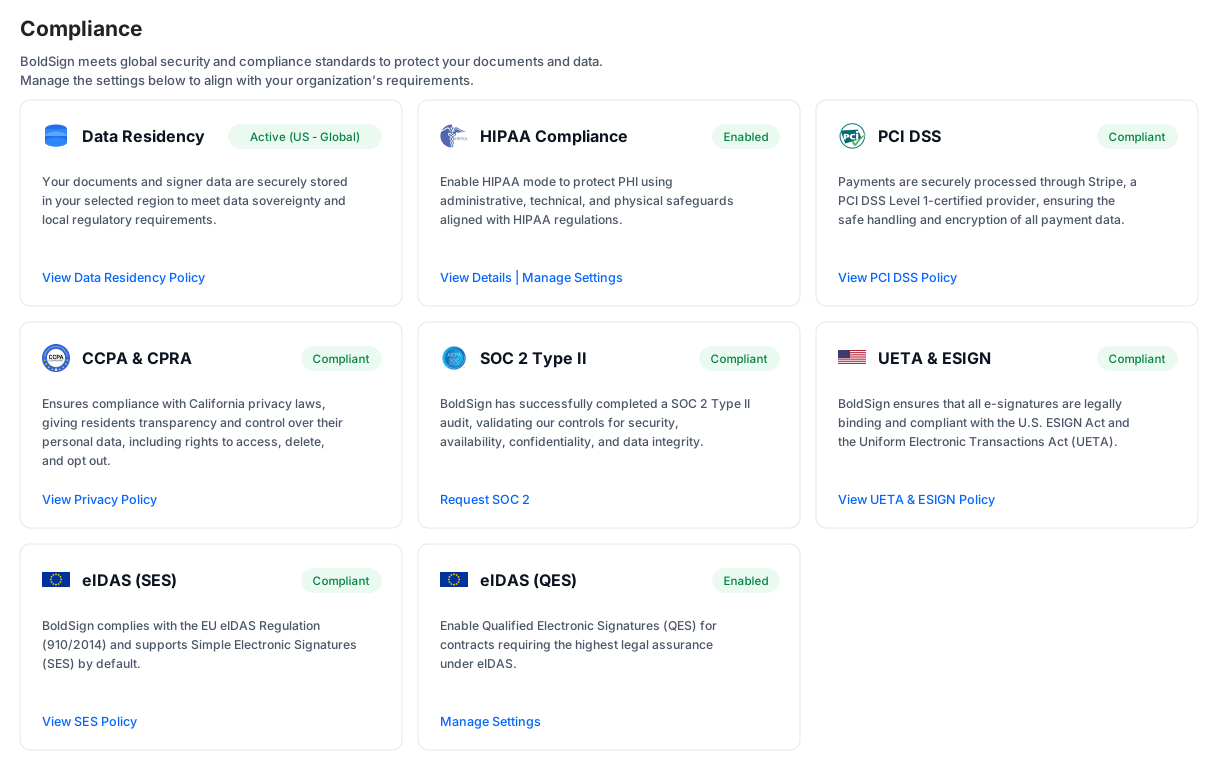
The compliance panel in a BoldSign account.
2. Is there a published uptime record?
A number on a marketing page and a number in a contract are different things, and only one of them matters when the service is down.
What to check: whether the figure appears in the service-level agreement rather than in marketing copy, what window it is measured over, and whether the incident record is public. A monthly window is stricter than an annual one, because one bad day cannot be averaged away across twelve months.
BoldSign’s service-level agreement guarantees 99.99% uptime in any calendar month. The agreement itself points to status.boldsign.com, where the incident history and a rolling 90 day record are published. Both the commitment and the record can be read without asking BoldSign for anything.
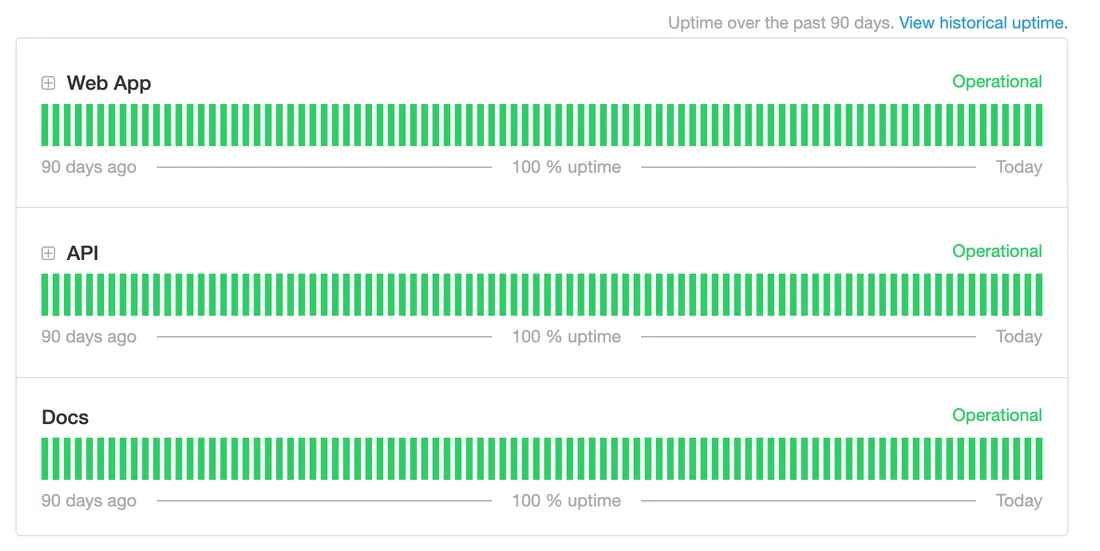
Uptime over the past 90 days on status.boldsign.com.
3. How was the signer identified?
Authentication decides how strong a signature is in a dispute. The cryptography matters less. A signature backed only by inbox access proves one thing: somebody reached the inbox.
What to check: the full list of available methods, and whether you can set them per document. If the setting is account-wide, the ID check you add for one high-value contract also lands on every routine form, and completion rates drop.
BoldSign supports access code, email one-time passcode, SMS one-time passcode, knowledge-based authentication using legal identity details and public-record questions, and ID verification that checks a government-issued document against a live selfie. You set the method per document. A routine acknowledgement can stay a simple email link while a high-value agreement requires an ID check. See signer authentication, knowledge-based authentication and identity verification.
4. What does the completed document prove?
A signature image pasted onto a PDF and a cryptographic seal look identical on screen. They behave completely differently when someone disputes the document.
What to check: two things. Does the completed file carry a signature built to a published standard? Can a third party validate it without the vendor’s help?
BoldSign answers yes to both. Every completed document is sealed with a CAdES signature using a SHA-256 digest, and that signature covers the entire file. Anyone holding the document can validate it in their own PDF software, with no account and nothing asked of BoldSign. The last section of this guide shows what a reviewer sees when they do.
One more thing separates two documents that look identical on screen, and it is easy to conflate with the seal. The file format and the legal assurance tier are different questions. eIDAS defines three tiers, and which one applies depends on how firmly the signer was identified rather than on how the file was sealed. So a document with a flawless cryptographic seal can still be the weakest tier in law.
This matters because EU and UK reviewers often have a minimum tier mandated for particular document classes, and finding that out after signing is expensive. Ask which tier applies by default and which ones are available. BoldSign supports simple electronic signatures as standard and qualified electronic signatures through a qualified trust service provider.
5. Who can administer it, and can that be governed?
Who can send on the company’s behalf? Who can open which documents? And what happens to a document once its retention period ends? These questions barely matter with one team using the platform. With four, they decide whether the rollout survives an audit.
What to check: whether administrative controls are part of the platform or a separate tier, and whether retention runs on a schedule instead of depending on someone remembering.
BoldSign covers this with:
- Single sign-on (SSO) through your own identity provider
- Custom roles and permissions
- Team management, so each team sees only its own documents
- IP restrictions, limiting access to approved networks
- Automatic deletion on a retention schedule
- Automatic cloud backup
The enterprise electronic signature software page sets out which plan carries each one.
Scale is where governance usually breaks, and the question is not whether a platform can send four hundred documents. It is whether the controls still hold when it does. Two things are worth asking directly. Does a bulk send produce a separate record for each recipient, or one shared document? And does a document sent through an integration or the API stay in the same region as one sent by hand?
BoldSign answers both. Bulk send, covered further down, issues an individually tracked request for every row of a CSV, so four hundred recipients produce four hundred records rather than one shared file. Residency holds however the document is sent, because each region runs on its own endpoint, so an API call lands in the region the account was created in.
Where does the data sit, and who decides?
For many enterprises this is the first hard disqualifier, and it gets decided before anyone looks at features.
What to check: three things, and the third is the one that catches people out. Whether region selection is a customer choice or a vendor default. Which regions are actually offered. And which plan you have to be on to get it, because a plan requirement discovered at contract stage rewrites a budget that was already approved.
BoldSign’s position is that where your data lives is not a feature to be sold. It is a property of the account, set the same way for every customer.
You pick the region during signup, before the first document exists. The choices are the United States, the European Union, Canada and Australia. It is available across BoldSign plans at no extra cost. On the pricing page it sits under security and compliance, not in a tier comparison. A two-person team on the EU region gets the same isolation as an organization of ten thousand.
This is how the platform is built, not a setting someone toggles. Each region has its own endpoint, so EU accounts sign in at account-eu.boldsign.com and Australian accounts work at app-au.boldsign.com. The United States region is hosted in US East, the EU region in the Netherlands, Canada in Toronto and Australia in Sydney, on Google Cloud Platform and Microsoft Azure.
Storage is not the whole story. Processing stays in region too. Data is not moved out of the region to be handled and then returned. BoldSign’s support documentation states that for each region, all data is both stored and processed within that region, and that no data is processed across regions.
See data residency compliance.
Why do enterprises outgrow basic electronic signature software?
Almost always because volume outgrew the plan the tool was bought on, and governance never caught up with it.
The pattern is consistent. A team adopts a signature tool for one workflow, at a volume the entry plan covers comfortably. Adoption spreads sideways into HR, finance, procurement and legal. Volume climbs past the plan allowance, and per-envelope overage becomes the largest line in a budget nobody planned. Around the same time IT discovers four departments running four accounts with no shared templates and no common retention rule, so the governance problem and the cost problem arrive together.
Payroc reached that point. The payment processing company in the United States runs an organization of 1,000 or more people and handles 12,000 or more documents a year through the BoldSign API. BoldSign’s case study describes what they left. They paid almost three times as much per transaction. Their plans capped monthly volume. The pricing was hard to predict. Testing the workflow was billable.
“There’s nothing hidden with BoldSign, and I think that’s one of the most refreshing things. Everything you’re paying for is right out in the open and clearly defined.”
Jason Meuter, developer at Payroc
They now pay a flat rate per document with no charge for testing, and they download audit trails to store internally. The full account is in the Payroc customer story.
What actually slows enterprise signing down?
The signature is rarely the bottleneck. The coordination around it usually is.
A supplier acknowledgement is a two-minute document. The work is everything around it. Getting it to 400 suppliers. Seeing who has not opened it. Chasing them. Then proving, months later, which version each one agreed to. The same goes for an onboarding pack, a policy attestation or a renewal notice.
That leaves most teams choosing between two bad options. Send individually and absorb the administrative time, which stops scaling past a few dozen recipients. Or send in bulk through a tool that produces one shared document and no per-recipient record, which will not survive an audit.
BoldSign closes that gap with two mechanisms. Bulk send issues an individually tracked request to every row of a CSV, so each recipient receives their own document and generates their own record. Bulk links publish a single link that any number of people can complete, each one producing a separate agreement. Both are available as add-ons. See bulk send and bulk links.
How does BoldSign handle enterprise signing at scale?
Four mechanisms do most of the work.
Centrally administered templates lock approved wording, so Legal controls contract language across every department and an auditor reviews one version instead of a folder of near-copies. See templates.
SSO means there is no second list of users to keep. People sign in with the company login they already have, and access follows your directory.
Automatic deletion applies your retention rule on schedule with no manual action, and automatic cloud backup keeps a second copy, so records management does not depend on anyone remembering.
Natural-language search resolves a description of a document into the document itself, which helps most when the person looking is not the person who sent it. See AI Search.
How does BoldSign prove a signed document has not been altered?
Most evaluations arrive at this check last, and it outlasts all the others, because a contract outlives the software that produced it.
A completed BoldSign document carries a CAdES detached signature, in the PAdES family. The digest algorithm is SHA-256. The signature covers the entire file, with no unprotected bytes at the end.
Then comes the part that does the real work. Verification requires nothing from BoldSign. The signature follows a published standard, so ordinary PDF software already knows how to read it. Anyone holding a completed document can open its signature properties. They will see who signed, which organization the certificate was issued to, the digest algorithm, and whether the signature covers the whole file. A validity result sits at the top. Change one byte after signing and that result fails. BoldSign’s support documentation shows an intact document and a tampered one side by side.
That is a different kind of assurance from a vendor statement. Nobody has to believe BoldSign about it.
Every document also carries an audit trail recording each action with user details, IP address and timestamp. That is a record of the signing process, separate from the seal on the file itself, and it is covered in why e-signature audit trails matter for compliance.
Signatures are enforceable under the US ESIGN Act and UETA, and recognized under eIDAS across the European Union. See ESIGN and UETA compliance and eIDAS compliance.
What else is worth following, and who owns it?
Three things a full enterprise evaluation covers that a security reviewer usually does not. Each one is worth following. Each belongs to somebody else.
The integration surface and the API. Whether signing can be embedded in your own product, and whether it reaches the system where the record already lives, is a technical evaluation rather than a security one. It usually runs on a different timetable, with a different team, and it can pass or fail independently of everything above. See the eSignature API and the integration list.
Rollout and adoption. How quickly people actually use the platform decides whether the purchase pays for itself, and none of it appears in a security questionnaire. A reviewer who approves a platform nobody adopts has still done their job correctly. This one belongs to whoever owns the rollout, not the review.
The depth of the audit trail. The checks above cover whether the completed file is sealed. What the audit trail records, how long it is retained, and whether a third party can verify it without BoldSign is a separate subject with its own answers. The guide linked earlier covers it, and it is worth reading alongside this one.
Where this sits in the BoldSign platform
Enterprise administration, the signature standard and the compliance evidence described here belong to the same platform as templates, bulk sending, integrations and the API. Every certification and legal document is collected in the Legal Center, which is the shortest route for a reviewer who wants the underlying paperwork rather than a summary of it.
Evaluating BoldSign for enterprise?
Walk through the controls, the certifications and the signature architecture with someone who can answer follow-up questions.
Frequently asked questions
What certifications and audits does BoldSign hold?
BoldSign has completed a SOC 2 Type 2 audit, which is an independent attestation and not a certification. The report goes to current and prospective customers through the security and compliance request form. BoldSign also holds TX-RAMP Level 2 certification, and supports HIPAA, GDPR and PCI DSS compliance. It is aligned with the NIST 800-53 control catalog.
Can an enterprise reviewer verify BoldSign's certifications independently?
Yes, for TX-RAMP. BoldSign is listed at Level 2 on the Texas Department of Information Resources public register, under certification ID TX1655099. DIR publishes it as a spreadsheet, so anyone can check the entry by ID without contacting BoldSign. The SOC 2 Type 2 report goes to customers and prospects through the security and compliance request form.
Where is enterprise data stored, and who chooses the region?
The customer chooses, during signup. BoldSign offers data residency in the United States, the European Union, Canada and Australia, available across BoldSign plans at no extra cost. Each region has its own endpoint, hosted on Google Cloud Platform and Microsoft Azure. The choice is permanent, so switching regions later means creating a new account.
What signature standard does a completed BoldSign document carry?
A CAdES detached signature in the PAdES family, using a SHA-256 digest, covering the entire file with no unprotected bytes.
Can a third party confirm a signed document has not been altered, without contacting BoldSign?
Yes. The signature follows a published standard, so ordinary PDF software can read it. Anyone holding the document can validate it themselves. No account, no license, no request to BoldSign. Any change after signing makes validation fail.
What signer authentication methods does BoldSign support?
Access code, email one-time passcode, SMS one-time passcode, knowledge-based authentication, and ID verification against a government-issued document with a live selfie. You choose the method per document, so a high-value agreement can require stronger checks than a routine one.
Do signers need a BoldSign account or a paid license?
No. Only senders are licensed. Recipients complete documents without registering and are never charged, which keeps cost predictable when the counterparties are customers, suppliers or employees outside your own team.
Is a BoldSign signature legally enforceable across regions?
Yes. Signatures are enforceable under the US ESIGN Act and UETA, and recognized under the eIDAS Regulation across the European Union. Legality by individual country is documented on the electronic signature legality pages.
Does BoldSign support qualified electronic signatures?
Yes. QES is the highest assurance tier under eIDAS, and BoldSign supports it through a qualified trust service provider. It is billed per completed signature per signer, and is not bundled into a plan.
What administrative controls does BoldSign provide for IT teams?
Single sign-on through your identity provider. Custom roles and permissions. Team management, controlling which documents each team sees. IP restrictions. Automatic deletion on a retention schedule. Automatic cloud backup. View all features.
How is document data encrypted?
Documents are encrypted twice using AES-256, once at service level and once at infrastructure level. Encryption applies in transit and at rest.
Will BoldSign sign a HIPAA Business Associate Agreement?
Yes. A BAA is available and is reviewed and accepted directly in the BoldSign account. Supporting controls include signer authentication, role-based access, two-factor authentication, IP restriction, encryption in transit and at rest, and a full audit trail.
What uptime does BoldSign commit to, and is availability published?
The SLA guarantees 99.99% uptime in any calendar month, with exclusions. Availability and incident history are published on the status page as a rolling 90 day record, so a reviewer can check the actual figures instead of relying on a stated one.
Which capabilities are charged separately from the plan?
Bulk send, bulk links, signer identity verification, knowledge-based authentication, and the Salesforce and Xero integrations are add-ons. HubSpot, Power Automate and Zapier are included.

Meikanda Nayanar
A veteran product manager at BoldSign, boasting a decade-long journey as a .NET developer. With a rich history of leading product development across diverse technologies like Windows Forms, WPF, UWP, Xamarin.Forms, Flutter, and MAUI, Meikandan brings a unique blend of technical expertise and strategic insight to the table. Connect with him on LinkedIn.
More posts by Meikanda Nayanar