How to Track Contract Status in Salesforce Without Switching Dashboards
TL;DR: Track contract status inside Salesforce by integrating the eSignature process with the right CRM record. This helps users see whether a contract is sent, opened, signed, declined, or expired without checking another dashboard.
A contract can slow down a deal even after it has been sent.
The rep is waiting for a signature. The manager wants an update. Finance needs the signed copy. Customer success is preparing for onboarding. But the contract status is somewhere outside Salesforce.
That gap creates unnecessary follow-ups, delayed handoffs, and incomplete records. Salesforce users should be able to answer simple questions without opening another dashboard:
Has the contract been sent? Did the signer open it? Is it signed? Did it expire? Where is the completed copy?
The fix is to connect an eSignature solution with Salesforce so contract activity stays tied to the record where the deal or customer relationship is already managed.
Takeaways
A strong Salesforce contract tracking workflow should let users:
- Keep contract status inside Salesforce, tied to the relevant deal or customer record.
- Use an eSignature integration to automatically sync contract updates.
- Track key stages like sent, opened, signed, declined, and expired in one place.
- Eliminate switching browser tabs and reduce manual tracking effort.
- Ensure signed documents are saved directly to the Salesforce record for full visibility.
Why contract tracking gets messy in Salesforce
Salesforce is where teams manage customer and deal activity. It stores opportunities, accounts, contacts, deal values, close dates, notes, and follow-ups.
But contracts often move outside Salesforce once they are sent for signature.
A typical workflow looks like this:
- The rep prepares the contract.
- The document is sent through an eSignature tool.
- The rep checks another dashboard for signing updates.
- Salesforce is updated manually.
- The signed copy is downloaded and uploaded later.
This creates room for delays. A contract may be opened, but the rep may not notice. A document may be signed, but the completed PDF may not be attached to the record. A request may expire, but the deal may still appear active in Salesforce.
The problem is not just the extra dashboard. The problem is that contract progress is separated from the place where the team already works.
What contract status should show inside Salesforce
A useful contract tracking workflow should show the key signing stages directly from the related Salesforce record.
Sent
The document has been sent to the signer. The team knows the contract is now waiting for customer action.
Opened
The signer has viewed the document. This helps the rep follow up at the right time with better context.
Signed
The document has been completed. Sales, finance, operations, and customer success can move to the next step.
Declined
The signer declined the document. The team can review the reason and decide whether a revised version should be sent.
Expired
The signing request is no longer active. If the deal is still valid, the document may need to be resent.
These statuses help Salesforce users answer the most important question: what should happen next?
Why tracking contracts inside Salesforce is better
Switching to a separate browser tab might work for a few documents, but it quickly becomes inefficient for growing teams. The real improvement comes when an eSignature solution is integrated with Salesforce.
Salesforce users already manage Opportunities, Accounts, Contacts, and activities in one place. When an eSignature integration brings contract status into Salesforce, teams no longer need to switch platforms to track progress.
With contract tracking inside Salesforce through an eSignature integration:
- Reps can follow up faster with real-time status updates.
- Managers get a clear view of deal progress without asking for updates.
- Finance can access signed documents directly from the record.
- Customer success can start onboarding without delays.
- Operations teams maintain cleaner, more accurate records.
- Teams eliminate manual updates and duplicate work.
The key benefit is simple: an eSignature integration keeps contract status, documents, and deal data connected in one platform, so teams can track progress without leaving Salesforce.
What Salesforce users should look for
A good setup should let teams send contracts from Salesforce records, track signing progress inside Salesforce, and store the completed agreement on the same Lead, Contact, Account, or Opportunity. That way, every contract stays connected to the deal it belongs to.
Send from Salesforce records
Users should be able to send documents for signing from records such as Opportunities, Accounts, Contacts, and Leads.
This keeps each document connected to the right customer, prospect, or deal from the start.
Create and use templates in Salesforce
Salesforce users often send the same documents again and again, such as NDAs, order forms, sales agreements, renewal documents, partner agreements, service agreements, and onboarding forms.
A document template is a reusable file with a standard layout, content, and fields. In Salesforce, users can create document templates and use Salesforce data, such as customer details, deal values, dates, or record information, to fill them.
With an eSignature integration, users can create or choose the right document template inside Salesforce and send it for signature from the related record.
This helps teams prepare documents faster, avoid manual errors, and keep every document consistent.
Map Salesforce fields
Field mapping helps pull Salesforce data into documents automatically.
This can include signer name, email, account name, opportunity amount, dates, and other record details. It reduces manual typing and helps avoid errors before sending.
Track real-time status
Users should be able to see document progress from the Salesforce record itself.
They should not need to search another dashboard just to know whether a contract was opened, signed, declined, or expired.
Save the signed copy back to Salesforce
Once the document is completed, the signed PDF should be stored on the related Salesforce record.
This makes it easier for sales, finance, operations, and customer success teams to find the final agreement later.
How BoldSign simplifies tracking contract status in Salesforce
BoldSign’s Salesforce integration keeps eSignature workflows within Salesforce, letting users send documents from records, use templates, auto-fill fields, track status, and store signed documents in the related record.
That means the whole contract journey can stay connected:
- Prepare the document from Salesforce.
- Auto-fill key details from Salesforce fields.
- Send the document for signature.
- Track whether it is sent, opened, signed, declined, or expired.
- Save the completed signed copy back to Salesforce.
BoldSign does more than help teams send documents for signature. It helps Salesforce users keep contract progress visible where the work is already happening.
BoldSign allows Salesforce users to track document status directly within each record using the “BoldSign Document Status” component. Only documents sent from that specific record are displayed, ensuring accurate association and avoiding duplicates.
- Status updates are synced in real time for better visibility.
- Users can view document progress for each record inside Salesforce.
- Document owners can open documents, send reminders, or revoke requests.
- Other users can only view the status, ensuring secure access control.
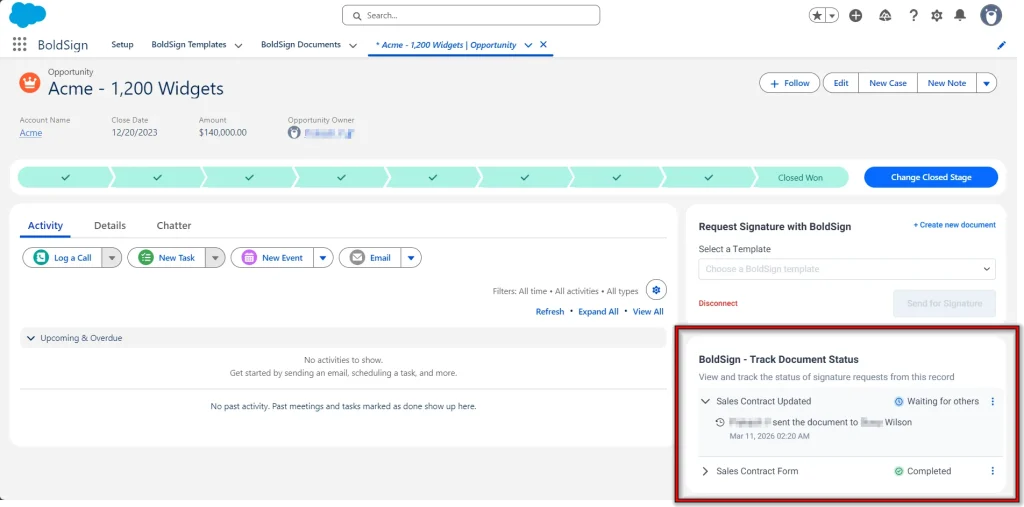
Overall, it enables accurate, record-level tracking while preventing duplicate signature requests and keeping document actions controlled.
For a deeper look, explore these resources:
- BoldSign Salesforce integration
- eSignature for Salesforce: Send, Track, Auto-Save Documents
- Salesforce Contract Management Webinar Recap
- Streamline Contract Workflows in Salesforce with BoldSign
- Salesforce Integration Help Center
Conclusion
Contract tracking should not force Salesforce users to leave Salesforce.
When status updates stay connected to the right record, teams can see whether a contract was sent, opened, signed, declined, or expired. They can follow up faster, reduce manual updates, and keep signed documents where everyone can find them.
BoldSign helps Salesforce users do exactly that. It brings document sending, status tracking, field mapping, templates, and signed-document storage into the Salesforce workflow, so teams can manage contracts without relying on a separate dashboard.
If your team already manages deals in Salesforce, your contract status should live there too.
Ready to keep your contract status where your deals live? Start your free trial or schedule a demo with BoldSign.
Frequently asked questions
Why is tracking contracts inside Salesforce important?
Tracking contracts inside Salesforce is important because it keeps contract status visible alongside deals, helping teams follow up faster, avoid missed updates, and access signed documents without switching tools. BoldSign makes this possible by bringing real-time document tracking directly into Salesforce.
Can you send reminders from Salesforce?
Yes, BoldSign allows document owners to send reminder emails directly from Salesforce, helping speed up pending signatures without switching tools.
Can signed contracts be attached to the same Salesforce record automatically?
Yes. BoldSign can save completed documents back to the related Salesforce record, making it easier for sales, finance, customer success, and operations teams to find the final signed copy.
Is contract tracking inside Salesforce useful for high-volume sales teams?
Yes. High-volume teams benefit because they can reduce manual status checks, avoid missed follow-ups, and keep contract progress visible across many active deals.

Stephen Otieno Okoth
Stephen is a Technical Assistant at BoldSign who specializes in creating clear documentation and engaging videos. He combines his technical skills and creativity to deliver user-focused solutions. Connect with him on LinkedIn.
More posts by Stephen Otieno Okoth