Convert PDF Pages to High-Quality JPG Images Online for Free
 BoldSign Team 2 min read
TL;DR: Convert PDF pages to high-quality JPG images in seconds with BoldSign’s free, secure, browser-based converter. Customize image quality, download all pages as a ZIP, and enjoy unlimited conversions with no sign-up or installation required.
We are excited to introduce another valuable tool in the BoldSign free tools collection, the PDF to JPG converter. It is designed to quickly turn PDF pages into high-quality JPG images in seconds while keeping your files fully private and secure.
Use this free online tool to convert PDF pages into crisp JPG images for documentation, thumbnails, UI designs, social media posts, reports, email attachments, and web uploads. No installations, no signups, and no watermarks.
To help you get started right away, here is a simple step-by-step guide.
How to use this tool
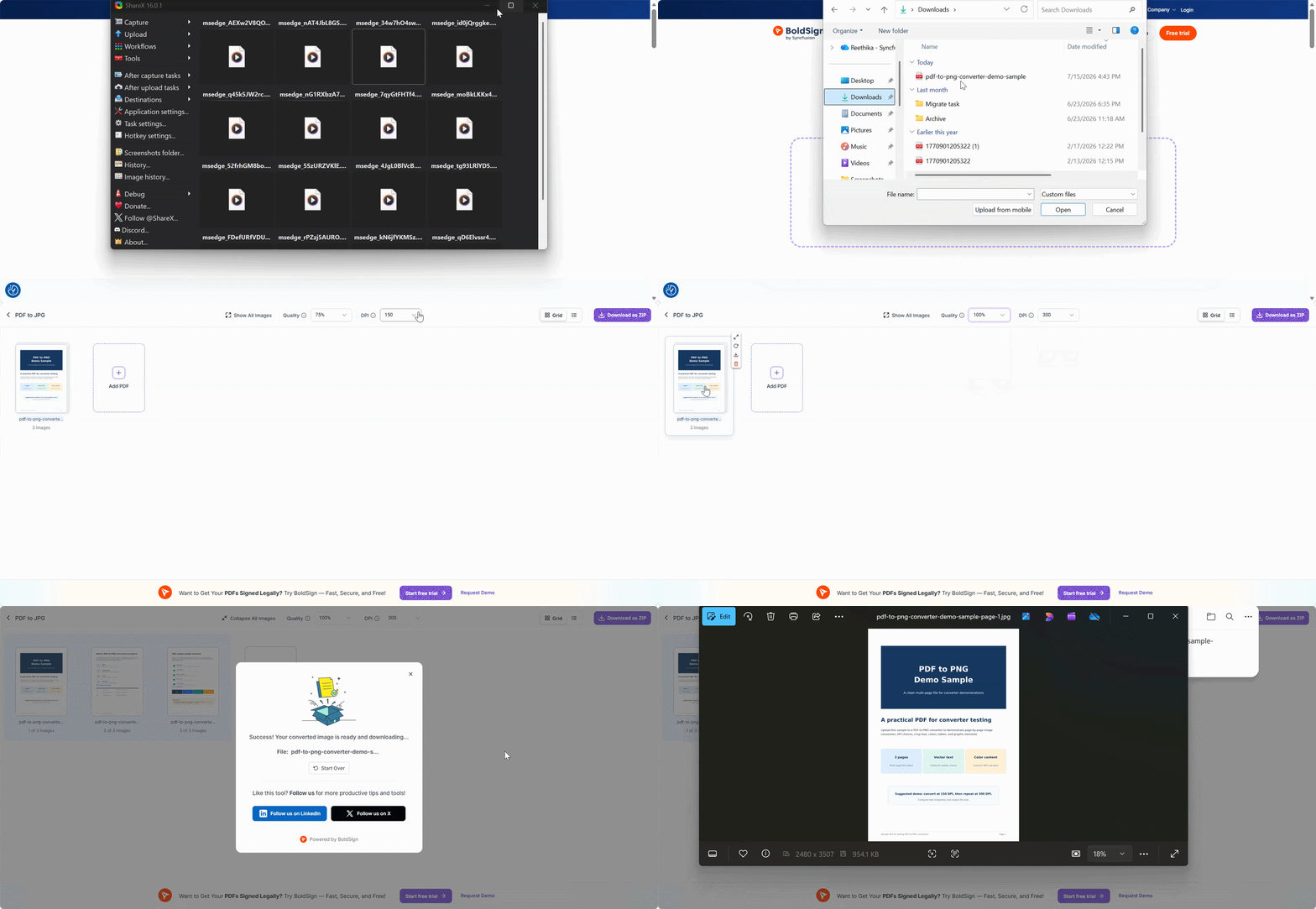
It is incredibly easy to use. Just follow these four simple steps to convert your PDFs into JPG images:
- Open the converter: Visit the BoldSign PDF to JPG tool in your browser.
- Upload your PDF: Drag and drop your PDF file or select it from your device.
- Customize JPG quality: Adjust the DPI and Quality options to set clarity, sharpness, and compression level.
- Download your images: Click Download as ZIP to save all converted JPG images to your device.
What you can do with this tool
BoldSign’s PDF to JPG converter includes powerful yet simple options that give you complete control:
- JPG quality selection: Choose your preferred DPI and compression quality to generate clear, high‑quality JPG images ideal for presentations, web uploads, illustrations, and previews.
- Convert multiple pages: Every page in your PDF is converted automatically. Perfect for multi‑page reports, design mockups, and scanned documents.
- Convenient ZIP download: Download all JPG images at once for quick access, sharing, or storage.
- Use JPG anywhere: JPGs are supported across websites, designs, documents, email platforms, and apps that do not allow PDF uploads.
Why you should use this tool
BoldSign’s PDF to JPG converter is built for everyone, whether you are a student, designer, marketer, developer, freelancer, or business professional. Here is why it stands out:
- 100% free for all users: Convert unlimited PDFs with zero cost and no hidden charges.
- No signup or installation: Open the tool in your browser and convert instantly.
- Safe and secure: Everything happens in your browser. Your files stay on your device and are never uploaded or stored.
- No watermarks or limits: Download clean JPG images without restrictions.
- Works on any device: Use it on Windows, Mac, Linux, iOS, or Android without installing software.
- Fast and intuitive: Upload, set DPI, convert, and download. The interface is built for speed and simplicity.
Part of the BoldSign free tools collection
This converter is one of many free browser-based utilities created to simplify document and image workflows. No downloads required, no signups needed.
Explore more in our free tools collection and enhance your workflow with BoldSign.
Ready to start converting?
Use BoldSign’s Free PDF to JPG Converter now. Convert your PDF pages into sharp, ready-to-use JPG images quickly and securely on any device.
Ready to simplify your document workflows? Sign up for a free 30-day trial or connect with our support team for a personalized demo.
Frequently asked questions
Can I convert only selected pages from my PDF to JPG?
We do not provide page‑selection support. However, you can download individual JPG images or download all images in a single ZIP file.
What is the recommended DPI for high-quality JPG images?
For most professional uses, 150 DPI suits reports and documents, while 300 DPI is ideal for print quality graphics, thumbnails, and UI mockups.
Will converting a PDF to JPG reduce the text sharpness?
JPG is a compressed image format, so slight softening may occur at lower DPI. Choosing a higher DPI ensures sharper text and better clarity.
BoldSign Team
The official team behind BoldSign—the simple, secure eSignature solution trusted by businesses worldwide. Our platform helps individuals and teams create, sign, and manage documents effortlessly while maintaining full compliance. Experience BoldSign yourself with a free trial or request a personalized demo to see it in action.
More posts by BoldSign Team