Node.js eSignature Integration Checklist for Go-Live
TL;DR: A production-ready Node.js eSignature integration needs more than a successful test send. This guide covers the essential checks for authentication, signer experience, webhooks, document storage, retries, and monitoring so your eSignature integration is reliable before launch.
Getting an eSignature flow working in development is one thing. Taking it live is where the real workflow problems start to show up.
The first successful test send proves that your API call works. It does not prove that your production workflow is ready. Webhooks can arrive more than once. A signer may abandon the process on mobile. A completed document may not be stored correctly in your system. Your app may still show a request as pending even after it has been signed.
That is why a go-live checklist matters. A production-ready Node.js eSignature integration is not only about sending documents successfully. It is about handling everything that happens before, during, and after the signing request so the workflow stays dependable, secure, and easy to support.
Key takeaways
- A working demo is not the same as a production-ready Node.js eSignature integration.
- Webhooks, retries, and idempotent event handling are critical for reliable document status tracking.
- The signer experience on desktop, mobile, and embedded flows should be tested as carefully as the API itself.
- Signed document storage, audit data retention, and reconciliation checks are essential for operational reliability.
- Templates reduce repeatable workflow errors, while dynamic generation offers flexibility for custom agreements.
- Launch readiness for a Node.js eSignature integration involves engineering, operations, and support.
Why a go-live checklist matters for eSignature integration
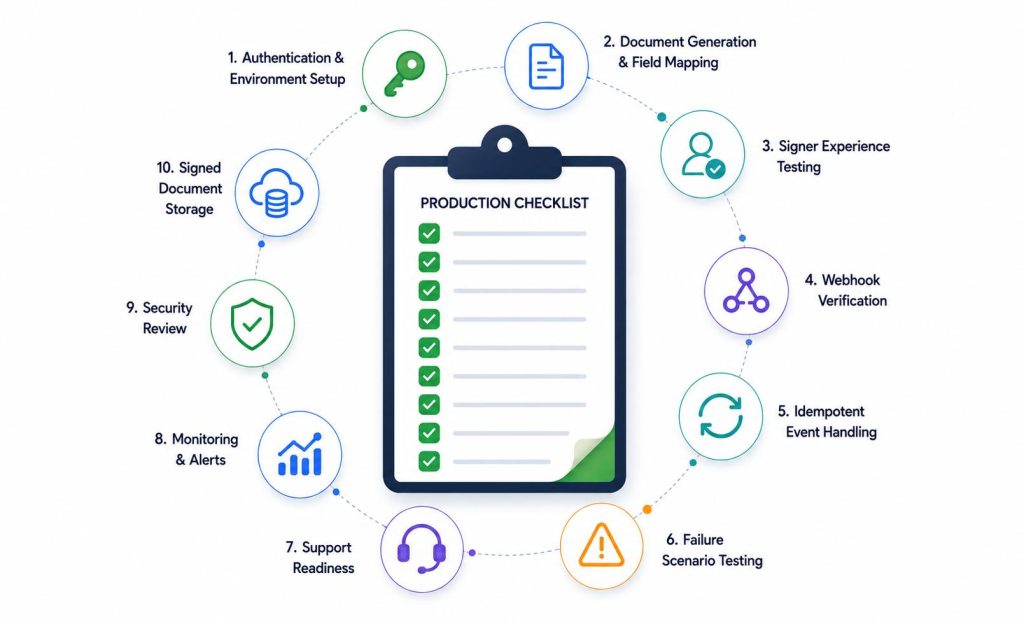
An eSignature integration usually spans multiple parts of your application:
- Authentication and API access
- Document generation and upload
- Signer notifications and signing flow
- Webhook-based status updates
- Signed document retrieval and storage
- Operational visibility and support
If one of these pieces is weak, the whole experience suffers. A signer may finish a document while your application still shows it as incomplete. A webhook may fail once and never update your internal status. A support team may not know whether the issue came from the payload, the signing platform, or your callback logic.
A production checklist helps prevent those gaps before real users start depending on the workflow.
1. Confirm authentication and environment separation
Before launch, make sure your eSignature API configuration is clearly separated between test and production.
Check that you have:
- Separate credentials for sandbox and live environments
- API keys stored in environment variables
- Restricted access to production secrets
- Environment-specific callback URLs and frontend return URLs
- Deployment-specific file storage configuration
In Node.js, this usually means keeping secrets outside the codebase and loading them through environment configuration.
Environment configuration:
ESIGN_API_KEY=your_live_api_key
WEBHOOK_SECRET=your_webhook_secret
APP_BASE_URL=https://yourapp.com
Loaded in Node.js:
const esignApiKey = process.env.ESIGN_API_KEY;
const webhookSecret = process.env.WEBHOOK_SECRET;
const appBaseUrl = process.env.APP_BASE_URL;
This sounds basic, but environment confusion is still one of the most common launch issues. A test callback URL left in production can make a working integration look broken very quickly.
2. Validate document generation and signer field mapping
A surprising number of production issues come from document setup rather than API connectivity.
Before going live, verify:
- The correct PDF or template is being used
- Signer names and email addresses are mapped correctly
- Fields are assigned to the right recipient
- Required and optional fields behave as expected
- Dates, titles, and custom fields appear in the correct places
If your workflow generates documents dynamically, test with realistic production-like data instead of ideal sample values.
Also validate multi-signer scenarios carefully:
- Signing order
- CC recipients
- Reminder settings
- Expiration behavior
- Decline or rejection handling
A request that sends successfully can still fail from the user’s point of view if the wrong person receives the wrong field.
3. Decide between dynamic documents and reusable templates
Before launch, be clear about how documents are created in your workflow.
Dynamic generation is a better fit when:
- Every agreement is unique
- Document content changes heavily per transaction
- Signer fields are created dynamically
Templates are a better fit when:
- The same agreement is sent repeatedly
- Signer roles are predictable
- Field placement should stay consistent
- Non-engineering teams need easier reuse
This decision directly affects how easy your workflow is to maintain and how often setup issues appear in production.
Reusable templates reduce the risk of inconsistent field placement. Dynamic generation gives you more flexibility, but it also needs stronger validation because more parts of the document are assembled at runtime.
A platform like BoldSign can help here by supporting both reusable templates for repeatable workflows and API-driven document creation for custom agreements. That flexibility is useful for teams that need to balance consistency with customization.
4. Test the full signer experience, not just the API response
A successful API response is only the beginning.
You also need to verify the real signer journey:
- Email delivery and message clarity
- Behavior on desktop and mobile
- Page load performance
- Redirect handling after signing
- Expired or invalid link behavior
- Accessibility and usability of the signing interface
If you support embedded signing, test the complete flow from your app to signing completion and back again. Embedded flows can create a better user experience, but they also require tighter coordination between frontend state, backend session handling, and completion tracking.
In a Node.js application, this usually means being clear about:
- Who starts the signing session
- How completion is detected
- What happens if the signer closes the browser before finishing
This is one of those areas where a clean test case can give false confidence. Real signers switch devices, close tabs, miss emails, and return later.
5. Treat webhooks as a core part of the integration
For most production workflows, webhooks are essential. They tell your application when a document is viewed, completed, declined, or otherwise updated.
Your eSignature integration should be ready to:
- Receive webhook events reliably
- Verify the authenticity of incoming events
- Process them safely
- Update internal status correctly
- Avoid duplicate handling
Webhook processing is one of the biggest production-readiness concerns because events are asynchronous. They can arrive late, out of order, or more than once.
Your webhook handling should be:
- Idempotent
- Logged
- Retry-safe
- Independent from fragile synchronous operations
If the same completion event is delivered twice, your system should not create duplicate records or trigger duplicate downstream actions.
This is also where provider support matters. BoldSign, for example, gives teams webhook-based event tracking that helps Node.js applications keep internal workflow states aligned with document activity.
6. Build idempotency into status updates
Idempotency deserves separate attention because it is where many production workflows quietly break.
Your webhook handler should not assume every event is new. Practical safeguards include:
- Storing the event ID if the provider supplies one
- Tracking processed status changes by document ID and event type
- Ignoring duplicate completion events
- Making downstream updates safe to repeat
For example, if a completed document triggers an internal email or onboarding step, that action should not run twice just because a webhook is retried.
The goal is simple: the same event can arrive more than once, but your business process should still move forward only once.
7. Plan where signed documents and audit data will live
A signing workflow is not complete when the document is signed. It is complete when your application has stored or linked the information it needs for future access.
Before launch, decide:
- Whether signed documents will be downloaded immediately
- Where files will be stored
- How long documents should remain accessible
- How audit metadata will be retained
- Who can access completed files internally
A practical strategy often includes:
- Durable object storage for files
- Application database records for metadata
- Clear links between document IDs, signer records, and stored files
- Internal access controls for sensitive agreements
Test this flow end to end. Do not rely on a one-time manual download as proof that storage is production-ready.
8. Define failure paths before users hit them
Your happy path may work perfectly. Production resilience depends on what happens when things go wrong.
Test cases should include:
- Invalid signer email addresses
- Abandoned signing sessions
- Expired signing requests
- Declined documents
- Webhook endpoint timeouts
- Temporary API failures
- Document upload failures
- Missing required field data
For each case, define:
- What the user sees
- What your support team sees
- What gets logged
- Whether the action can be retried safely
- Whether someone should be notified
A strong eSignature API workflow does not just succeed cleanly. It also fails clearly.
9. Review security and access controls
Security should be part of go-live readiness from the start.
Review at minimum:
- Secure API key management
- Least-privilege access to production credentials
- HTTPS for callback and application endpoints
- Webhook signature verification
- Restricted internal access to signed files
- Careful logging of sensitive data
Also review what your system logs during request creation and webhook processing. Avoid logging signer access links, full personal data, or raw document payloads unless absolutely necessary.
If your workflow operates in a regulated industry or across regions, review any compliance, retention, or legal requirements with the appropriate internal or legal teams before launch.
10. Add monitoring across the document lifecycle
Production support becomes much easier when your team can quickly answer simple questions:
- Was the signature request created?
- Was it delivered?
- Was it viewed?
- Was it completed?
- Did the webhook arrive?
- Was the signed document stored successfully?
This means monitoring should cover more than request success. It should cover workflow state from start to finish.
Useful signals include:
- Document creation success rate
- Webhook processing failures
- Documents stuck in pending state
- Signed document retrieval failures
- Retry counts on background jobs
- Signer drop-off by stage
In Node.js environments, structured logging and job monitoring can make these issues much easier to trace.
11. Reconcile internal status with provider status
Even reliable webhook systems can have temporary delivery problems. That is why it helps to have a reconciliation process.
For example, run a scheduled job that checks:
- Documents still marked pending in your database
- Requests expected to be completed already
- Mismatches between your internal status and provider status
This matters even more when signed documents trigger billing, onboarding, or contract activation.
In other words, do not rely on a single webhook event as your only source of truth.
12. Make support and operations ready for launch
A production checklist is not only for developers.
Your support or operations team should know:
- What each document state means
- How to tell whether a signer is blocked
- How to resend or restart a request if supported
- Where completed files are stored
- What common failure scenarios look like
- When engineering needs to step in
A short internal runbook can prevent a lot of confusion during the first few weeks after launch. It also helps support teams avoid escalating every signing issue as an engineering incident.
13. Test with realistic production scenarios
Before release, run a final round of testing with realistic use cases instead of ideal demo conditions.
Include scenarios like:
- One signer
- Multiple signers
- Signing order dependencies
- Mobile signing
- Interrupted browser sessions
- Webhook retries
- Duplicate events
- Post-signing file retrieval
- Support recovery flow
This final pass often catches the operational issues that standard QA misses.
Final checklist before go-live
Before launch, confirm that:
- Authentication is separated between test and production
- Document payloads and signer field mapping are validated
- Your template or dynamic generation approach is clearly defined
- The signer experience has been tested on desktop and mobile
- Webhook verification and idempotent processing are in place
- Signed document storage and retrieval are tested end to end
- Failure scenarios are defined and recoverable
- Security controls are reviewed
- Monitoring covers the full signing lifecycle
- Support teams know how to troubleshoot common issues
Choosing an eSignature platform for Node.js workflows
Once your checklist makes the production requirements clear, it becomes easier to evaluate eSignature providers.
Look beyond basic sending capabilities and focus on what will keep your workflow reliable after launch.
Useful criteria include:
- Node.js SDK or well-documented REST APIs
- webhook support and verification guidance
- Embedded signing support if needed
- Status tracking for documents
- Signed document download access
- Template support for repeatable agreements
- Clear production and sandbox separation
If you are comparing tools, BoldSign is worth considering for Node.js eSignature integration projects that need templates, embedded signing, webhooks, document tracking, and API-first workflow control. For teams moving from a simple demo to a production-ready workflow, those capabilities can make rollout and long-term maintenance much easier.
Ready to launch your Node.js eSignature integration?
Getting to production takes more than sending a document successfully once. You need a workflow that can handle signer activity, webhook events, document storage, and the small failures that show up in real usage.
If you are looking for a simpler way to manage that in Node.js, BoldSign offers the building blocks to create, send, track, and complete eSignature workflows with less operational overhead.
Try BoldSign for your Node.js eSignature integration with a sandbox account to build, test, and validate your signing workflow before going live.
Frequently asked questions
What should I test before launching a Node.js eSignature integration?
Test authentication, document generation, signer field mapping, webhook handling, signed document retrieval, mobile signing experience, retry behavior, and monitoring. A production-ready eSignature integration should cover both the API workflow and the real signer journey.
Why are webhooks important in eSignature integration?
Webhooks help your application track document events such as viewed, completed, declined, or expired. Without reliable webhook handling, your internal system can fall out of sync with the eSignature provider.
Should I use templates or dynamic document generation?
Templates work well for repeatable agreements with fixed field placement and signer roles. Dynamic generation is better when each document changes significantly per transaction. The right choice depends on how standardized your signing workflow is.
How do I store signed documents after completion?
Most teams store signed files in durable object storage and save related metadata in their application database. This makes it easier to link completed documents to users, transactions, and audit records inside the app.
What makes an eSignature API integration production-ready?
A production-ready integration includes secure environment setup, verified webhook processing, idempotent event handling, tested failure paths, document storage, monitoring, and support readiness. It should be reliable beyond just sending a test document.

Vallary Achieng Otieno
Vallary Achieng Otieno is a growing content writer focused on creating clear, engaging, and user-centered content. She specializes in simplifying complex ideas into practical insights that are easy for readers to understand and apply. With a growing interest in technical writing, Vallary develops well-structured articles that prioritize clarity, consistency, and value. Through her writing, she aims to help readers navigate concepts effectively while maintaining a strong, customer-focused approach. Connect with her on LinkedIn.
More posts by Vallary Achieng Otieno