How to Sign Documents on Android Using an eSignature App
TL;DR: Sign PDFs, Word files, and email attachments directly on your Android phone with BoldSign. You can self-sign documents, request signatures from others, and track their progress from one app.
You can sign documents on Android by uploading the file to an eSignature app such as BoldSign, adding your signature and other required fields, and saving or sending the completed document. With the BoldSign Android app, you can sign PDF, Word, Excel, and image files, request signatures from others, and track each document from your phone.
This guide explains how to sign documents on Android, including PDFs, Word documents, and files received by email. It also covers app-free signing methods, legal considerations, and how popular Android signing solutions compare.
Key Takeaways
- You can sign or send documents directly from your Android phone without printing or scanning them.
- You can self-sign a document or add recipients and request their signatures.
- Word files can be uploaded directly, so converting them to PDF is optional.
- If you receive a BoldSign signature request by email, you can tap the signing link and complete the required fields without creating a BoldSign account.
- Audit trails, authentication options, and tamper-evident records can provide evidence of the signing process.
Why Choose BoldSign for Mobile Document Signing?
The BoldSign mobile app, available on the Google Play Store, is designed to simplify mobile document signing for Android users. It stands out among signing apps for Android due to its:
- Seamless Experience: Upload and sign supported files, including PDF, JPG, PNG, DOCX, and XLSX documents, directly from your Android device.
- Advanced Features: Create reusable templates, add multiple recipients, configure signing orders, branding, comprehensive form fields.
- Security: Ensure signer authenticity with email OTP, access code, or SMS OTP authentication.
- Protect app access with biometrics: Secure the BoldSign Android app using Fingerprint, Face Unlock, or your device credential. You can also configure Auto-Lock or require verification every time the app opens.
- Localization: Customize the signer’s experience with the language of their choice and local time settings.
- Cloud Integrations: Connect with apps like Google Drive, OneDrive, and Dropbox for easy document access.
- Push notifications: Receive real-time updates about document activity and customize notifications for sender, recipient, CC, and template-related events.
- AI-powered search and field detection: Quickly find documents using natural-language queries and automatically detect and place relevant form fields while creating templates, reducing manual effort and accelerating document preparation.
With these features, BoldSign is a powerful Android signing app for professionals who need secure and efficient e-signature solutions.
How to Sign Documents on Android with BoldSign
Follow these simple steps to use BoldSign as your document signing app on Android. This guide covers both self-signing and sending documents for others to electronically sign any PDF document.
Step 1: Download and Install the BoldSign App
- Open this Google Play Store link on your Android device.
- Install the app.
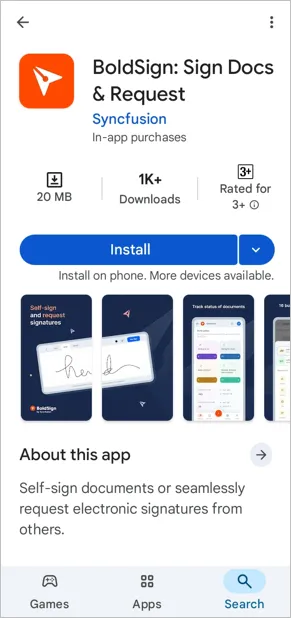
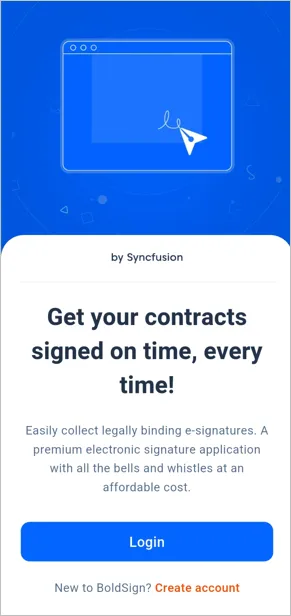
- Open the app and log in with your existing BoldSign account or create a new one by tapping Create Account.
Step 2: Upload Your Document
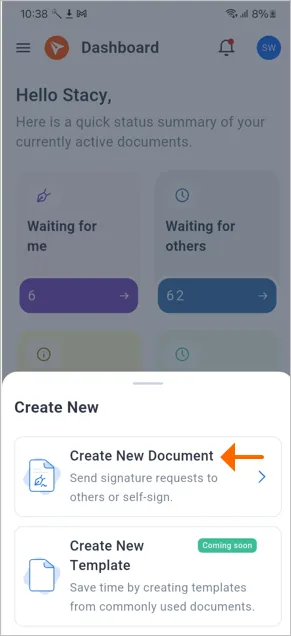
- On the BoldSign dashboard, tap the + button on the bottom navigation bar to open the Create New screen.
- Select Create New Document.
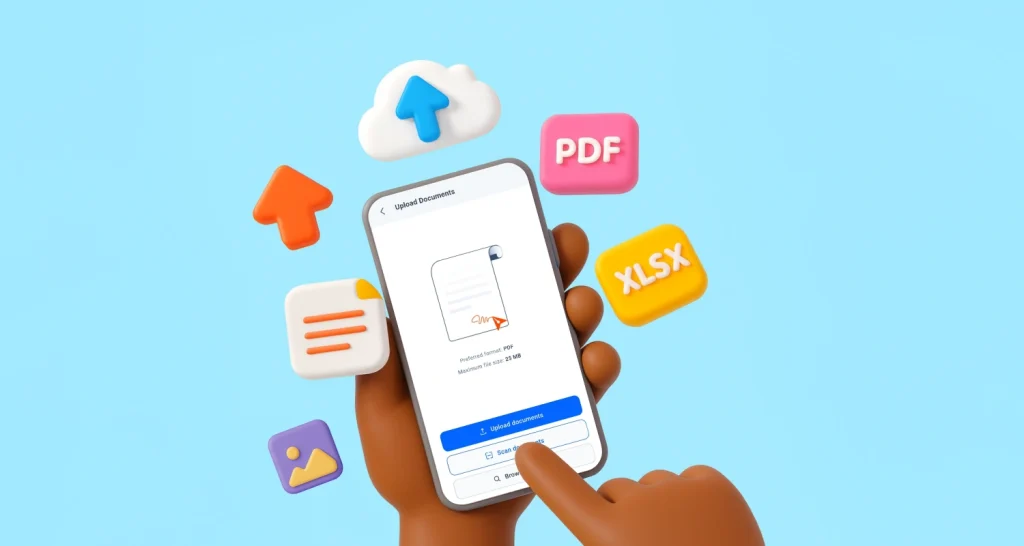
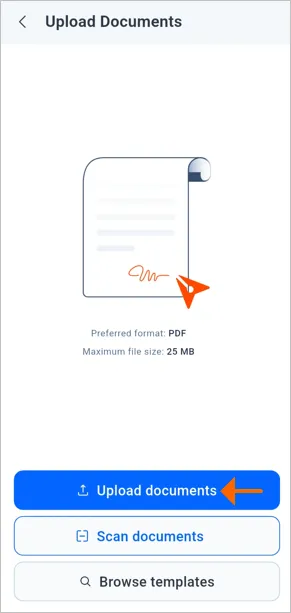
- Tap Upload Documents to choose files from your local storage or cloud services like Google Drive or Dropbox. Supported formats include PDF, JPG, PNG, DOCX, and XLSX (up to 25 files, 1,000 pages each).
Signing different types of documents
- PDF files: Upload the PDF and proceed with the same signing process. PDF is generally the preferred format when maintaining consistent page formatting is important.
- Word documents: Upload the DOCX file directly or convert it to PDF first if you want to preserve the document’s fonts, spacing, and page layout.
- Email attachments: Download the attachment to your Android phone and upload it to BoldSign.
- BoldSign email requests: If the email contains a BoldSign signing link, tap the link and complete the assigned fields directly. You do not need to download and upload the document again.
Step 3: Add Recipients and Configure Fields
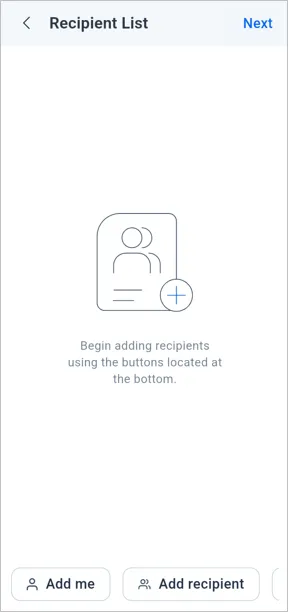
- On the Recipient List screen, add yourself as a recipient by tapping Add Me or enter the names and email addresses of other signers.
- Enable signing orders if multiple recipients need to sign sequentially.
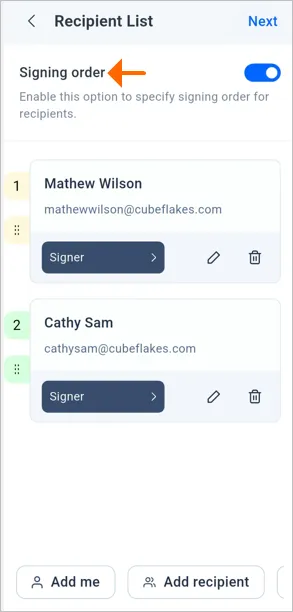
- Optionally, enable features like a document expiration date, auto reminders, or private messages for recipients.
- Tap Configure Fields to add form fields like signature, initials, date, or checkboxes. Drag and place fields where needed, zooming in for precision.
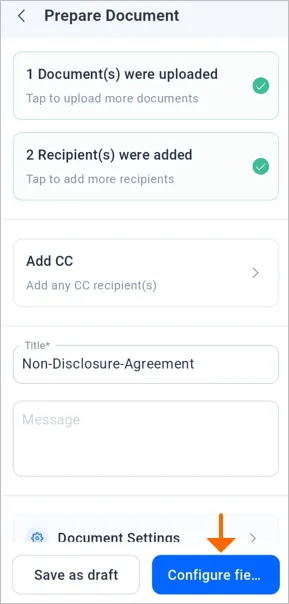
- For self-signing, fill in the fields immediately (e.g., draw or upload your signature). Fields like date signed and name autofill for convenience.
Step 4: Finalize and Send
-
Tap Continue to review the document on the Document Actions screen.
-
Choose Finish Signing for self-signing or Send document to request signatures from others.
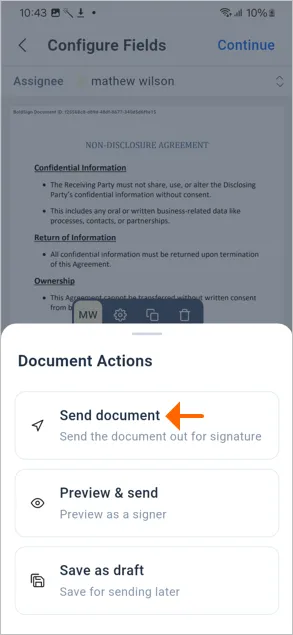
- Once signed, BoldSign stores the signed document securely and sends a confirmation. You can track its status in real time via the app’s dashboard.
How to Sign Documents on Android Without a Dedicated App
You can sign documents through the BoldSign web application without installing a dedicated app. Open BoldSign in your Android browser, sign in, upload your document, add the required signature fields, and choose Finish Signing or Send.
The browser version is useful when you have limited storage space or only need to sign occasionally. It also provides access to complete eSignature features, including multiple recipients, signing orders, signer authentication, document tracking, reminders, templates, and audit trails.
Is Signing Documents on Android Legally Binding?
Yes. Documents signed on Android can be legally binding when the signing process meets applicable legal requirements. In the United States, the ESIGN Act and UETA generally recognize electronic signatures when the signer’s intent and consent are established and the completed record can be retained.
BoldSign supports this process with activity records, audit trails, and digitally signed final documents that help identify changes made after signing.
Requirements vary by jurisdiction and document type, so consult a legal professional for specific guidance.
BoldSign vs. Other Android Signing Apps
Android eSignature apps differ in their mobile experience, workflow capabilities, and subscription requirements. The comparison below shows how BoldSign, Docusign, Adobe Acrobat Sign, and Signaturely support document preparation, signing, sending, and tracking on Android devices.
| Solution | Android experience | Notable capabilities | Key consideration |
| BoldSign | Native Android app and mobile-browser access | Self-signing, signature requests, templates, mobile field configuration, signer authentication, signing order, reminders, status tracking, in-person signing, push notifications, document scanning, and audit trails. | Supports complete mobile eSignature workflows, from preparing and sending documents to authenticating signers and tracking completion. |
| Docusign | Native Android app and mobile-friendly signing | Document uploading, self-signing, signature requests, multiple signers, signing order, reminders, push notifications, in-person signing, and agreement tracking. | Some sending, template, and advanced workflow capabilities may depend on the selected subscription plan. |
| Adobe Acrobat Sign | Native Android app and mobile-friendly signing | Self-signing, signature requests, reminders, in-person signing, real-time status updates, identity verification, cloud document access, and audit trails. | Functions as a mobile companion to the Adobe Acrobat Sign service and supports Adobe and third-party cloud-storage sources. |
| Signaturely | Mobile-browser signing workflow | Self-signing, requests for one or multiple signers, reusable templates, required fields, automatic reminders, and online document management. | Provides browser-based signing through emailed links. Its official product page does not identify a separate native Android app. |
Advanced Tips for Using BoldSign on Android
- Reusable Templates: Save time by creating templates for frequently used documents like NDAs or contracts.
- Secure Authentication: Require signers to authenticate using an access code, email OTP, or SMS OTP before accessing the document.
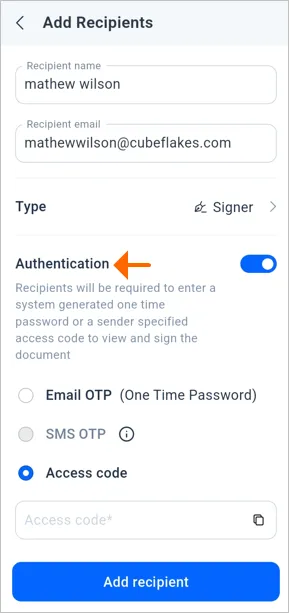
- Track and Manage: Use the dashboard to categorize, filter, and monitor sent and received documents.
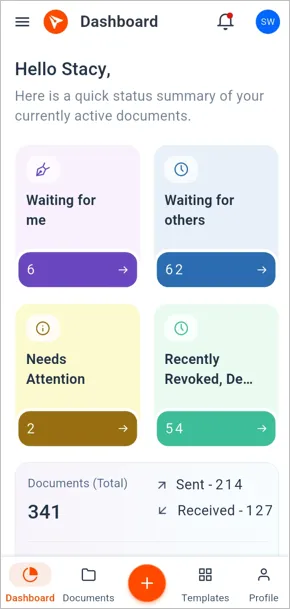
- Integrate with APIs: Developers can leverage BoldSign APIs (available for .NET, Python, etc.) to build custom workflows.
Why BoldSign Ranks Among the Best Signing Apps for Android
Compared to other e-signature apps for Android, like Docusign or Adobe Acrobat Reader, BoldSign offers a unique blend of affordability, security, and mobile-friendly features. Its signing capabilities and template creation support make it ideal for users who need flexibility without compromising security. Regular feature updates continue to improve the BoldSign mobile experience and help users manage eSignature workflows more efficiently.
For businesses, BoldSign streamlines processes across industries:
- Banking: Securely sign loan agreements or KYC documents.
- HR: Simplify onboarding with digital HR forms.
- Legal: Expedite contracts and NDAs with legally binding e-signatures.
- Education: Convert paper forms to digital for students, parents, and staff.
Get Started with BoldSign Today
The BoldSign mobile app is a game-changer for signing documents on Android. Its intuitive interface, robust security, and versatile features make BoldSign a secure and feature-rich document signing app for Android users. Whether you’re self-signing a PDF or sending contracts to multiple recipients, BoldSign ensures a fast, secure, and seamless experience.
Ready to simplify your e-signature workflow? Download the BoldSign app from the Google Play Store and start signing today. For more details, visit the BoldSign documentation or contact support at support@boldsign.com.
Frequently asked questions
How do I sign a PDF on Android?
Open BoldSign, select Create New Document, upload your PDF, and add yourself as a recipient. Place and complete the signature field, then select Finish Signing.
Can I sign a Word document on Android?
Yes. Upload your DOCX file to BoldSign and follow the standard signing process. You can also convert it to PDF first to preserve its layout.
Do recipients need a BoldSign account?
No. Recipients generally do not need a BoldSign account to complete a document sent to them for signature. They can open the signing link, complete the assigned fields, and submit the document.
Can I track the progress after I sign documents on Android?
Yes, BoldSign’s dashboard allows you to track the real-time status of every document after you sign a PDF on Android, including whether it’s pending, completed, or declined.
What types of signatures can I use to sign PDFs on Android in BoldSign?
You can draw your signature, type it, or upload an image of your signature when you sign a PDF using BoldSign.
Is it safe to sign documents on an Android phone?
The security of a mobile signing process depends on the eSignature platform, signer authentication settings, and device protection. BoldSign supports recipient authentication, document activity tracking, audit trails, and digitally signed final documents.
- * *
Why should I use BoldSign to sign documents on Android?
BoldSign offers a complete mobile signing solution, letting you sign documents on Android with advanced features like signer roles, field customization, and real-time tracking, all from your smartphone.
- * *

Rayronald Ochola Otieno
Rayronald Ochola Otieno is a content specialist at BoldSign, specializing in video content and help articles within the eSignature domain. As a blog author, he creates well-researched, insightful content that simplifies complex eSignature topics like digital signatures, compliance, and workflow automation for businesses and professionals. With expertise in creating educational videos and articles, Ray helps users understand and adopt secure, efficient signing solutions. Beyond writing and video creation, Ray enjoys exploring new technologies, reading about the latest industry trends, and continually refining his skills.
More posts by Rayronald Ochola Otieno