TL;DR: MCP gives AI agents a standard way to connect with eSignature tools and take real signing actions, such as sending documents, checking status, sending reminders, and revoking requests, without manual handoffs or app switching.
AI agents can answer questions, summarize information, and guide users through workflows. However, when a document needs to be signed, the process often becomes manual again.
Someone still has to open the eSignature application, prepare the document, send it for signature, monitor status, and follow up with signers.
The challenge is not that AI cannot understand the workflow. The challenge is that the agent usually has no way to interact with the eSignature system itself.
That is where eSignature MCP comes in.
By using the Model Context Protocol (MCP), AI agents can connect with eSignature systems and perform signing-related actions through connected tools. This allows them to participate in agreement workflows instead of simply explaining the next step.
This article explains how eSignature MCP works, what AI agents can do with it, and how organizations can use it to simplify document-signing workflows, improve visibility, and reduce manual handoffs.
Key takeaways
- AI agents become more valuable when they can complete document actions, not just provide information.
- eSignature workflows are a strong fit for AI automation because they follow predictable states such as sent, pending, signed, completed, and revoked.
- MCP provides a standard way for AI agents to access eSignature capabilities without custom integrations for every action.
- AI agents can send documents, check status, send reminders, revoke requests, and retrieve document details through MCP.
- BoldSign MCP demonstrates this approach through a working AI Warranty Claim Agent.
What is eSignature MCP?
MCP is an open standard that allows AI agents to interact with external tools and systems.
For eSignature workflows, MCP makes signing-related actions available as tools that an AI agent can call during a conversation.
For example, an AI agent may be able to:
- Send documents from templates
- Check document status
- Send reminders
- Retrieve document details
- Revoke signature requests
eSignature workflows are especially well suited for MCP because they follow predictable states such as sent, pending, signed, completed, and revoked.
MCP does not replace the eSignature API. The API continues to perform the underlying work, while MCP provides a standard way for AI agents and MCP-compatible clients to access those capabilities.
BoldSign MCP is a practical implementation of this approach, exposing eSignature capabilities as MCP tools that AI agents can use.
What an AI agent can do with eSignature MCP
Once connected to an eSignature system through MCP, an AI agent can support common signing workflows:
Send documents from templates
The agent can find and use pre-configured templates for frequently used agreements such as NDAs, onboarding forms, and vendor contracts.
Check document status
Instead of opening another application, users can ask whether a document is pending, signed, completed, or expired.
Send reminders
The agent can help follow up with signers who have not completed the document.
Revoke requests
If a document was sent by mistake or needs to be replaced, the agent can revoke the request.
Retrieve document details
The agent can retrieve information about a document and provide visibility into its current signing state.
From AI conversation to signed agreement
A typical eSignature MCP workflow looks like this:
- A user provides agreement details.
- The AI agent calls the appropriate MCP tools.
- A suitable document template is identified and prefilled with the information collected during the conversation.
- The document is sent for signature.
- The signer reviews and signs the document.
- The AI agent tracks status and sends reminders when needed.
Because the signing actions are handled through connected tools, users can manage the workflow through their interactions with the AI agent instead of switching between multiple applications.
Practical example: AI Warranty Claim Agent using BoldSign MCP
BoldSign provides a working AI Warranty Claim Agent demo powered by BoldSign MCP.
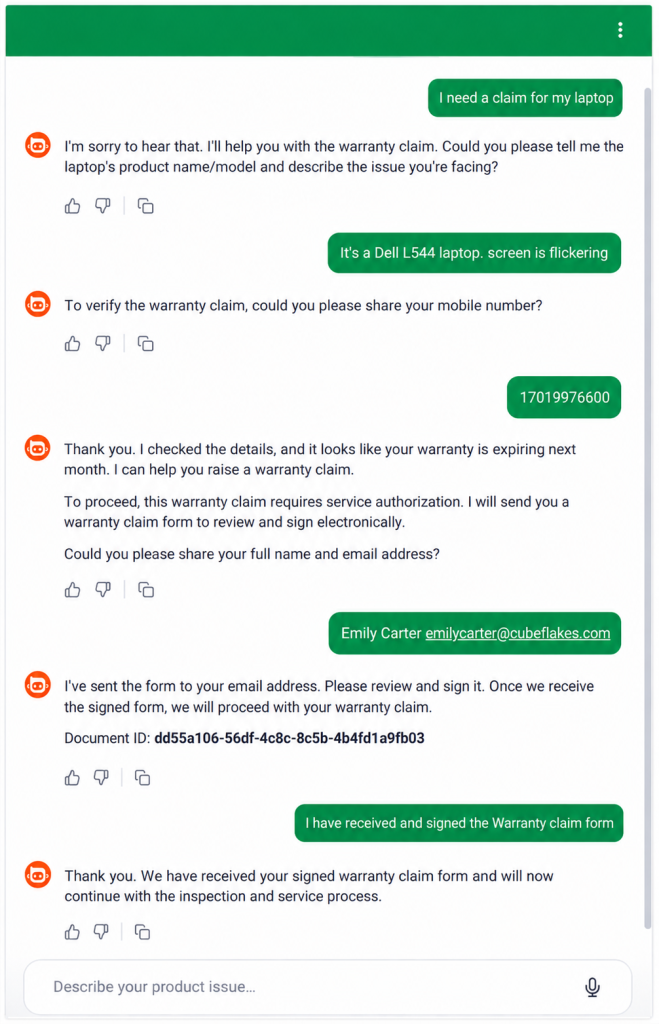
Sample AI Warranty claim chat
Consider a retailer that sells laptops and manages warranty requests through an AI-powered support assistant.
Step 1: Customer reports an issue
A customer starts a conversation and reports a problem with a laptop.
Step 2: AI assistant collects information
The AI assistant gathers product details, customer information, and warranty-related data needed to process the claim.
Step 3: Agreement is sent for signature
Using BoldSign MCP, the AI assistant finds the appropriate warranty claim template and sends the document for signature.
Step 4: Customer signs
The customer reviews and signs the warranty claim agreement through the standard signing experience.
Step 5: Status is tracked
The AI assistant checks document status and can send reminders if action is still pending.
Step 6: Workflow continues
Once the agreement is signed, the retailer can continue with inspection, repair, replacement, or claim approval.
This demonstrates how BoldSign MCP connects AI conversations with real eSignature actions instead of handing the workflow back to a person.
For developers and product teams, the demo also shows how AI agents can interact with signing workflows through BoldSign MCP without building every signing action from scratch.
Beyond warranty claims
The same approach works for many agreement-driven workflows:
- NDAs
- Employee onboarding documents
- Vendor agreements
- Customer approvals
- Service contracts
- Insurance forms
- Renewal agreements
The document may change, but the actions remain the same: send, track, remind, revoke, and retrieve details. That is what makes eSignature workflows a natural fit for MCP-enabled AI agents.
Why developers and product teams should care
Without MCP, every signing-related action typically requires a separate integration.
Developers write code to send documents, check status, send reminders, and manage workflows individually.
With the BoldSign MCP Server, these capabilities are exposed as MCP tools that AI agents can access through a standard protocol.
This allows teams to:
- Reduce custom integration effort
- Deliver AI experiences faster
- Reuse existing workflows
- Simplify maintenance
- Build on top of existing document-signing workflows.
The BoldSign eSignature API remains the foundation. MCP simply makes those capabilities easier for AI agents to access.
What to look for in an eSignature MCP solution
When evaluating an eSignature MCP implementation, look for:
- Template support
- Document status tracking
- Reminder functionality
- Revocation support
- Authentication and security controls
- Audit trails
- Developer documentation
- API coverage
The API performs the work, while MCP enables AI agents to use it. Strong solutions provide both.
Try a working eSignature MCP demo
The fastest way to understand what eSignature MCP feels like in practice is to use a working example.
The AI Warranty Claim Agent demo shows how an AI agent collects claim details, sends a warranty claim agreement through BoldSign MCP, and tracks signing status inside a real AI conversation.
If you’re a developer or product team evaluating BoldSign MCP for your own agent workflow, the BoldSign MCP Server documentation covers everything you need to set up and connect the server.
The BoldSign MCP Server is also available on GitHub and published as an NPM package for easy evaluation and deployment.
You can also explore the BoldSign MCP feature page to learn more about the capabilities available through the MCP server and how they fit into document-signing workflows.
Conclusion: Move AI agents from conversation to signed agreements
AI agents are becoming increasingly capable, but their greatest value comes from helping complete real business tasks.
Agreement workflows are a clear example. Collecting information is important, but documents still need to be sent, tracked, and followed up on before work can move forward.
eSignature MCP helps bridge that gap by giving AI agents a standard way to access signing-related capabilities. Instead of creating another manual handoff, the agent can participate directly in the workflow.
BoldSign MCP provides a practical way to explore this approach through a working demo, an open-source MCP server, and the full BoldSign eSignature API. If you’re building AI-powered workflows, it provides a straightforward way to bring eSignature actions into the conversation experience.
Ready to explore this approach in your own workflows? Start a free BoldSign trial. A BoldSign account is required to use the BoldSign MCP Server and test AI-powered signing workflows in your own environment.
Frequently asked questions
What is eSignature MCP?
eSignature MCP uses the Model Context Protocol to connect AI agents with eSignature capabilities.
Can AI agents send documents for signature?
Yes. Through MCP, agents can trigger document-sending actions exposed by an eSignature platform.
Can AI agents check document status?
Yes. Agents can retrieve signing status and provide updates within a conversation.
Does MCP replace the eSignature API?
No. The API performs the underlying actions, while MCP provides a standard way for AI agents to access them.
How does BoldSign MCP help?
BoldSign MCP exposes eSignature capabilities as MCP tools, allowing AI agents to send documents, check status, send reminders, revoke requests, and manage signing workflows.

Evans Omondi Otieno
Evans Omondi Otieno is a customer support representative and writer at BoldSign, specializing in creating clear, insightful content to help users navigate eSignature solutions. As a blog author, Evans writes well-researched articles that simplify technical concepts, helping businesses and professionals understand how to use BoldSign effectively. With expertise in technical support and content creation, he ensures users have a seamless experience and gain valuable knowledge from his articles. Connect with him on LinkedIn.
More posts by Evans Omondi Otieno