How to Sign a Document Online with a Legally Valid Electronic Signature
 Preethi Loganathan
 TL;DR: Under the U.S. ESIGN Act, a signature cannot be rejected just because it is electronic, and a typed, drawn, or uploaded signature all count. Validity rests on four things: intent to sign, consent to go electronic, association with the record, and retention. The harder question is proof. A signed file alone shows you signed it. A tracked signing workflow shows who signed, when, and how.
There is a small pause that happens right before someone types their name into a contract on screen. The document is due today, printing and scanning it feels ridiculous, and yet a name in a script font does not quite feel like a signature.
It is one. U.S. law settled this in 2000, and the rules are simpler than most people expect. What the law does not settle for you is how much proof you will hold if someone later claims they never agreed to anything.
This guide covers both parts: how to sign a document online in a few minutes, and how to tell when that is enough versus when you need a tracked workflow behind it.
What makes an electronic signature legally valid in the United States
Two laws do the heavy lifting. The federal ESIGN Act states that a signature, contract, or record cannot be denied legal effect or enforceability only because it exists in electronic form. At the state level, UETA does similar work and has been adopted by 49 states.
ESIGN also defines an electronic signature broadly. It covers any sound, symbol, or process attached to or logically associated with a record and adopted by a person with the intent to sign it.
Read that definition again, because it settles the question most people are actually asking. A typed name in a signature field qualifies. So does a signature drawn with a mouse or a fingertip, and so does an uploaded image of your handwriting. Nothing in the statute asks the mark to look handwritten, and nothing in it names a specific brand of software.
What the law does care about are four conditions:
- Intent to sign. You knowingly applied the signature rather than clicked through something you never saw.
- Consent to do business electronically. Both parties agreed to handle the transaction this way. ESIGN is explicit that nobody can be forced to accept electronic records.
- Association with the record. The signature is tied to that specific document, not floating loose in an email.
- Record retention. The signed record accurately reflects the agreement and stays accessible to everyone entitled to it, in a form that can be reproduced later.
Three of those four are about the document and the moment of signing. The fourth is about what happens for the next several years, which is where most self-signers quietly fall short, regardless of which tool they used to sign.
If you are signing outside the United States, the equivalent frameworks are eIDAS across the EU and UK, and comparable statutes in Canada, Australia, India, and most other major markets. The four conditions above map closely to all of them, so the practical guidance in this guide still holds.
A few documents still need a handwritten signature
ESIGN carves out a short list of exceptions where an electronic signature will not hold up on its own: wills and testamentary trusts, family law matters like adoption and divorce, court orders and filings, most Uniform Commercial Code transactions outside Articles 2 and 2A, and a handful of consumer notices such as loan default, eviction, or utility cancellation. States add a few extra rules on top, and New York runs its own statute instead of UETA.
None of this touches ordinary business paperwork. Sales agreements, NDAs, offer letters, vendor contracts, and consent forms are all fine to sign electronically. If your document sits near one of the categories above, check with counsel before you sign.
Ten seconds spent checking that list can save you from an agreement that falls apart later. Most people skip this step and are fine, right up until the one time they are not.
Before you sign, pick the right method
Your document is eligible. Now there is one decision left, and it determines everything about how you sign.
The three ways to sign a document online
- Built-in PDF tools, such as Preview on macOS or the markup tools in Adobe Acrobat Reader, let you drop a signature onto a page and save the file. Fast and free, with no record of anything beyond the file itself.
- Free one-off signing tools work in a browser with no account. Convenient for a single form, but most give you no lasting record, and many process your document on servers you know nothing about.
- eSignature platforms like BoldSign handle both signing and sending. You get the completed file plus a timestamped record of what happened, signer identity checks when other people are involved, and a place the document lives afterward.
All three produce a legally valid signature under ESIGN. They differ in what evidence you are left holding.
Where self-signing stops being enough
Here is the part that gets lost in most explainers about legal validity. Signature style is not what separates a solid electronic signature from a fragile one. Typed, drawn, and uploaded signatures are equally valid under ESIGN. What separates them is the evidence each method leaves behind.
Signing a PDF in a desktop PDF editor gives you exactly one artifact: a signed file. That is genuinely fine when you are the only signer, the stakes are modest, and nobody is likely to contest anything.
Signing the same file through BoldSign gives you the file plus a timestamped record of the signing event. And sending it as a signature request adds everything you need about the other party: when they opened it, how their identity was checked, and a timestamp for every action up to completion.
| PDF editor self-sign | BoldSign self-sign | BoldSign signature request | |
| Who signs | You only | You only | You, other parties, or both |
| What you keep | The signed file | The signed file and a timestamped signing record | The signed file and a full audit trail |
| Identity check | None beyond your own device | Your authenticated account | OTP, access code, KBA, or ID verification per signer |
| Proof of when and by whom | The file and your email thread | Timestamped record tied to your account | Timestamped record of every action by every party |
| Best fit | One-off forms nobody will question | Acknowledgments and internal records you may need to retrieve later | Anything with money, renewal terms, or liability attached |
Switch to a tracked signature request when any of these is true:
- Someone other than you has to sign
- The agreement carries payment terms, a renewal clause, or liability
- You operate in a regulated industry such as finance, insurance, healthcare, or real estate
- You would struggle to prove the other party saw the final version rather than an earlier draft
- You need to produce the record years later, possibly after the person who signed it has left
None of this makes a self-signed document invalid. It changes how easily you could defend it.
How to sign a document online with BoldSign
BoldSign handles both paths. Follow Path A if you are the only signatory, Path B if anyone else has to sign. Either way, the whole thing takes a few minutes.
Path A: Sign a document yourself
Use this for a vendor form, a policy acknowledgment, a return authorization, or a contract someone else has already signed and sent to you.
Upload the document. Sign in to your BoldSign account, start a new document, and choose the Sign yourself option. Upload the PDF, Word file, or image you need to sign. BoldSign converts Word, Excel, and image files automatically, so there is no need to export to PDF first.
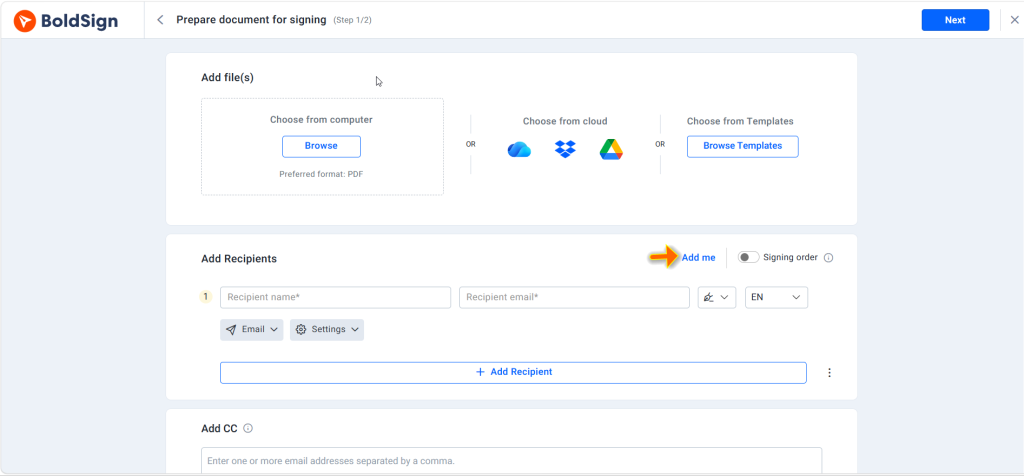
Place your signature and any other fields. Drag a signature field onto the page where the agreement expects your signature. You can type your name, draw it with a mouse or fingertip, or upload an image of your handwriting, all three are equally valid under ESIGN. Add dates, initials, printed name, or checkboxes wherever the document requires them.
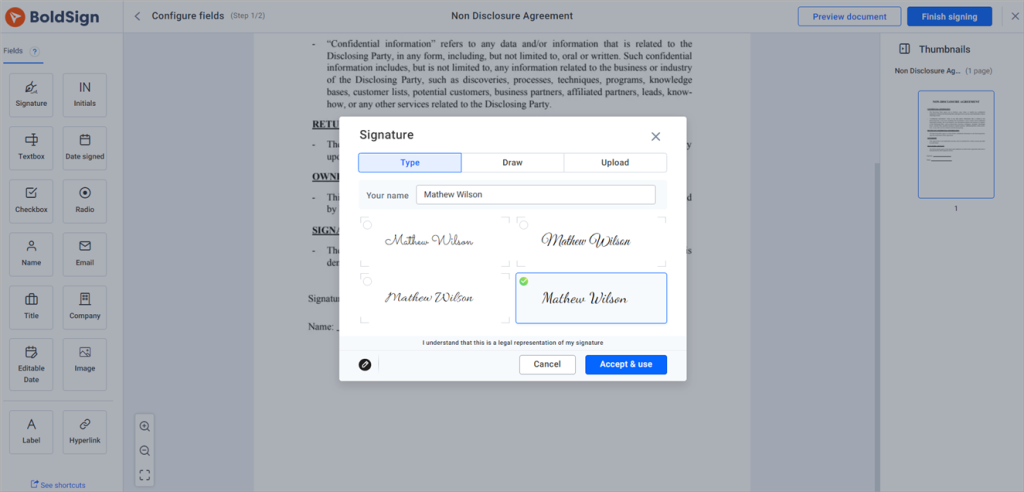
Finish and download. Complete the document, and BoldSign finalizes it and stores it in your account along with a timestamped record of the signing. Download the signed file, or share it directly from BoldSign.
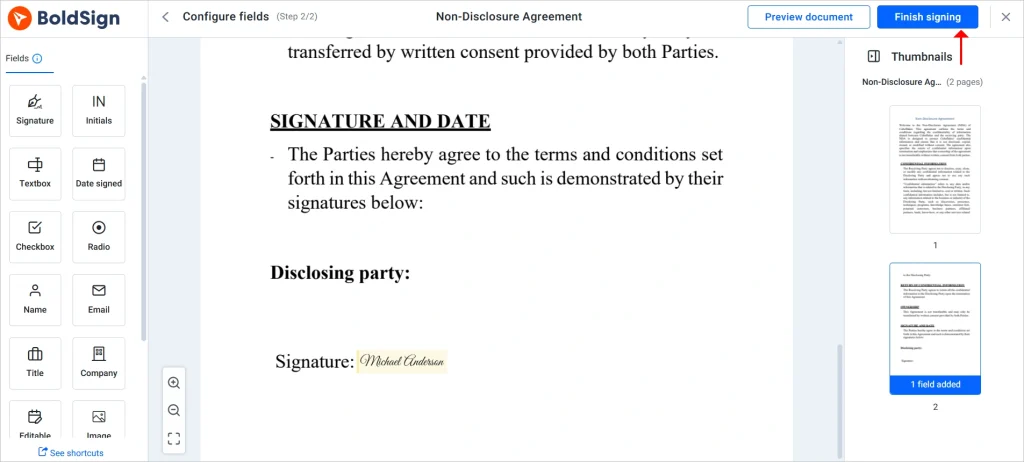
That is the whole flow. No printing, no scanning, no separate PDF editor.
Path B: Send a document to other people for signature
Use this when a client, employee, vendor, or counterparty has to sign, whether or not you are also signing.
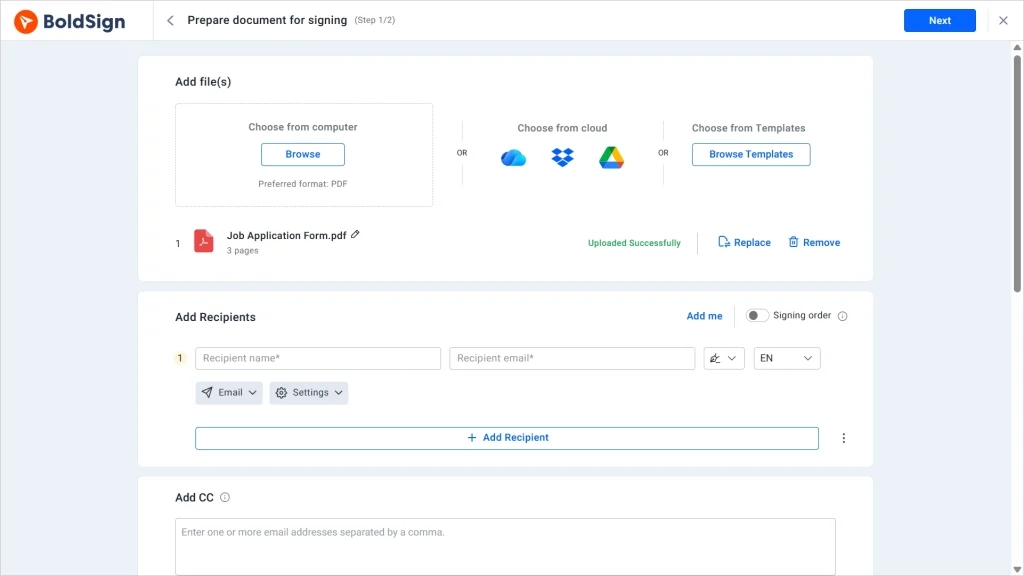
Upload the document and add the signers. Start a new document, upload the agreement, then add each recipient’s name and email address. If you also need to sign, add yourself as a recipient too. Recipients do not need a BoldSign account to sign; they receive a secure link and can complete the document in their browser, on a laptop or a phone.
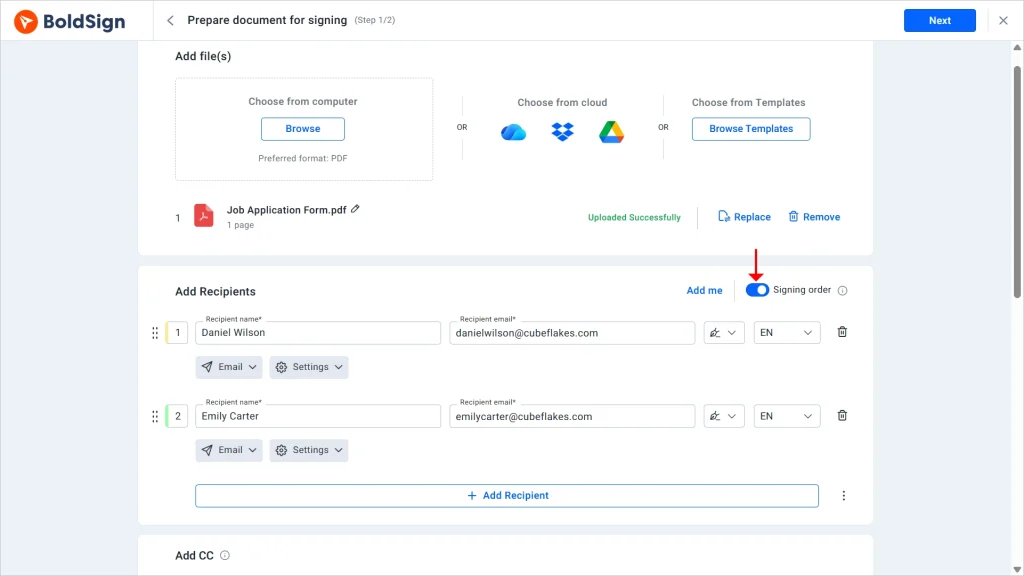
Set the signing order, if the sequence matters. When the document has to move through people in a specific order, such as a manager approving before a client countersigns, turn on signing order and arrange the recipients. BoldSign will only notify each person once the previous signer has finished.
Add signature fields and any other required information. Place a signature field wherever each recipient needs to sign, then add supporting fields such as dates, printed names, initials, checkboxes, or free-text fields. Assign every field to the correct recipient, so each signer sees exactly what they are responsible for and nothing else.
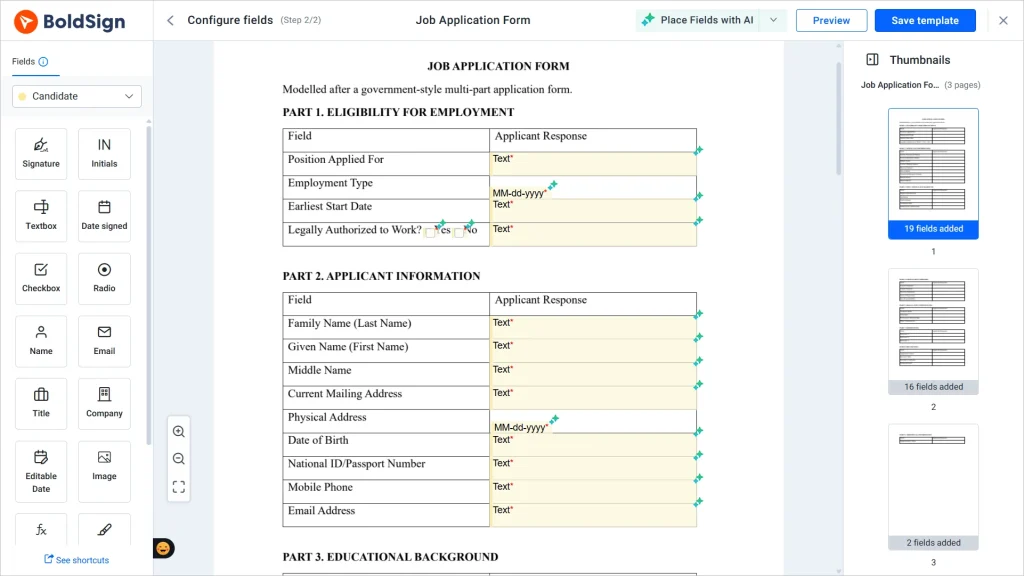
Review and send. Check the document, the recipient details, and the field assignments. Add a subject line and a short message explaining what the document is and why it needs signing. This measurably improves completion rates. Send the request, and each recipient receives their own secure link.
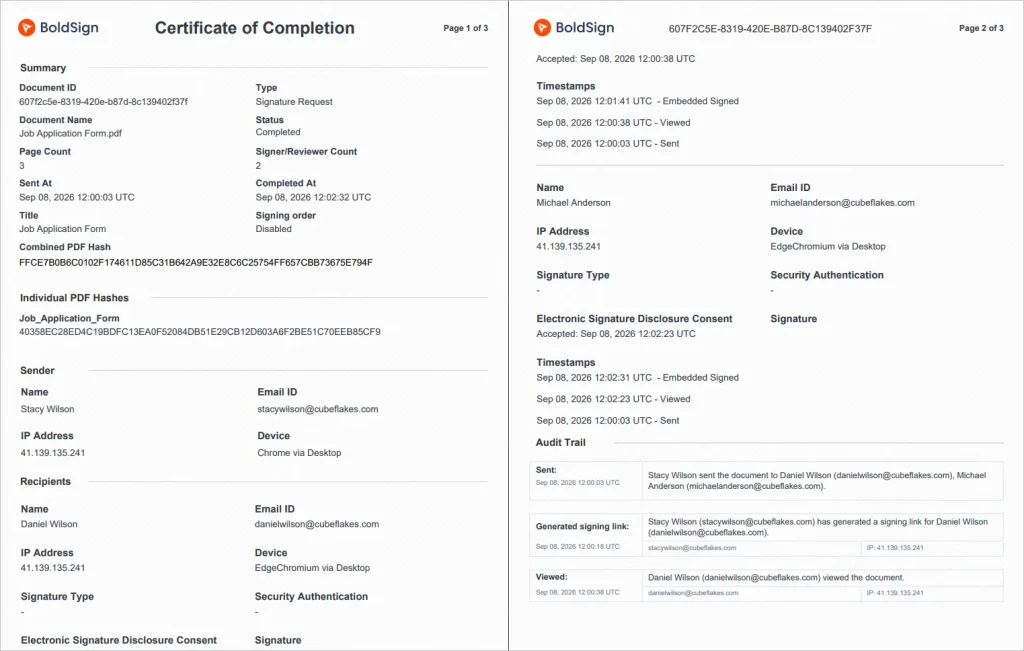
Track and store the completed record. BoldSign keeps the document in your account history and records the signing activity with timestamps. You can see whether the document was sent, viewed, signed, declined, or completed without chasing separate email threads. Once everyone has signed, the completed document and its audit trail stay available for download and future reference, showing who signed, when they signed, and what took place along the way.
Match the identity check to what the agreement is worth
When other people sign, the weakest link is usually identity. An email arriving at an address proves someone had access to that inbox, and not much else.
BoldSign lets you choose an authentication method per signer:
- Email OTP for everyday agreements
- SMS OTP to tie verification to a phone instead of an inbox
- Access code shared through a separate channel
- Knowledge-based authentication (KBA) to verify U.S.-based signers through public-record security questions, without requiring an ID upload or selfie check
- ID verification with a government ID and selfie check, for higher-stakes agreements
Whichever you pick, it is recorded in the audit trail alongside the signature.
There is a real tradeoff here. Every layer of authentication adds a step the signer has to complete, and steps cost completions. A $200 renewal does not need a photo ID check. A commercial lease or a loan document probably does.
Choose per document rather than setting one policy for everything.
Keep repeat agreements consistent and compliant
For agreements you send repeatedly, NDAs, offer letters, client engagement forms, BoldSign’s reusable templates keep the fields and wording consistent instead of rebuilt from scratch each time.
BoldSign is built to meet the requirements of the ESIGN Act and UETA, and is SOC 2 Type II certified, with GDPR, HIPAA, and PCI DSS support for teams handling regulated data. That covers the four legal conditions from earlier in this guide, plus the surrounding handling of your documents.
The practical rule is simple. Ask what you would need to show if this agreement were challenged in two years. If the answer is “the file,” sign it yourself and move on. If the answer involves who, when, or how, use a tracked request instead, because you cannot reconstruct that evidence afterward.
Start your free trial and send your first tracked signature request. No credit card required.
Frequently asked questions
Is signing a document online legally valid?
Yes. Under the U.S. ESIGN Act and applicable state laws, documents generally cannot be denied legal effect solely because they were signed electronically.
What makes an electronic signature legally binding?
An electronic signature is generally binding when the signer intends to sign, agrees to transact electronically, the signature is associated with the document, and the completed record remains accessible and reproducible.
Can I sign a PDF online instead of printing it?
Yes. Most business PDFs, including contracts, NDAs, offer letters, and consent forms, can be signed electronically without printing, scanning, or mailing them.
Can I sign a Word document online, or does it have to be a PDF?
You can sign Word documents, Excel files, and images. BoldSign converts them to PDF automatically when you upload, so you do not need to export the file yourself first.
Is a typed name a legal electronic signature?
Yes. A typed name can qualify as a legal electronic signature when it is added with the intent to sign and is logically associated with the relevant document.
Do the people I send a document to need an account to sign it?
No. Recipients sign through a secure link sent to their email and do not need to create an account or install anything. Only the person sending the document needs a BoldSign account.
Can I sign a contract online from my phone?
Yes. You can review and sign most contracts from a smartphone browser, including drawing your signature with a fingertip. The signing process captures your intent and associates your signature with the document in the same way it does on a desktop.
Do I need witnesses or notarization for online signing?
Not for most everyday contracts. Some documents require witnesses or notarization under state law, and electronic or remote notarization is permitted only when the applicable legal requirements are met.
Is an audit trail required for legal eSignatures?
An audit trail is not universally required for every electronic signature, but it provides valuable evidence of signer identity, intent, timing, and document activity if the agreement is challenged.
What is the difference between an electronic signature and a digital signature?
An electronic signature is any electronic symbol or action used with the intent to sign. A digital signature is a specific type of electronic signature that uses certificate-based cryptography to verify identity and detect document changes.
How do I prove who signed an online document?
Use an eSignature platform that records signer details, authentication results, timestamps, and document activity in an audit trail. This evidence can help establish who accessed and signed the document.

Preethi Loganathan
Preethi is a Digital Marketing Executive at BoldSign who develops precise, research-driven content on eSignatures, compliance, and digital signing workflows. She works closely with product and engineering teams to ensure every article is accurate, validated, and aligned with industry best practices. Connect with her on LinkedIn.
More posts by Preethi Loganathan