How to Mark Issues in a Property Inspection Report Before Signing
TL;DR: Mark property issues directly on inspection reports before signing so every party can see the exact location, context, and priority of each concern. With BoldSign’s Drawing Form Field, recipients can add visual markups that remain visible in the final signed PDF.
Property inspection reports often delay approvals when readers cannot clearly identify what issue is being referenced, where it is located, or how serious it is. Marking issues directly on the report before signing creates a shared visual reference, helping buyers, tenants, landlords, contractors, and property teams align faster and avoid disputes.
This blog explains what to mark, how to prioritize issues, and how to use BoldSign’s Drawing Form Field to visually document property conditions so everyone signs with the same understanding.
Why inspection reports slow down approvals
Property inspection reports often delay approvals because issues are described without clear visual reference.
A note like “water damage near window” may be obvious to one person but confusing to everyone else reviewing the document:
- Which window?
- Which room?
- How serious is it?
- Who is responsible?
Inspection reports are not just records. They are decision points for repairs, approvals, payments, and ownership.
What visual markups solve
Marking issues directly on the report ensures everyone reviews the same location and context before signing.
This helps you:
- Eliminate ambiguity about where the issue exists
- Separate urgent problems from minor ones
- Reduce back-and-forth clarification
- Create a clear, shared record for all parties
With BoldSign’s Drawing Form Field, recipients can mark issues visually during signing using circles, arrows, freehand drawing, and shapes.
Before vs after visual markup
Before markup:
“Leak near the window”
- Unclear location
- No visual confirmation
- Higher risk of disputes
After markup:
- A circled stain on the inspection photo
- Text: “Leak stain, seller to obtain contractor quote by May 10”
Everyone reviewing the report sees the same issue and context.
What to mark first in an inspection report
Not every issue needs marking. Focus on what affects decisions.
| Priority | What to mark | Example labels |
| Safety hazards | Immediate risk or liability | Safety, Observed, Recommend evaluation |
| Water and moisture | Active or suspected water issues | Leak stain, Damp area, Monitor |
| Structural and envelope | Integrity and weather protection | Crack observed, Seal failure |
| Mechanical systems | Function and operating cost | HVAC concern, Electrical panel issue |
| Cosmetic or monitor | Non‑urgent conditions | Cosmetic, Monitor |
How BoldSign’s drawing form field works
The Drawing Form Field allows recipients to visually mark issues directly within a defined section of the document during signing.
Users can:
- Draw freehand
- Add arrows, circles, rectangles, or lines
- Adjust colors and stroke thickness
The sender defines where the drawing field appears, and the recipient marks the issue inside that area.
Step-by-step: Add a drawing field as the sender
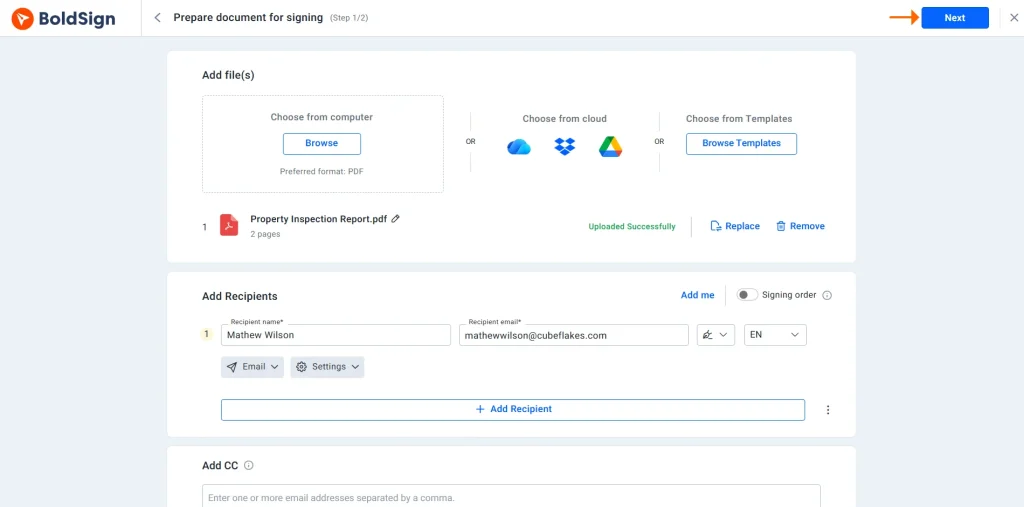
- Create a new document in BoldSign and upload the inspection report.
- Add recipients and proceed to the Configure Fields step.
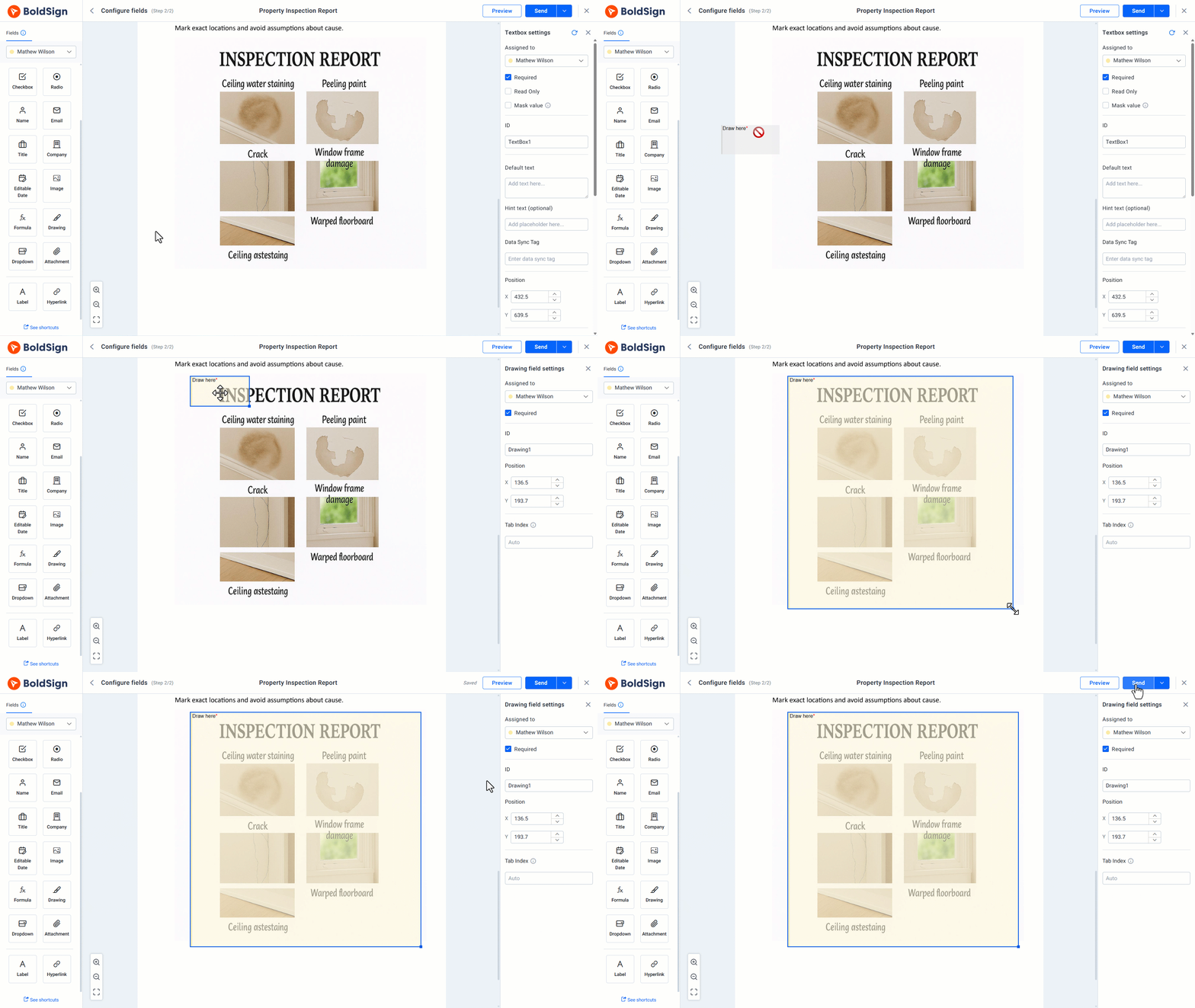
- Locate the Drawing Field in the fields panel.
- Drag the Drawing Form Field onto the relevant section (photo, diagram, etc.)
- Resize it for clear visibility (especially for mobile users)
- Assign it to the appropriate recipient
- Send the document.
Step-by-step: Mark an issue as the recipient
- Open the document from the email or BoldSign dashboard if you are an account holder.
- Click the drawing field to open the cropped drawing view.
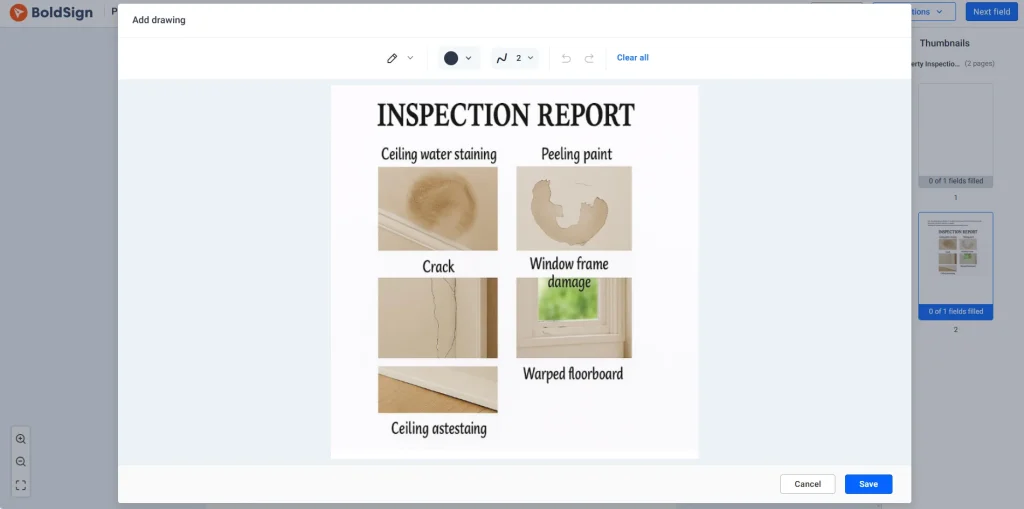
- Use drawing tools, colors, and stroke widths to mark the issue clearly. Thicker strokes help visibility on mobile.
- Select Save to apply the drawing or Cancel to discard it.
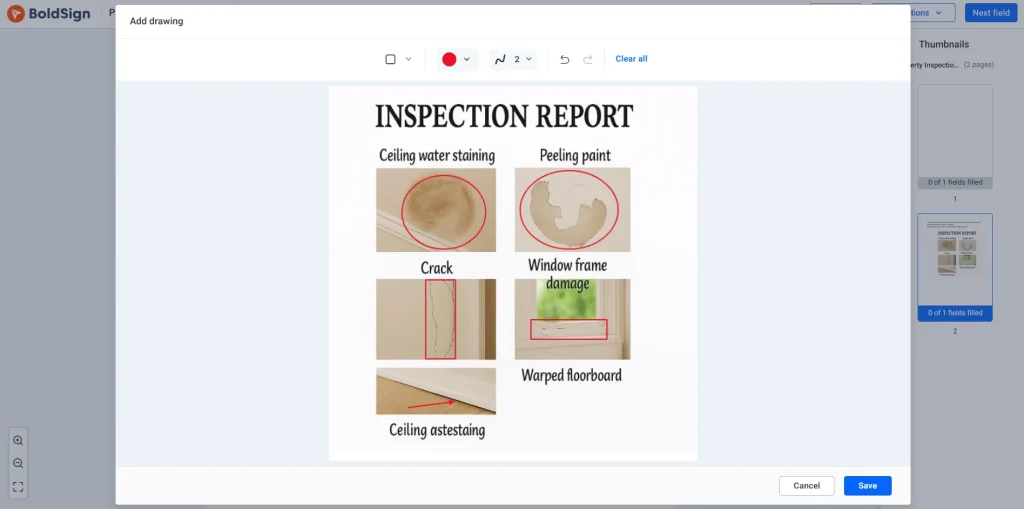
- Complete remaining required fields and finish signing.
What is captured in the final signed PDF
All visual markups are:
- Embedded in the final document
- Preserved exactly as drawn
- Visible to all signers and reviewers
This ensures the signed document reflects the agreed visual context.
The 5-step rule for every issue
To avoid confusion or disputes, follow this process:
Mark → Label → Assign → Route → Confirm
For each issue:
- Mark the exact location
- Label the issue clearly
- Assign responsibility (buyer, seller, landlord, contractor)
- Route it for action (quote, repair, inspection)
- Confirm what counts as resolved
Best practices for clear inspection reports
- Use consistent labels like Observed or Recommend evaluation
- Mark one issue per annotation
- Pair every visual mark with a written explanation
- Standardize terminology across reports
- Don’t rely on color alone, use labels or shapes
When not to rely on visual markups
Drawing markups are useful for observable issues, but they may not replace:
- Formal legal addendums
- Third-party engineering or environmental reports
- Situations where detailed documentation is required
Use markups for clarity, not as a substitute for formal documentation.
Practical use cases
- Homebuyer reviews: Focus repair discussions on high-impact items
- Move-in documentation: Capture existing damage clearly
- Facilities management: Standardize issue tracking across locations
- Landlord–tenant agreements: Align on condition without disputes
- Contractor scoping: Reduce ambiguity in pricing and execution
Conclusion
The Drawing Form Field lets recipients mark inspection issues directly on documents before signing. This reduces ambiguity, limits follow-up questions, and helps all parties review and sign with the same understanding of the property’s condition.
Ready to get started? Sign up for a free trial and start using the Drawing Form Field today. You can also schedule a demo to see it in action or contact support for assistance

Rayronald Ochola Otieno
Rayronald Ochola Otieno is a content specialist at BoldSign, specializing in video content and help articles within the eSignature domain. As a blog author, he creates well-researched, insightful content that simplifies complex eSignature topics like digital signatures, compliance, and workflow automation for businesses and professionals. With expertise in creating educational videos and articles, Ray helps users understand and adopt secure, efficient signing solutions. Beyond writing and video creation, Ray enjoys exploring new technologies, reading about the latest industry trends, and continually refining his skills.
More posts by Rayronald Ochola Otieno