TL;DR: BoldSign’s free PayPal QR code generator converts your PayPal.Me URL or username into a clean, scannable payment QR code within seconds. You can prefill an amount, customize colors and size, then download as PNG, JPEG, or SVG. No signup, no watermarks, no limits, and all processing happens in your browser for privacy.
A PayPal QR code lets customers open your PayPal payment page with one scan, which shortens checkout, reduces errors, and helps you collect money faster online or in person.
Whether you need a quick way to accept tips, sell at pop ups, speed up cafe lines, or add a buy option to your link in bio, this guide explains how PayPal QR codes work and how to use them for maximum conversion.
What is a PayPal QR code?
A PayPal QR code is a scannable code that opens your PayPal payment link when someone points a smartphone camera at it. You can link to:
- A PayPal.Me URL or PayPal username
- A payment link that includes a preset amount for faster checkout
- These options enable quick, error-free payments without typing
Why it matters: Fewer steps mean more complete payments and happier customers.
Why use a PayPal QR code?
A PayPal QR code makes taking payments faster, simpler, and more flexible across stores, events, and social channels.
Key benefits
- Instant payments: Customers scan and pay in seconds.
- Preset amounts: Add a fixed amount to reduce friction for tickets, set menus, or donations.
- Brand friendly: Adjust pattern color, background color, and size for print or screens.
- Private by design: Generation runs in your browser, so your payment details are not stored or tracked.
- Free and unlimited: No fees, no watermarks, no usage caps for personal or commercial use.
- Works everywhere: Use it on Windows, macOS, iOS, or Android without installing anything.
How to create a PayPal QR code for free
Creating your PayPal QR code takes less than a minute. Just follow these steps.
What you will need
- Your PayPal.Me link or PayPal username
- Any desktop or mobile browser
Step-by-step
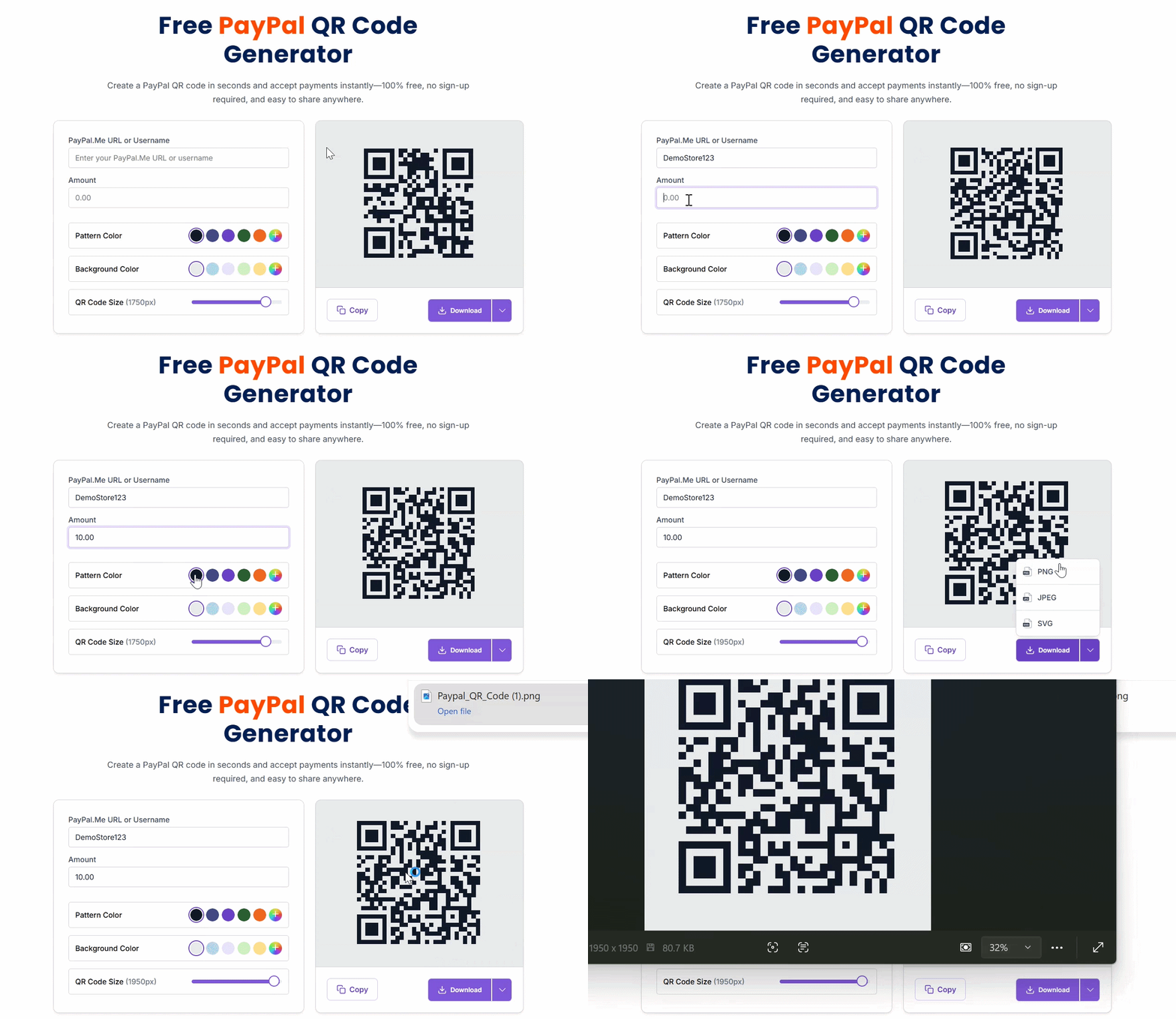
- Paste your PayPal link into BoldSign’s PayPal QR code generator. Your QR code appears instantly.
- Add an amount if you want a fixed price.
- Customize your QR code.
Adjust:- Pattern color
- Background color
- QR code size
- Download and share
Export your QR code as: PNG, JPEG, or SVG for digital or print use.
Why choose BoldSign’s PayPal QR code generator
BoldSign focuses on privacy, speed, and professional output.
- 100% free forever with no watermark and no limits
- Privacy first with all processing done in your browser
- Instant results with high-quality files ready for print or screens
- Any device support for quick creation on desktop or mobile
Best ways to use a PayPal QR code
Put your code where people are most likely to scan and pay.
- Retail checkout: Counter displays, window clings, and receipt footers
- Food trucks and cafes: Menus, table tents, and tip jars
- Pop ups and events: Banners, wristbands, and digital screens
- Local services: Invoices, estimate sheets, and vehicle decals
- Nonprofits and schools: Donation posters, program booklets, and signs at booths
- Creators and streamers: Livestream overlays, merch tags, and thank you cards
- Social and web: Link in bio, landing pages, and email signatures
Customize color and size for each placement, then export the right format for print or digital.
Conclusion
PayPal QR codes remove typing and speed up checkout, which boosts completed payments in stores, at events, and across social channels. BoldSign makes creation fast, private, and free so you can publish a polished payment QR in seconds.
Create your PayPal QR code now and start collecting payments faster.
Ready to simplify your document workflows? Sign up for a free 30-day trial or connect with our support team for a personalized demo.
Frequently asked questions
Is the PayPal QR code generator free to use?
Yes. It is completely free with no watermark and no usage limits.
What file formats can I download?
PNG, JPEG, and SVG are available for print and digital use.
Will BoldSign store my PayPal details?
No. Generation happens in your browser, and your details are not stored, tracked, or shared.

BoldSign Team
The official team behind BoldSign—the simple, secure eSignature solution trusted by businesses worldwide. Our platform helps individuals and teams create, sign, and manage documents effortlessly while maintaining full compliance. Experience BoldSign yourself with a free trial or request a personalized demo to see it in action.
More posts by BoldSign Team