Create a YouTube QR Code for Videos, Channels, and Playlists
TL;DR: BoldSign’s free tool instantly converts any YouTube video, playlist, or channel link into a clean, customizable QR code, perfect for presentations, posters, classrooms, product packaging, marketing campaigns, and growing your YouTube reach.
A YouTube QR code lets viewers watch your video immediately with just one scan. With BoldSign’s Free YouTube QR code generator, you can convert any YouTube link into a scannable QR code in seconds with no signup, no watermark, and unlimited downloads.
Whether you want to boost video views, simplify sharing in a presentation, engage customers using product demo videos, or make educational content more accessible, this guide explains how YouTube QR codes work and how to use them effectively.
What is a YouTube QR code?
A YouTube QR code is a scannable code that opens a YouTube destination when scanned with a smartphone camera. It can link to a:
- YouTube video
- YouTube channel
- YouTube playlist
Why it matters: It removes the friction of typing long URLs, searching for videos manually, or expecting viewers to remember your channel name.
Who should use a YouTube QR code?
YouTube QR codes are useful for:
- Content creators and influencers
- Marketers, advertisers, and brand agencies
- Teachers and trainers sharing video lessons
- Event organizers promoting highlight videos
- Businesses showcasing product demos
- Real estate agents sharing video tours
Why use a YouTube QR code?
A YouTube QR code makes video sharing faster, simpler, and more effective across both digital and physical channels.
Key benefits
- Instant viewing – Users scan and start watching in seconds
- Higher engagement – Great for flyers, posters, menus, packaging, and slides
- Better conversions – Easy for customers to access tutorials, demos, or explainers
- Perfect for offline sharing – No typing or searching needed
- Mobile friendly – Works with any camera app on modern smartphones
How to create a YouTube QR code for free
Creating your YouTube QR code takes less than a minute.
What you’ll need
- Your YouTube link
- Any browser on desktop or mobile
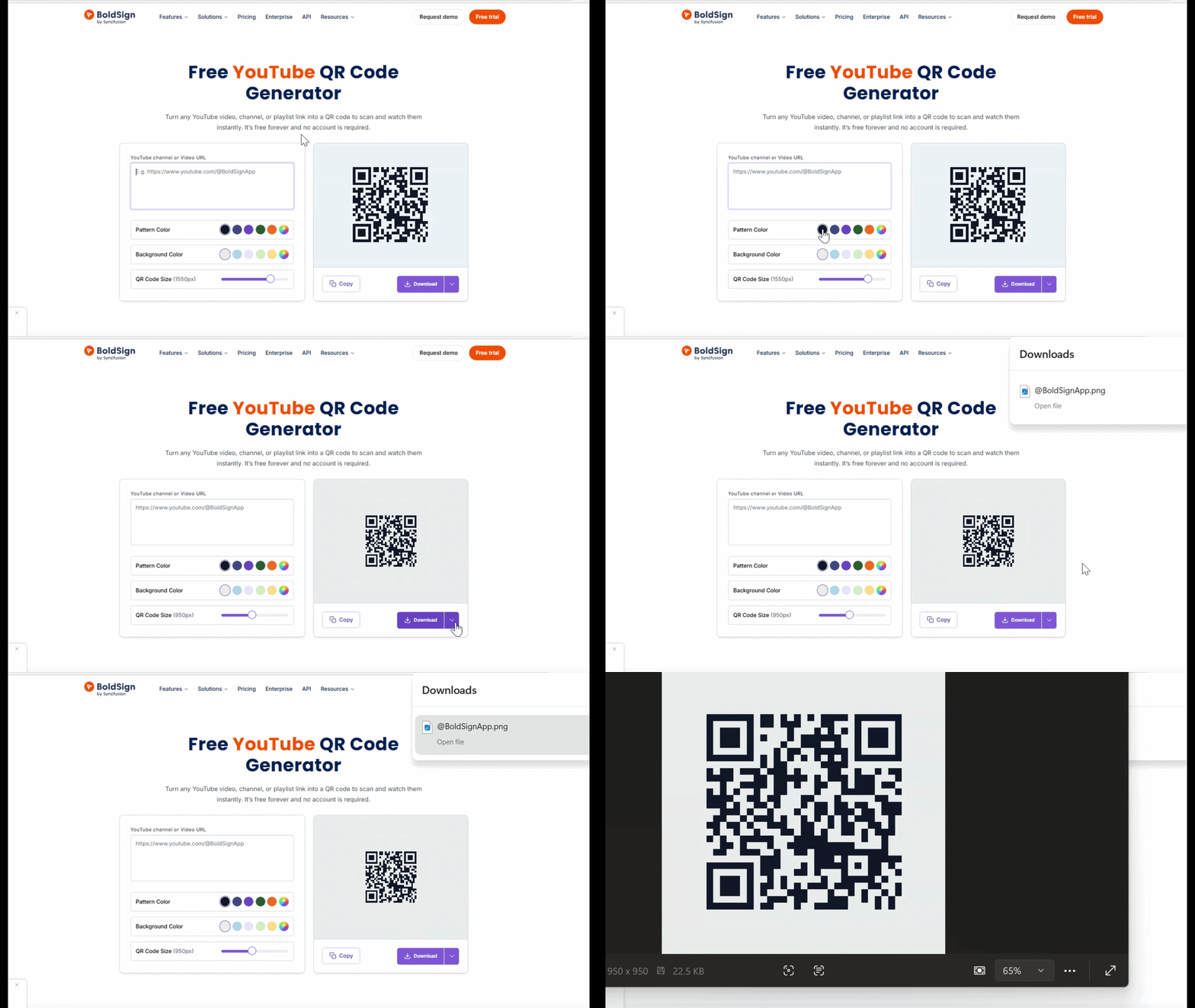
Step by step
1. Copy your YouTube URL
Use a link from your video, playlist, YouTube Shorts, or channel.
2. Paste it into BoldSign’s YouTube QR code generator
Your QR code will appear instantly.
3. Customize your QR code
Adjust styles such as:
- Pattern color
- Background color
- QR code size
4. Download and share
Export your QR code as:
- PNG
- JPEG
- SVG
Why choose BoldSign’s YouTube QR code generator
BoldSign’s tool is built for speed, privacy, and clean output.
- 100% free forever: No hidden charges, no watermarks, and unlimited QR codes
- Privacy first: Generate QR codes directly and securely in your browser.
- Instant results: Generate high-resolution QR codes in seconds
- Customizable: Change colors, patterns, and sizing easily
- Works on any device: Windows, macOS, Linux, iOS, and Android
Best ways to use a YouTube QR code
YouTube QR codes help you bring viewers directly to your content, no matter where they are.
Use them on:
- Presentations and events – Add QR codes to slides for instant viewing
- Posters and flyers – Drive views for promos, product launches, or tutorials
- Product packaging – Showcase setup videos, demos, or testimonials
- Menus and stores – Let customers view food videos or product walkthroughs
- Classrooms and training – Share lessons, instructions, or assignments
- Business cards – Link to your intro video or channel
Conclusion
A YouTube QR code helps people watch your content instantly by removing the steps that delay engagement. It improves visibility, boosts video views, and makes sharing effortless across both digital and print formats.
Create your YouTube QR code with BoldSign today and make your videos easier to access than ever.
Want to simplify your signing workflows? Sign up for a free 30-day trial or connect with our support team for a personalized demo.
Frequently asked questions
Can I create a YouTube QR code for Shorts?
Yes. Any YouTube Shorts link can be converted into a QR code, making it easy to promote vertical videos on print and digital channels. Just paste the Shorts URL into the generator.
Will my QR code open the YouTube app automatically?
If users have the YouTube app installed, most smartphones open the app directly after scanning. If not, the video will open in a browser but still load instantly.
Can I track how many people scanned my YouTube QR code?
BoldSign’s QR codes are static for privacy, so no tracking occurs.
Can I customize the design to match YouTube branding?
Yes. You can customize pattern color, background color, and size. Many users choose red, white, or black to match YouTube’s brand look.
Can I print the QR code on large banners or billboards?
Yes. Since the QR code can be downloaded as an SVG, it scales to any size without losing quality, making it suitable for posters, display stands, banners, and billboards.

BoldSign Team
The official team behind BoldSign—the simple, secure eSignature solution trusted by businesses worldwide. Our platform helps individuals and teams create, sign, and manage documents effortlessly while maintaining full compliance. Experience BoldSign yourself with a free trial or request a personalized demo to see it in action.
More posts by BoldSign Team