Free Text QR Code Generator – Create Custom QR Codes Online
 BoldSign Team 2 min read
 TL;DR: Create text QR Codes instantly for free with no sign up, no data storage, and full privacy. Customize your design, preview in real-time, and download high-quality QR Codes that work seamlessly across any device for quick and secure information sharing.
We are excited to introduce the BoldSign Text QR Code generator, a fast and secure tool that instantly converts plain text into a clean, scannable QR Code. Share notes, instructions, messages, announcements, labels, or any plain text content in seconds.
Turn your text into QR Codes that work on any device. Perfect for teachers, event organizers, businesses, product teams, support teams, and anyone who wants to share information quickly. No sign up, no fees, no complications. Simple, free, and ready to use anytime.
Why should you try this tool?
- 100% free, no hidden costs: Generate unlimited text QR Codes without paying anything. No watermarks or restrictions.
- No watermarks: Your QR Codes look clean and professional, ready for printing or sharing anywhere.
- No sign up needed: Start creating QR Codes immediately. No registration or account required.
- Your data stays private: Everything happens in your browser. Your text is never sent to a server or stored.
- Works on any device: Create QR Codes on your computer, tablet, or smartphone using any browser.
- Fast and effortless: Type or paste your text and download your QR Code instantly. No technical skills required.
Key features
- Browser-based privacy: Your privacy matters. The tool runs completely inside your browser, so none of your content is uploaded or saved.
- Simple and clean interface: A user-friendly design that lets you create and download QR Codes quickly. Perfect for beginners and professionals.
- Compatible everywhere: Works smoothly on Windows, Mac, Linux, iOS, and Android without installing software or apps.
- Customizable QR Codes: Adjust colors, patterns, background, and size to match your brand or creative style.
- Instant preview: See your QR Code in real time before downloading to make sure it looks perfect.
- Unlimited QR Code creation: Create as many text QR Codes as you want without limits.
- High-quality downloads: Download sharp, high-resolution QR Codes suitable for documents, posters, packaging, labels, and digital content.
How to get started
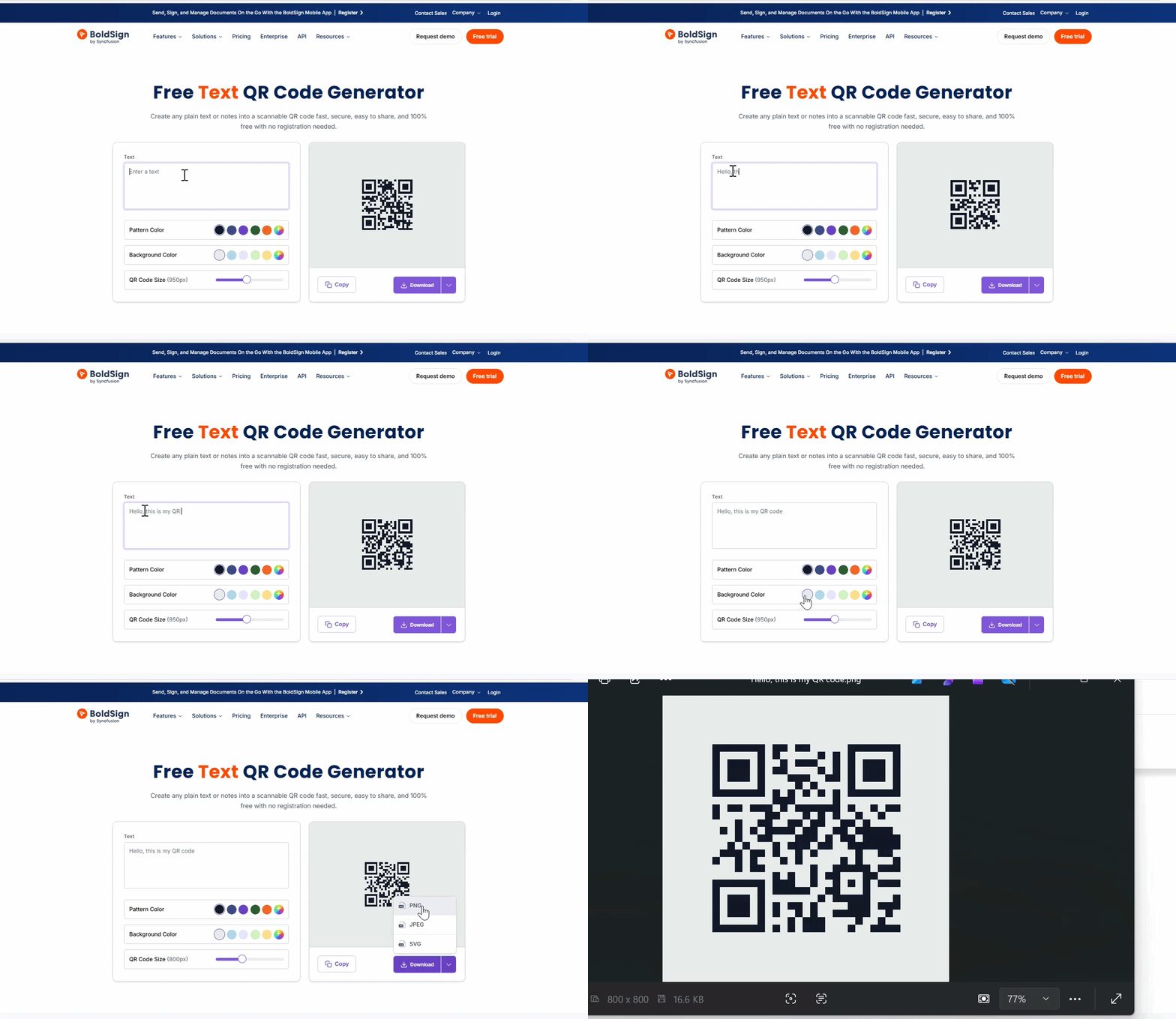
Creating your first text QR Code is simple. Just follow these steps:
- Visit the tool: Open the BoldSign Text QR Code generator.
- Add your text: Enter any text message, note, instruction, code, or information you want to share.
- Download your QR Code: Click Download and save your QR Code to your device. It is ready to print, share, or embed instantly.
Start creating text QR Codes today!
BoldSign’s Text QR Code generator lets you convert any text into a QR Code quickly, safely, and for free. It works on all devices, keeps your data private, and requires no sign up.
Ready to simplify your document workflows? Sign up for a free 30-day trial or connect with our support team for a personalized demo.
Frequently asked questions
When should I use a text QR Code instead of a link QR Code?
Use a text QR Code when the message itself is the destination. If you want users to open a website, landing page, app listing, or social profile, a link-based QR Code is the better fit. BoldSign offers both text and link-oriented QR options in its free tools set.
Can I customize the design of my text QR Code?
Yes. BoldSign’s text QR Code generator lets users adjust the pattern, color, background color, and QR Code size before download.
Which file format should I choose?
BoldSign supports PNG, SVG, and JPEG downloads. SVG is the best choice when you want the QR Code to stay sharp at different sizes, while PNG or JPEG works well for quick sharing in common digital workflows.
Can I print a text QR Code on flyers, packaging, or signs?
Yes. QR Codes are commonly used across printed materials, and BoldSign lets users download the code in formats suitable for print or digital use.
BoldSign Team
The official team behind BoldSign—the simple, secure eSignature solution trusted by businesses worldwide. Our platform helps individuals and teams create, sign, and manage documents effortlessly while maintaining full compliance. Experience BoldSign yourself with a free trial or request a personalized demo to see it in action.
More posts by BoldSign Team