TL;DR: BoldSign’s free Telegram QR Code Generator lets you instantly convert any Telegram link into a customizable QR Code with no signup, no limits, and full device compatibility, making sharing faster and easier.
We’re excited to introduce another smart addition to our free online tools collection, Telegram QR Code Generator, your new go-to solution for helping people reach your Telegram profile, channel, group, or bot instantly without searching or typing links.
We’ve all been there. You want someone to join your Telegram group, follow your channel, or message your bot, but long links get messy fast. Whether it is community growth, customer support, event onboarding, or promotions, you need a simpler way to share your Telegram presence. BoldSign now offers a faster, cleaner, and completely browser-based way to generate Telegram QR Codes in seconds.
What makes this tool special?
- No sign‑up, no installation: Open the tool in your browser and create your QR Code instantly.
- Private and secure: Your Telegram link is processed directly in your browser. We never store, track, or upload your data.
- No watermarks or limits: Generate unlimited QR Codes with no restrictions and no fees.
- Works on any device: Whether you’re on Windows, macOS, Linux, iOS, or Android, it works effortlessly.
- Simple customization: Adjust the pattern color, background color, and QR Code size for a branded look.
- Free forever: Suitable for businesses, creators, educators, and community managers with no license required.
How to create a Telegram QR Code using the BoldSign Telegram QR Code Generator?
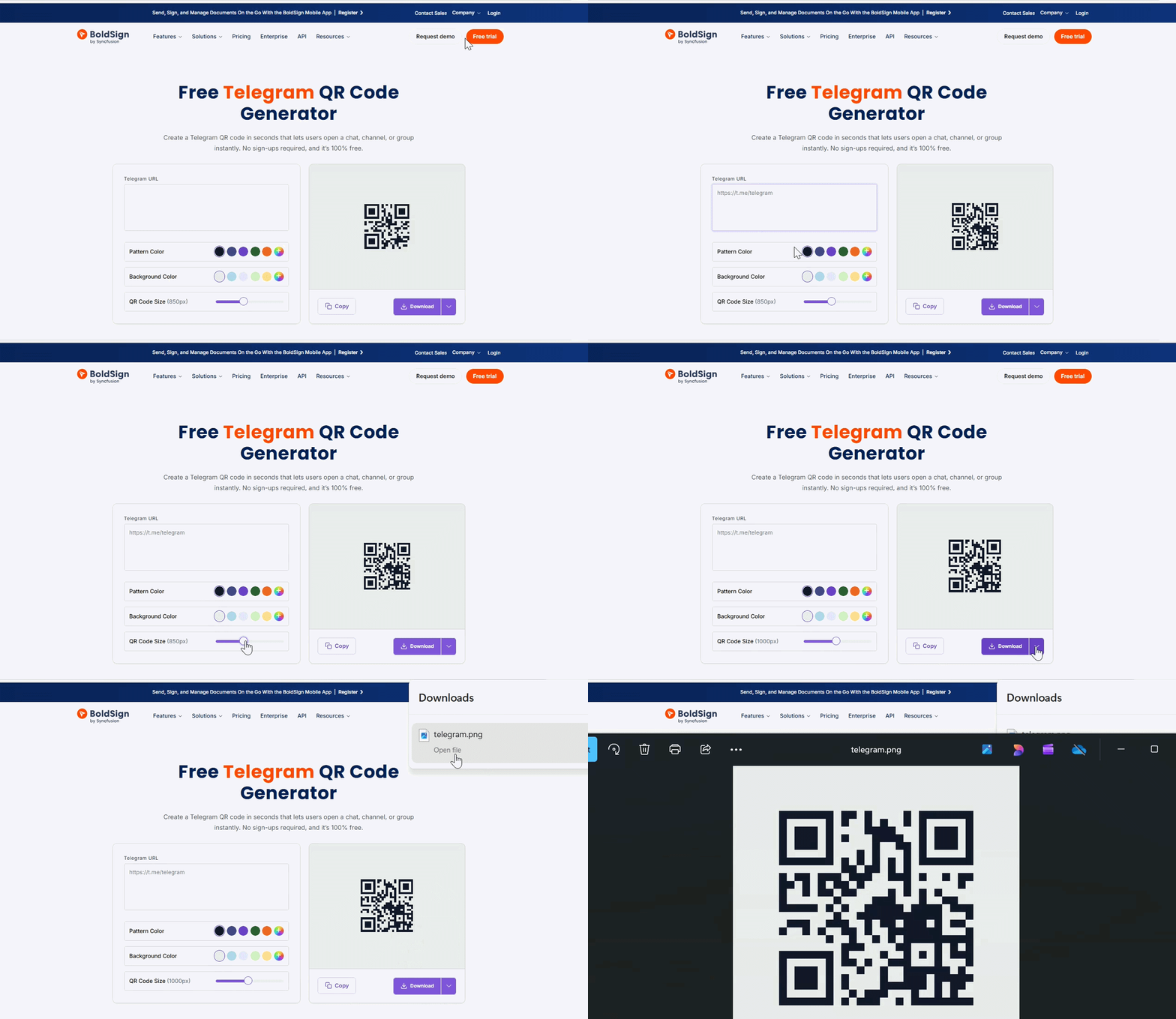
Creating a Telegram QR Code using our tool is incredibly simple. Just follow these steps:
- Visit the BoldSign Telegram QR Code Generator
- Add your Telegram link (profile, chat, channel, group, or bot)
- Customize your QR Code by adjusting the pattern color, background color, and size
- Click “Download” to save your QR Code as PNG, SVG, or JPEG in your preferred format.
Part of the BoldSign free tools collection
This tool joins our growing collection of free, browser-based utilities designed for creating and sharing QR codes with ease:
- Wi‑Fi QR Code Generator – Connect to Wi‑Fi instantly without typing passwords.
- Calendar Event QR Code Generator – Add events to calendars with one scan.
- vCard QR Code Generator – Share contact details quickly and professionally.
- Phone Number QR Code Generator – Let users dial you instantly.
- SMS QR Code Generator – Pre‑fill text messages for instant communication.
- Email QR Code Generator – Open email drafts with predefined recipients and subjects.
- WhatsApp QR Code Generator – Let users start a WhatsApp chat instantly.
Each one is designed to be simple, secure, and accessible, with no downloads, no sign-ups, and no limits.
Experience easy sharing!
Ready to try it out? Visit the Telegram QR Code Generator and create a scannable Telegram link in seconds. It is free, fast, and frustration-free.
If you’d like to explore more productivity and document tools, try BoldSign’s full-featured e‑signature platform with a free trial.
Need assistance? Schedule a personalized demo or contact our support team through our support portal.
Frequently asked questions
Will the Telegram QR Code keep the original link format?
Yes. The QR Code simply encodes your Telegram URL exactly as provided.
Is this tool browser-based?
Yes. All QR code generation happens directly in your browser, with no installation required.
Can I preview the QR Code before downloading it?
Yes. You’ll see a live preview that updates instantly as you customize.
Can I change my options before generating the final code?
Yes, you can modify colors and size at any time before downloading.
Will the downloaded QR Code use the same file name?
You’ll receive a clean, ready‑to‑use QR file with a standardized name.
Can I use this QR Code on print materials or social media?
Yes. The QR Code is high-resolution and works perfectly across digital and print formats.

BoldSign Team
The official team behind BoldSign—the simple, secure eSignature solution trusted by businesses worldwide. Our platform helps individuals and teams create, sign, and manage documents effortlessly while maintaining full compliance. Experience BoldSign yourself with a free trial or request a personalized demo to see it in action.
More posts by BoldSign Team