Free Email QR Code Generator for Ready‑to‑Use Email Drafts
TL;DR: BoldSign lets you create and share email details instantly using a free, browser‑based Email QR Code Generator. No signup, no cost, and complete privacy.
We are excited to introduce the free BoldSign Email QR Code Generator, a simple and secure tool that helps anyone share a complete email template, including email address, subject, and message, with a quick scan. Whether you’re a freelancer adding contact details to business cards, a professional sharing support information on brochures, or a small business placing QR codes on packaging, this tool makes communication effortless. There is no software to install, no account required, and no cost. Everything runs inside your browser, keeping your information private and helping you connect faster.
Why choose the free BoldSign Email QR Code Generator
Our email QR code generator is built for convenience, privacy, and professional results. It works entirely inside your browser, so your email information is never stored. It is perfect for professionals, creators, and businesses who want a quick way for people to reach their inbox.
Here are the main reasons for choosing our tool:
- Completely free: No sign up, no fees, and no restrictions. Create email QR codes online for free.
- Privacy first: All processing happens on your device. Your information is never saved or shared.
- Professional look: Generate clean and polished QR codes ideal for business cards, posters, menus, flyers, resumes, and printed materials.
- Works everywhere: Create email QR codes from your phone, tablet, or computer without installing anything.
- Fast and simple: Add your email address, subject, or message and generate a QR code in seconds.
Key features of the free Email QR Code Generator
Whether you’re sharing a support email or a personal contact address, these features make BoldSign your go‑to solution:
- Custom email details: Add your email address along with a subject and an optional predefined message so people can contact you instantly with the right context.
- High quality downloads: Download clear and print ready QR codes perfect for physical or digital use.
- Unlimited creation: Generate as many email QR codes as you need. There are no limits and no watermarks.
- Simple customization: Adjust the pattern color, background color, and QR code size to match your brand or design.
- Beginner friendly: No technical knowledge is needed. Enter your details and download them immediately.
How to create an email QR code in three simple steps
Getting started takes only a few clicks. Follow these three steps to create your first email QR code:
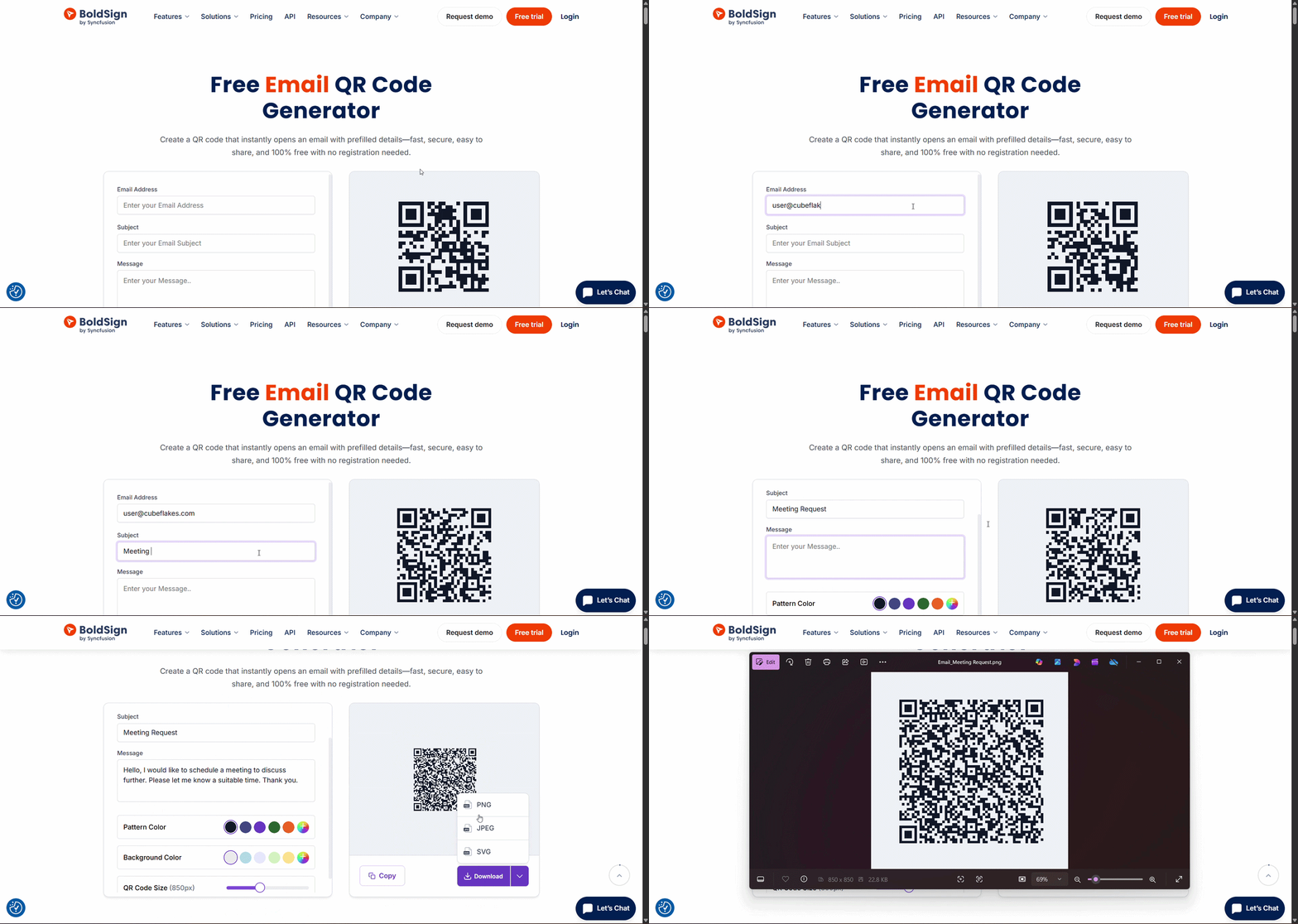
- Open the tool: Go to the free BoldSign Email QR Code Generator.
- Enter your information: Type your email address, subject line, and optional message. Customize the pattern color, background color, and QR code size as needed.
- Download your email QR Code: Save your QR code as PNG, SVG, or JPEG, and display it anywhere so guests can scan and connect instantly.
Start sharing your email smarter today
The free BoldSign Email QR Code Generator makes sharing your email address fast, simple, and accessible to everyone. Whether you are a freelancer, business owner, job seeker, or student, this tool helps people reach you instantly with a quick scan. There is no cost, no setup, and no technical skills required. Create your QR code in minutes and make communication easier than ever.
Ready to simplify your document workflows? Sign up for a free 30-day trial or connect with our support team for a personalized demo.

BoldSign Team
The official team behind BoldSign—the simple, secure eSignature solution trusted by businesses worldwide. Our platform helps individuals and teams create, sign, and manage documents effortlessly while maintaining full compliance. Experience BoldSign yourself with a free trial or request a personalized demo to see it in action.
More posts by BoldSign Team