TL;DR: BoldSign’s free tool lets you instantly turn any event details into a ready-to-scan Calendar Event QR code. Perfect for meetings, webinars, workshops, classes, conferences, and any situation where you want attendees to save the event in one tap without typing the date, time, or location manually.
A Calendar Event QR code lets anyone add your event to their device calendar instantly with a single scan. With BoldSign’s Free Calendar Event QR code generator, you can create a clean, customizable QR code in seconds with no sign-up, no watermark, and no limits.
Whether you are hosting an online meeting, organizing a training session, or managing large event registrations, this guide covers how Calendar Event QR codes work and how to use them effectively.
What is a Calendar Event QR code?
A Calendar Event QR code is a scannable code that opens an event card on the user’s device. It automatically preloads the event title, description, location, start date and time, and end date and time so the attendee can save it instantly.
You can link it to details for:
- Meetings and appointments
- Webinars and online sessions
- Classes and workshops
- Conferences and business events
- Product launches or promotions
Why it matters: It removes the friction of typing event details manually, preventing mistakes and saving attendees’ time.
Who should use a Calendar Event QR code?
This tool is ideal for:
- Event organizers and coordinators
- Businesses hosting sessions or demos
- Teachers, trainers, and coaches
- Community groups and clubs
- Marketers promoting scheduled activities
- Teams managing internal meetings
Why use a Calendar Event QR code?
A Calendar Event QR code makes event attendance easier and increases participation by simplifying the save to calendar step.
Key benefits
- Instant event saving – One scan adds the full event to the user’s calendar
- Higher attendance – No missed times or forgotten dates
- Better user experience – No typing, no copying, no manual entry
- Professional touch – Great for posters, invites, emails, badges, and registration pages
- Universal support – Works on all major calendar apps including Google Calendar and Apple Calendar
How to create a Calendar Event QR code for free
Creating your event QR code takes less than a minute. Just follow these simple steps:
What you will need
- Event Title
- Start and end date
- Event time
- Location
- Optional description
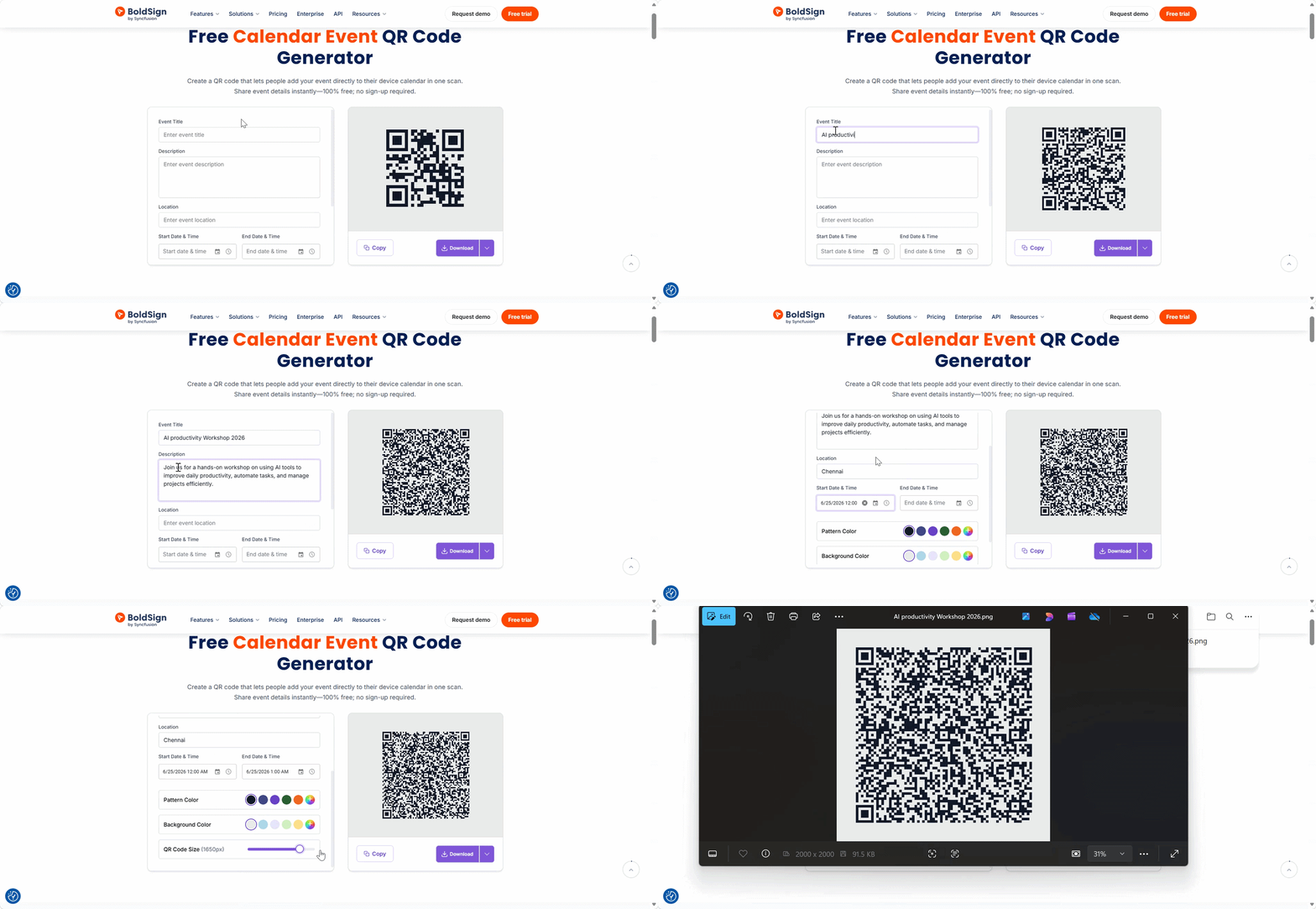
Step by step
1. Enter your event details
Fill in the title, date, time, and location.
2. Customize your QR code
Adjust:
- Pattern color
- Background color
- QR code size
3. Download and share
Export your QR code as:
- PNG
- JPEG
- SVG
You can print it or share it digitally anywhere.
Why choose BoldSign’s Calendar Event QR code generator
BoldSign’s tool is built for speed, privacy, and reliability.
- 100% free forever – No hidden fees and no watermarks
- Privacy first – All event details stay on your browser
- Instant results – Generate clean, high quality QR codes in seconds
- No limits – Create unlimited event QR codes for any purpose
- Works everywhere – Use it on Windows, macOS, iOS, Android, and Linux
Best ways to use a Calendar Event QR code
Calendar Event QR codes help people save your event instantly across both digital and print channels. Here are some of the most effective ways to use them:
- Event posters and flyers – Make it easy for attendees to save the event while viewing printed materials.
- Email invitations – Give recipients a one tap way to add the event to their calendar.
- Registration pages – Let users save the event right after they sign up.
- Business cards or staff badges – Perfect for conferences where quick access to event details matters.
- Presentation slides – Share your event link during talks, workshops, or demos to boost participation.
- Conference booths – Display a scannable code for visitors to save schedules or session timings instantly.
- Social media images and announcements – Promote your event online with a QR code that drives instant calendar saves.
Conclusion
A Calendar Event QR code helps people save your event instantly with a simple scan. It removes the risk of incorrect details, improves attendance, and makes scheduling effortless across both print and digital channels.
Create your Calendar Event QR code with BoldSign today and make it easier for attendees to join you on time, every time.
Want to simplify document signing too? Sign up for a free 30-day trial or connect with our support team for a personalized demo.
Frequently asked questions
Where should I place a Calendar Event QR code for better attendance?
Place the QR code on event posters, email invitations, registration pages, presentation slides, badges, brochures, and social media graphics where attendees can easily scan and save the event.
Can I use a Calendar Event QR code for online meetings or webinars?
Yes. You can include the webinar title, meeting time, description, and meeting link in the event details so attendees can save the session to their calendar and join on time.
What should I check before sharing a Calendar Event QR code?
Before sharing, scan the QR code on different devices, confirm the event title, date, time, time zone, location, and description are correct, and make sure the QR code is clear enough for printing.
How can Calendar Event QR codes improve event participation?
Calendar Event QR codes make it easier for attendees to save event details instantly. This reduces manual entry errors, reminders become more reliable, and attendees are less likely to miss the event.

BoldSign Team
The official team behind BoldSign—the simple, secure eSignature solution trusted by businesses worldwide. Our platform helps individuals and teams create, sign, and manage documents effortlessly while maintaining full compliance. Experience BoldSign yourself with a free trial or request a personalized demo to see it in action.
More posts by BoldSign Team