
Introducing BoldSign’s Free Organize PDF Tool
We’re excited to introduce Organize PDF Pages, the newest addition to our free online PDF toolkit, making it easier than ever to rearrange, rotate, or remove pages effortlessly and securely.
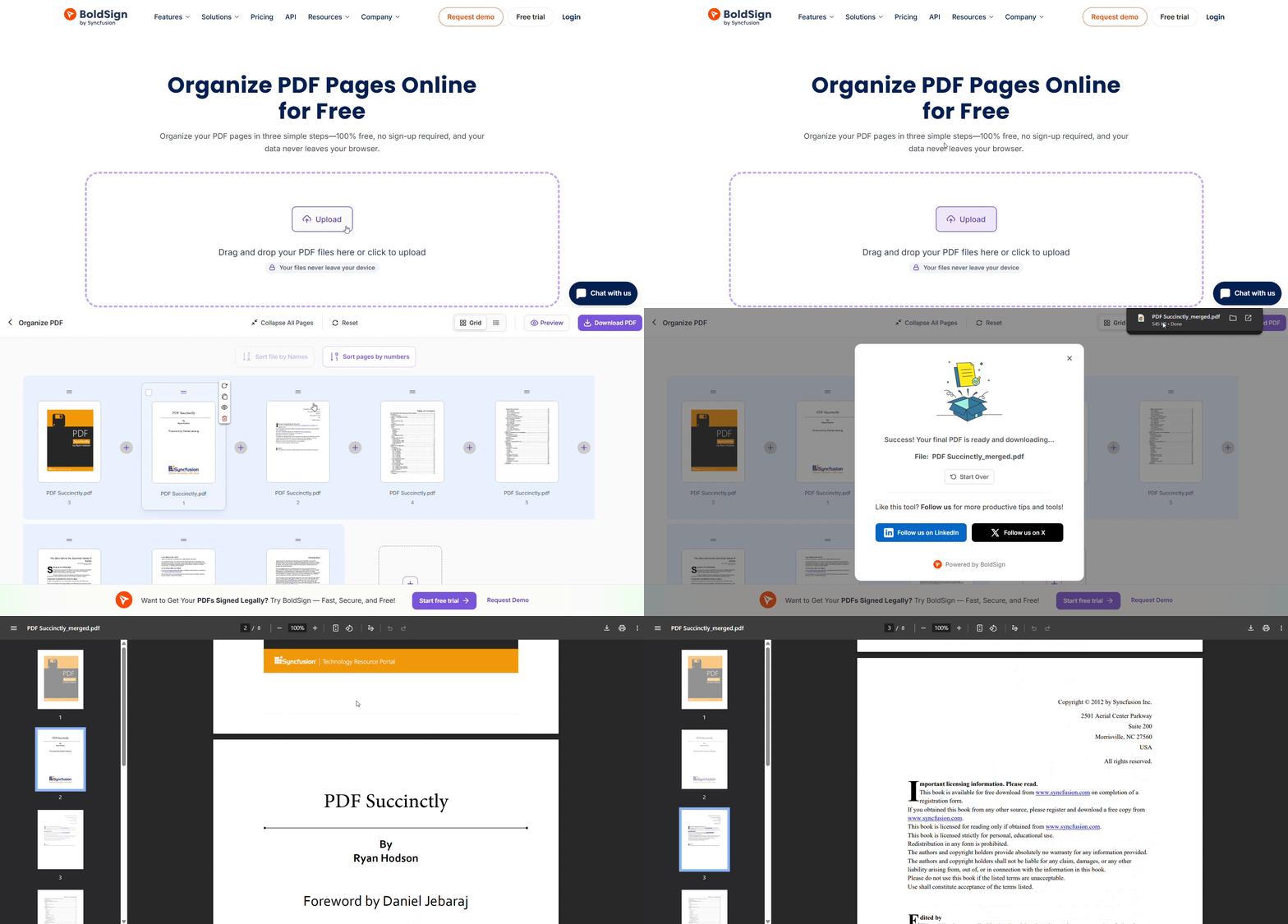
Whether you’re preparing a report, cleaning up a scanned document, or just tidying up a presentation, organizing PDF pages shouldn’t be a chore. With BoldSign, it’s now refreshingly simple.
Why does this tool stand out
- No sign-up, no installation: Just open the tool in your browser and start organizing.
- Private and secure: Your files stay on your device. No uploads, no risks.
- No watermarks or limits: Organize as many pages as you want, whenever you need.
- Works on any device: Phone, tablet, or desktop, it’s optimized for all.
- Completely free: No hidden fees, no subscriptions.
Things you can do with this tool
-
Rearrange PDF pages
- Perfect for fixing misaligned documents or creating a logical flow.
- Drag and drop pages to reorder them in any sequence you want.
-
Rotate PDF pages
- Rotate individual pages in your PDF with ease.
- Ideal for correcting scanned pages that appear sideways.
-
Delete PDF pages
- Remove unwanted or blank pages from your PDF.
- Helps clean up documents before sharing or printing.
-
Combine actions
- Rearrange, rotate, and delete pages in one go—no need for multiple tools.
How does it work?
Using the tool is as easy as 1-2-3:
- Upload your PDF: Drag and drop your file or select it from your device.
- Organize your pages: Rearrange, rotate, or delete pages with a simple drag-and-drop interface.
- Download your result: Save your newly organized PDF instantly.
Part of the BoldSign free PDF tools collection
This tool joins our growing suite of browser-based PDF utilities:
- Merge PDFs Online
- Rotate PDFs Online
- Delete PDF Pages
- Split PDFs Online
- Add Blank Pages to PDFs
- Extract PDF Pages
- Add Watermark to PDF
Each tool is designed to be fast, secure, and user-friendly—no downloads, no sign-ups, no hassle.
Experience effortless organization!
Ready to tidy up your PDFs? Head over to the organize PDF pages tool and enjoy the easiest way to rearrange, rotate, or remove pages—free, fast, and frustration-free.
Want to streamline your document workflows even further? Try a free BoldSign trial and explore our full-featured e-signature platform.
Frequently asked questions
Is my PDF secure when I organize PDF pages online?
Your PDF is completely secure. All files remain on your device and are never uploaded to any server, ensuring full privacy and protection.
Can I delete or rotate pages while organizing my PDF?
Yes, you can delete or rotate PDF pages using the organize PDF pages tool.
Can I rearrange PDF pages without installing software?
Yes! You can rearrange PDF pages online directly in your browser—no downloads needed.
Is there a limit on the number of pages I can organize?
There is no strict limit, but for optimal performance, we recommend uploading fewer than 50 files at a time.
Does the tool add watermarks to my PDF?
No watermarks are added. Your PDF remains clean and professional.

Sivasankaranarayanan Dharmalingam
Sivasankaranarayanan is a Software Developer at Syncfusion, specializing in building high-performance web applications using modern frameworks like .NET, Vue.js, and React. With a strong passion for exploring emerging technologies, he consistently strives to deliver user-centric, scalable, and efficient solutions. His expertise spans both frontend and backend development, enabling him to craft seamless digital experiences. Connect with him on LinkedIn.
More posts by Sivasankaranarayanan Dharmalingam