Delete unwanted PDF pages online for free in seconds
We’re excited to launch the BoldSign Delete PDF Pages Online tool. A fast, secure, and user-friendly solution for removing unwanted pages from PDF files.
PDFs often have extra pages you don’t need, like blank sheets or outdated info. With our Delete PDF Pages Tool, you can easily delete pages from pdf in a few clicks to keep only what you want. Perfect for students, professionals, or anyone with PDFs. Delete unwanted pages easily—no sign-up, no cost, no hassle!
Why should you try this tool?
- 100% Free, No Hidden Costs: Delete pages from your PDFs without paying a dime—no watermarks, no limits.
- No Watermarks: The edited PDFs are clean, professional, and free of watermarks, leaving your documents ready for sharing or printing.
- No Sign-Up Required: Jump right in, upload, delete, and download PDFs without creating an account.
- Your Files Stay Private: Everything happens in your browser, so your PDFs are never sent to a server or stored.
- Works on Any Device: Use it on your phone, tablet, or computer—Windows, Mac, Linux, iOS, or Android—no downloads needed.
- Quick and Easy: Remove pages from PDF online through an intuitive interface with just a single click.
Key Features
- Unmatched Security: Your privacy is our priority. The page deletion process happens entirely in your browser, meaning your files are never uploaded to a server or stored, for 100% security and confidentiality.
- Super Simple to Use: Enjoy a clean, intuitive interface with drag-and-drop functionality. Upload your PDF, delete unwanted pages and download your files with one click, no tech skills needed.
- Cross-Platform Compatibility: The tool works flawlessly on Windows, Mac, Linux, iOS, and Android through any modern web browser, with no need for software downloads or installations.
- Flexible Page Deletion: Delete individual pages or multiple pages at once with a simple selection process.
- Preview Functionality: Preview your PDF after deleting pages to ensure the final document meets your expectations, making it easier to avoid mistakes.
- Reset Functionality: Reset all files with a single click. You can start over without re-uploading your PDF.
- Unlimited Deletion: Delete pages from PDFs as many times as needed, with no limits on files or pages. For best performance, process up to 50 files at once, each under 250 MB.
- Instant PDF Downloads: Save your edited PDF as a high-quality file, ready to share, email, or print.
How to Get Started
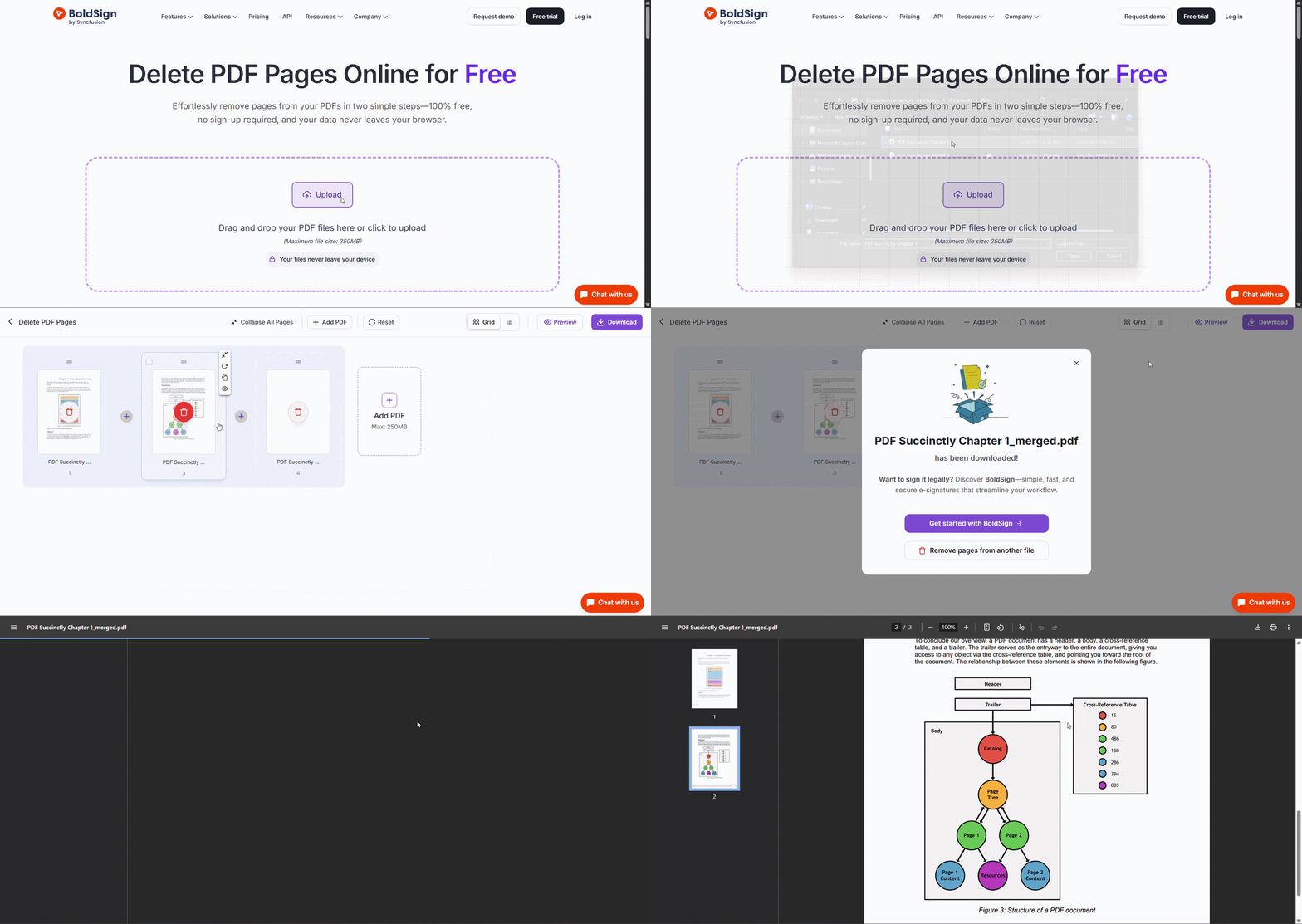
It’s super easy to use, just follow these three simple steps to delete PDF pages online:
- Visit the Tool: Go to Delete PDF Pages Tool.
- Upload and Delete Pages: Upload your PDF files and delete unwanted pages.
- Download Your PDF: Click Download to save your edited PDF to your device.
Clean Up Your PDFs in Seconds!
BoldSign’s Delete PDF Pages Online for Free Tool allows you to delete pdf pages online free, quickly, safely, and with no sign-up required. It works on any device, keeping your files private and secure.
Want to Get Your PDFs Signed Legally? Use BoldSign e-signature solution to add secure, legally binding signatures, with a clear record of who signed and when.
Frequently asked questions
What is the easiest way to delete pages in a PDF?
Upload your PDF to BoldSign’s Delete PDF Pages tool, remove the pages you don’t want, and download the updated file. You don’t need to install anything or create an account, just use your browser.
Can I delete PDF pages on my phone?
Yes. Open BoldSign’s Delete PDF Pages tool in your phone’s browser, upload the PDF, choose the pages to remove, and download the new file. No app or account is required.
Can I remove multiple pages from a PDF at once?
Yes. In BoldSign’s Delete PDF Pages tool, upload your PDF, select all the pages you want to remove, and delete them at once. Then download the updated PDF immediately. No install or sign-up is needed.

Sivasankaranarayanan Dharmalingam
Sivasankaranarayanan is a Software Developer at Syncfusion, specializing in building high-performance web applications using modern frameworks like .NET, Vue.js, and React. With a strong passion for exploring emerging technologies, he consistently strives to deliver user-centric, scalable, and efficient solutions. His expertise spans both frontend and backend development, enabling him to craft seamless digital experiences. Connect with him on LinkedIn.
More posts by Sivasankaranarayanan Dharmalingam