Unsigned Change Orders Are Unpaid Work: What the Gap Costs
 Meikanda Nayanar 8 min read
 TL;DR: An unsigned change order can lead to unpaid work, project delays, and disputes. BoldSign for Construction helps contractors get change orders approved and signed electronically before work starts.
On most construction projects, the conversation happens before the paperwork. A homeowner asks for an extra window, a project manager approves a design adjustment, or unexpected site conditions require additional work. The crew moves forward because the schedule cannot wait.
The problem is that the documentation often lags behind the decision. Work begins, materials are ordered, and costs accumulate while the change order remains unsigned or has not been created at all. What felt like a straightforward agreement on site can become a payment dispute weeks later when the final invoice arrives.
An unsigned change order creates risk for everyone involved. Contractors can be left chasing payment for work already completed, while clients may face charges they never approved in writing. The longer the gap between agreement and signature, the greater the chance of delays, confusion, and disputes.
This article explains what an unsigned change order really costs, why these gaps happen so often on construction projects, and how electronic signatures can help contractors get approvals in place before work begins.
Key takeaway
- An unsigned change order removes the clearest record of what was agreed: without a signed record of the new scope and price, the contractor risks going unpaid and the client risks an unexplained charge on the final invoice.
- The cost shows up in three places: unpaid work, a stalled schedule while approval sits in an inbox, and, at the expensive end, a formal dispute.
- The fix is speed, not more paperwork discipline: a pre-approved template plus electronic signing gets a change order signed the same day the change is agreed.
- An electronically signed change order is legally binding under the US ESIGN Act and UETA and recognized under the EU eIDAS Regulation, with a tamper-evident seal and an independent timestamped audit trail.
What is a change order, and what does unsigned mean?
A change order is the short document that updates a construction contract when the job changes. It records what is different, what it now costs, and how the finish date moves. Once both sides sign it, it becomes part of the contract. There is a full beginner explanation in What Is a Change Order and How an AI Agent Gets One Signed in Minutes.
Unsigned means the work was agreed in conversation and started, but nobody completed that document. The client said yes on the phone on Tuesday, the crew is already cutting, and the paperwork is somewhere behind the work.
That gap is not usually a discipline problem. It is a speed problem, and it can lead to unpaid work, project delays, and disputes.
What does a change order need to include?
Before looking at what goes wrong, it helps to know what a complete one contains. Whatever form your contract uses, it has to answer these questions.
- Which project and which contract? The job it amends, so the change order attaches to the right agreement.
- What is actually different? The changed scope in plain description, not a line reference to a drawing nobody has open.
- What does it cost? The price for the change, and the new contract total.
- How does the date move? Added days, and the revised completion date. A change order that adjusts cost but not schedule creates the next dispute.
- Who has to approve it? Every party whose signature the original contract requires.
- When was it agreed? The date the change was approved, which becomes important if the work or payment is later questioned.
If the change adds time to the project, record it in the change order. Otherwise, extra work can make it look like the project missed its original deadline.
What happens when a change order goes unsigned?
One: the work goes unpaid. A verbal go-ahead feels binding on a Tuesday afternoon. Six weeks later, when the invoice lands and memories differ, it often is not. Work performed without a signed change order can be denied payment, and the contractor is left with two options: absorb the cost, or start a formal dispute.
Two: the schedule stalls. Crews stand idle while a PDF sits unopened in an inbox, and standing crews are paid crews. The delay is not caused by the changed work itself. It is caused by waiting for approval of the changed work, which creates a separate cost that nobody quotes for.
Three: it becomes a dispute. This is the expensive end of the problem. No signed document means no clear record of what was agreed, and without that record a simple disagreement can turn into months of back-and-forth, with the contractor carrying the cost of work already done in the meantime.
It is worth adding that the unsigned change order is bad for the client too. Without it, the new price is not fixed anywhere in writing, which is exactly how a surprise line item appears on a final invoice.
Why signing is slower than agreeing
The reason is visible in a normal week. Agree on Tuesday. Draft on Wednesday, because someone has to open the last one and copy its format. Email on Thursday. Opened the following Monday, on a phone, as an attachment that will not display properly. Printed, signed, photographed, and sent back whenever. Work started somewhere in the middle of all that, because the crew was already on site.
That leaves two poor options. Tell crews to stop until the signature arrives, which asks the contractor to choose between the schedule and the paperwork, and on a real site the schedule wins every time. Or carry on and accept the exposure, which is the choice almost everyone actually makes.
So the fix is not more paperwork discipline. It is making the signature nearly as fast as the verbal yes, because that is the only version that survives site pressure.
How to get a change order signed the same day
This assumes you already have a BoldSign account and a pre-approved change order template. If you’re still setting up your process, Construction Contract Basics: What Every Project Agreement Should Include covers how to define your change order process, including what qualifies as a change and who has to approve it.
Four things collapse that week into one conversation.
- The change order is a template, not something someone drafts from scratch. Scope details, cost lines, and schedule impacts can be filled into a pre-approved form in minutes.
- It goes out electronically the moment the change is agreed, and the client signs from a phone. Electronically signed change orders are legally binding under the US ESIGN Act and UETA and recognized under the EU eIDAS Regulation, with a timestamped audit trail that records when the client approved the work before anyone has to ask.
- Reminders go out automatically. Contractors no longer have to remember to follow up on unsigned change orders.
- The send step lives in the conversation. An AI assistant such as Claude, connected to BoldSign through the BoldSign MCP server, can fill and send your approved template on your behalf. Sending a change order becomes as simple as typing, “Send the Hendersons a change order for the rot repair.” The agent prepares the document and sends it for signature, while the client completes their side from their own inbox.
The result is one conversation instead of a week. The change is agreed, the template is filled, the summary is confirmed, the request is sent, the client signs the same day, and the crew starts work with the approved document already in hand.
If your business runs 20 jobs a year with four change orders each, that is 80 documents a year where a signature is either in place before the work starts or missing when the invoice is questioned. Contractors have a clear path to payment, and clients have a clear record of what they approved.
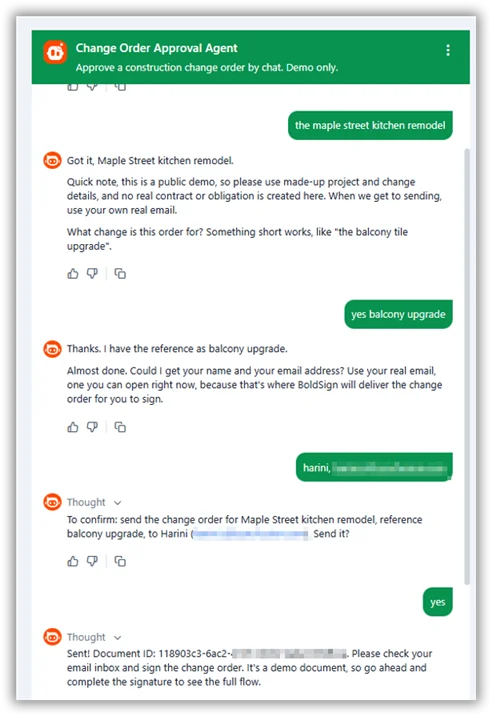
Change order approval agent conversation
We built a live demo of exactly that flow. Try the Change Order Approval Agent, read how to build one for your own business, or see the no-code version using Claude Desktop. The documents and amounts in the demo are fictional.
Does an electronically signed change order hold up later?
Speed is only useful if the record survives being questioned. Three things make sure it does.
- An altered line item gives itself away. If the agreed price or scope is changed after signing, the cryptographic, tamper-evident seal breaks, and any PDF reader that validates digital signatures flags the file as modified. The version both sides signed stays the version of record.
- The approval date is not a memory test. Sent, viewed, and signed each carry their own timestamp. So the question that starts most payment disputes, when did the client actually approve this, is already answered before anyone has to argue about it.
- The signature holds as evidence. Electronic signatures are enforceable under the US ESIGN Act and UETA and recognized under the EU eIDAS Regulation. If a change order ever has to be proven, this guide to producing electronic signature evidence for litigation or arbitration covers what a court or an arbitrator will ask for.
Change orders sit alongside work orders, subcontractor agreements, lien waivers, and closeout forms in the construction document set, and the same MCP server behind this agent also runs AI eSignature agents for leases, claims, and patient intake.
See eSignature for construction, covering change orders, work orders, subcontractor agreements, lien waivers, and closeout.
Close the signature gap before the crew starts work
Every unsigned change order is a bet that the client will remember what was agreed and pay for it anyway. A locked template and a same-day electronic signature turn that bet into a signed record before work begins.
Start your BoldSign free trial to build your first change order template and stop chasing signatures after the fact.
Frequently asked questions
What happens if work is done without a signed change order?
The contractor may not be paid for it. Without a signed document the extra work has no agreement behind it, so recovering the money means proving something that was never written down. Sometimes that succeeds, but it is a fight rather than an invoice.
What does a change order need to include?
The contract it amends, a plain description of the changed scope, the cost and the new contract total, the added days and revised completion date, the approvals your contract requires, and the date it was agreed.
What is the difference between a change order and a change order request?
A request proposes the change and its price. A change order is the signed version that amends the contract. Work carried out on an unsigned request is the exposure this post is about.
What is the fastest way to get a change order signed?
Send it electronically the moment the change is agreed, so the client can sign from a phone. Electronic signatures on change orders are legally binding under the ESIGN Act and UETA, and an AI agent can prepare and send the document from a template in the same conversation where the change was discussed.
Who has to sign a change order?
Everyone whose approval the original contract requires. On a residential job that is usually the homeowner and the contractor. On larger work it can also include an architect, an engineer, or a lender.
Is an electronically signed change order legally binding?
Yes. Electronic signatures are enforceable in the United States under the ESIGN Act and UETA and recognized in the European Union under the eIDAS Regulation, and the completed file carries a tamper-evident seal with independent timestamps.
Does the change order agent sign the change order?
No. The change order agent does not sign documents on behalf of your client. It prepares the change order using your approved template and sends it for signature. Your client reviews and signs the document themselves from their own inbox, with the same consent process, audit trail, and legal safeguards as any other electronic signature request.
Should a client ever agree to extra work without a change order?
No. Without one, the new price is not fixed in writing anywhere, which is how an unexpected line item ends up on the final invoice. Asking for it in writing protects the client as much as the contractor.
Meikanda Nayanar
A veteran product manager at BoldSign, boasting a decade-long journey as a .NET developer. With a rich history of leading product development across diverse technologies like Windows Forms, WPF, UWP, Xamarin.Forms, Flutter, and MAUI, Meikandan brings a unique blend of technical expertise and strategic insight to the table. Connect with him on LinkedIn.
More posts by Meikanda Nayanar