TL;DR: An NDA sets the rules for handling confidential information before anyone gains access to it. Use a unilateral NDA when only one side discloses, and a mutual NDA when both do. What decides whether it holds up is the definition of confidential information, the exclusions, the permitted use, and the term. In the United States, an NDA signed electronically carries the same legal weight as one signed on paper, as long as both parties agreed to sign that way.
You’re about to give someone access to something that matters: product plans, a client list, financials, source code, or a prototype nobody has announced yet. Maybe it’s a new hire on day one, maybe it’s an investor you met last week. Either way, once that information is out of your hands you can’t fully take it back.
A non-disclosure agreement is the contract that sets the terms first. It defines what counts as confidential information, what the receiving party may do with it, and how long those obligations last.
Creating one rarely means drafting from a blank page. In practice it means choosing the right type, getting a handful of clauses right, starting from a template you trust, and knowing how to sign an NDA online instead of chasing a scanned copy for a week. This guide covers each of those, in that order.
Key takeaways
- The NDA type follows the direction of disclosure: unilateral for one-way sharing, mutual when both sides open up.
- Weak NDAs usually fail on a vague definition of confidential information or a missing term, not on length.
- Electronic NDAs carry the same legal effect as paper ones under the ESIGN Act and UETA when both parties agree to transact electronically.
- Match signer authentication to what’s actually being disclosed, because every extra verification step is another place a signer stalls.
When your business needs an NDA
The trigger isn’t whether someone works for you. It’s whether they’re about to gain access to information they have no existing duty to protect.
That splits into two situations. The first is people joining the business, where the NDA is usually signed as part of onboarding and does most of its work later:
- New employees who will access internal systems, code, financials, or customer data
- Contractors and freelancers with temporary access to the same material
The second is parties outside the business, where the NDA goes in front of the conversation:
- Investors reviewing unreleased financial information
- Partners discussing products, roadmaps, or shared customers
- Vendors receiving specifications before a contract is in place
- Agencies and consultants handling client material on your behalf
The distinction matters when you draft. For an outside party, the question is mostly what they may do with the information during a defined evaluation. For an employee or contractor, access is continuous and the largest exposure often comes after they leave, which is why the term, the trade secret carve-out, and the return-or-destroy clause carry more weight in that version.
Mutual NDA vs. unilateral NDA
The right type depends entirely on who is sharing information.
| Unilateral NDA | Mutual NDA | |
| Who discloses | One party only | Both parties |
| Who carries obligations | The receiving party | Both parties |
| Common use | Employee NDA, contractor NDA, vendor evaluation, investor NDA where only you disclose | Partnership and reseller talks, joint product work, M&A discussions |
Sending a unilateral NDA when the other side also plans to share is one of the most common causes of redlines and a stalled signature. If both teams expect to open the hood, start with a mutual NDA and save the round trip.
The clauses that decide whether an NDA holds up
A short NDA is not automatically a weak one, but it does need these elements regardless of length:
- Parties: The legal names of the disclosing party and receiving party, not company nicknames.
- Definition of confidential information: What counts, described specifically enough that a court could apply it. “All information” is not a definition.
- Exclusions: What the agreement doesn’t cover, such as information the receiving party already knew, information that becomes public without their fault, or information they develop independently.
- Permitted use: The use limitation that says what the receiving party may do with the information, usually restricted to evaluating a specific deal or project.
- Term: How long confidentiality lasts. Some obligations, such as protecting trade secrets, may need to survive the agreement itself.
- Return or destroy: What happens to materials and copies once the relationship ends.
- Remedies and governing law: What happens if the agreement is breached, including whether the disclosing party can seek injunctive relief, and which state’s law applies.
Skip any of these and you’re relying on goodwill instead of a document, which defeats the point of having one.
Most teams don’t write these from scratch. Starting from a vetted online NDA template, such as a free confidentiality agreement template for the disclosing or receiving party, is faster than a blank page, as long as you check that the scope, duration, and permitted use fit the relationship in front of you.
Where NDAs overreach
The most common way an NDA goes wrong isn’t a missing clause. It’s language that tries to do more than protect legitimate confidential information. A definition so broad it sweeps in information the receiving party already had is one example. A duration with no end date, for information that won’t stay sensitive forever, is another. Both invite redlines at best and unenforceability at worst.
This guide covers the mechanics of preparing and signing an NDA, not legal advice. Have counsel review anything tied to employment restrictions, cross-border data sharing, regulated data, or a financing round.
Whether an NDA signed online is legally valid
In the United States, yes, with no exception that applies to a normal business NDA.
The ESIGN Act establishes that a signature or contract may not be denied legal effect, validity, or enforceability solely because it’s in electronic form, for transactions in or affecting interstate commerce. At the state level, the Uniform Electronic Transactions Act gives electronic records and signatures the same legal effect as paper, once both sides have agreed to transact electronically.
Neither law requires a specific technology or vendor, so an electronic signature on an NDA is valid whichever platform produced it. What matters is that the signer intended to sign and that the parties agreed to sign electronically. If the other party is outside the US, a separate framework applies, such as eIDAS in the European Union, so confirm the rules for that jurisdiction before you rely on the same assumptions.
There are a lot of platforms in this category. What separates them is the value they return to your business: the evidence behind the signature, what that evidence costs, and how much you ask of the person signing. Look through the e-signature software category on G2 and the same complaints repeat: free plans capped at a few documents, and basic capabilities held back for paid tiers. BoldSign works the other way. The free plan covers 25 envelopes a month and includes the audit trail, signer authentication, automated reminders, and support on every plan, reachable by email, chat, or ticket. Signers need no account and nothing to install. They open the NDA, sign, and it is done.
What an eSignature platform changes is speed and evidence. You go from finished draft to a signed, searchable agreement in minutes, with a time-stamped record of who did what.
NDA workflows by team
The document is similar across teams. The volume and the failure points are not.
- HR: Employee and contractor NDAs travel inside an onboarding packet. The template has to match the relationship, since a full-time employee NDA rarely fits a three-month contractor. When a whole cohort starts the same week, sending one personalized copy per hire in a single action beats preparing each one.
- Sales: Mutual NDAs sit in front of discovery calls and pilot conversations. Speed matters most here, because every day the NDA sits unsigned is a day the deal doesn’t move. A prepared template plus automatic reminders removes most of that delay.
- Procurement: Vendors receive specifications before a contract exists. The permitted use clause is what stops a supplier reusing your requirements in a competitor’s bid.
- Founders raising money: Financials and roadmap detail justify stronger signer verification, and usually a tighter definition of confidential information than a generic template offers. Note that many institutional investors decline to sign NDAs at the pitch stage, so decide in advance what you’ll share without one.
- Consultants and agencies: They sign the client’s NDA and issue their own to subcontractors, so keeping both a disclosing party and a receiving party version ready saves real time.
- Legal ops: The job is governance: one approved template, with permissions controlling who can edit it, so business teams stop rewriting clause language on the fly.
Why a template beats rebuilding the NDA each time
Most of the delay in NDA work isn’t the signing. It’s the setup. Someone hunts down the last version, checks whether it’s still current, re-uploads it, drags the signature and date fields back into position, and retypes the signer details. It’s a small amount of work each time, repeated by whoever happens to be handling it that day, and it’s almost entirely avoidable.
A template removes it by saving the finished setup once: the approved document, the field positions, the signer roles, and the send settings. Every later send maps a real person onto a role that’s already configured, so the only new information is a name and an email. It’s worth building one as soon as the same agreement goes out a second time.
Two cautions keep templates useful rather than risky:
- Keep one template per relationship type. A single catch-all “NDA template” is how an employee version ends up in front of a vendor. Separate disclosing party and receiving party versions, and separate employee and contractor versions, prevent that.
- Give every template an owner and a review date. Templates drift. Clause language gets updated in the master document and not in the template, and nobody notices until a counterparty flags it.
Common mistakes that slow down or weaken an NDA
The same handful of problems show up across most delayed or disputed NDAs:
- Sending to the wrong email, or to someone without authority to sign for their organization
- Forgetting a field you actually need, such as a date or a countersignature, so the agreement returns incomplete and needs a second round
- Defining confidential information so loosely that it means nothing
- Leaving out the term entirely, or setting one with no rationale
- Reusing a template written for a different relationship
That last one is the expensive version. An employee NDA used for an investor conversation reads fine until someone examines it closely. Each of these takes a minute to catch before sending and far longer to fix afterward.
What to check before you send an NDA for signature
Drafting checks are one thing. These are the send-time checks that stop an agreement coming back unusable:
- The final version of the file is uploaded, with placeholder text and tracked changes removed
- The named signers are actually authorized to bind their organizations
- Email addresses are correct, and personal addresses aren’t being used where a company address is expected
- A signing order is set when one party must sign before another
- The request carries a short message explaining the purpose and any deadline
A wrong address or an unauthorized signer costs a full round trip, and neither is visible until someone follows up.
How to sign an NDA online with BoldSign
BoldSign lets senders prepare, send, track, and store NDAs online, and turn a one-time agreement into a template the whole team can reuse. Here’s the flow end to end, whether you’re digitizing your own NDA or starting from BoldSign’s free template library. You’ll need a BoldSign account to follow along.
Start from your NDA or a library template
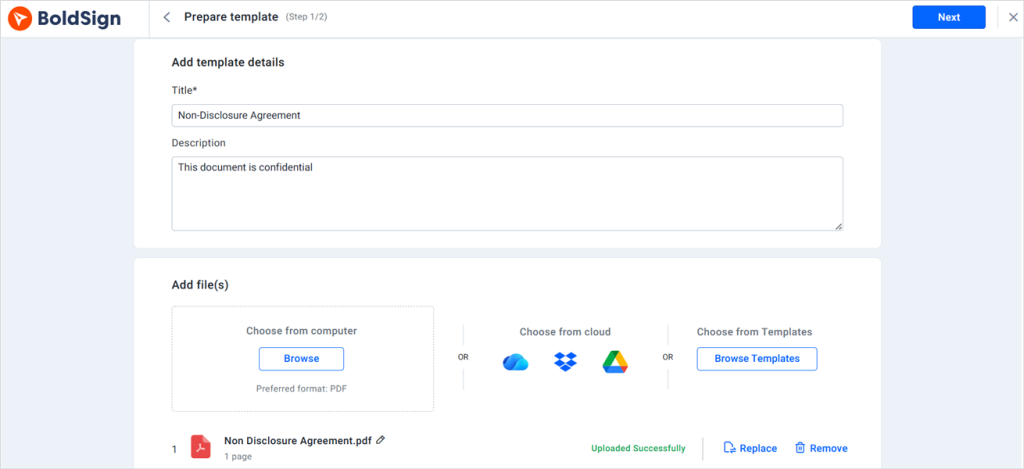
Select Create New, choose Create New Template, then upload your NDA file. Or open one of the disclosing party or receiving party confidentiality agreement templates from the library directly.
Place the fields and assign roles
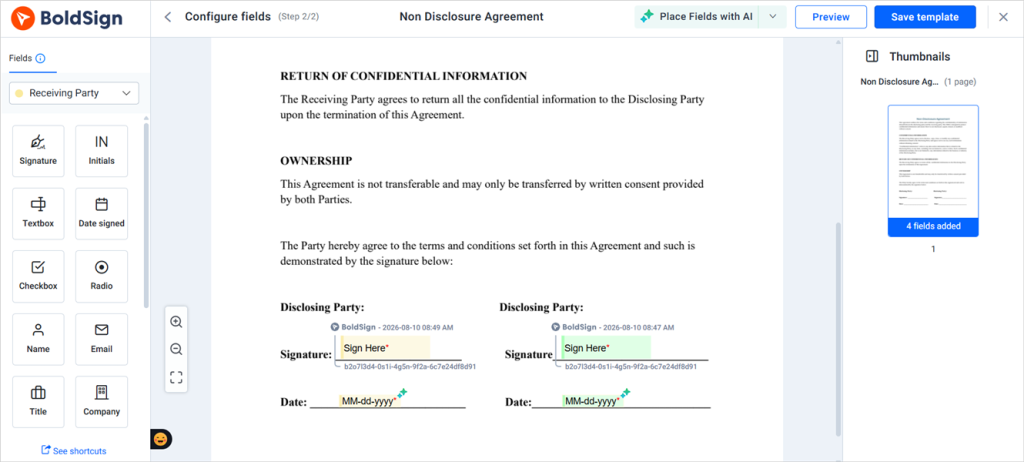
On the Configure Fields page, add the signature, date, name, and title fields, then assign each one to the correct signer role so the right person completes the right field. Roles are what make the template reusable, since every future send maps a real person onto a role you’ve already configured.
Send it for signature
Choose Use Template, enter the signer’s name and email, apply signer authentication if the disclosure warrants it, and send.
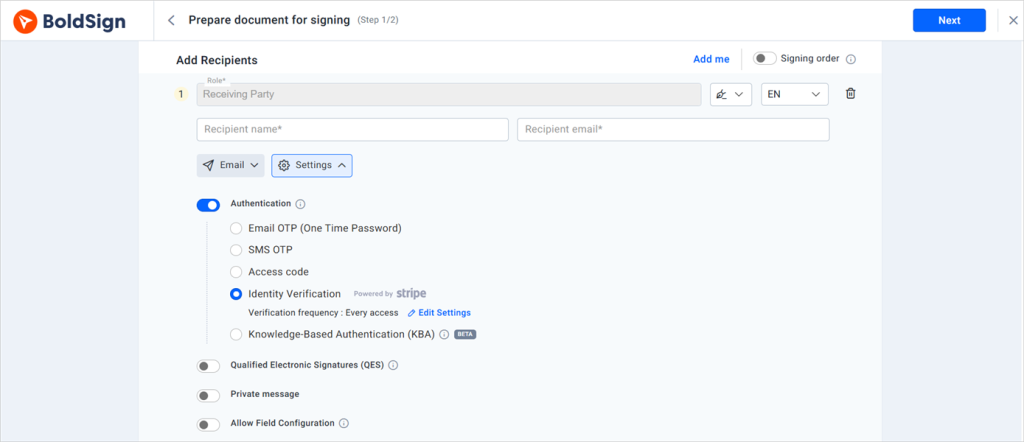
For an NDA that needs to reach many people at once, such as a cohort of new hires starting the same week or a group of contractors joining one project, bulk send takes a CSV of names and emails and delivers each recipient their own copy of the template. There’s no separate setup per person.
Track status and download the signed copy
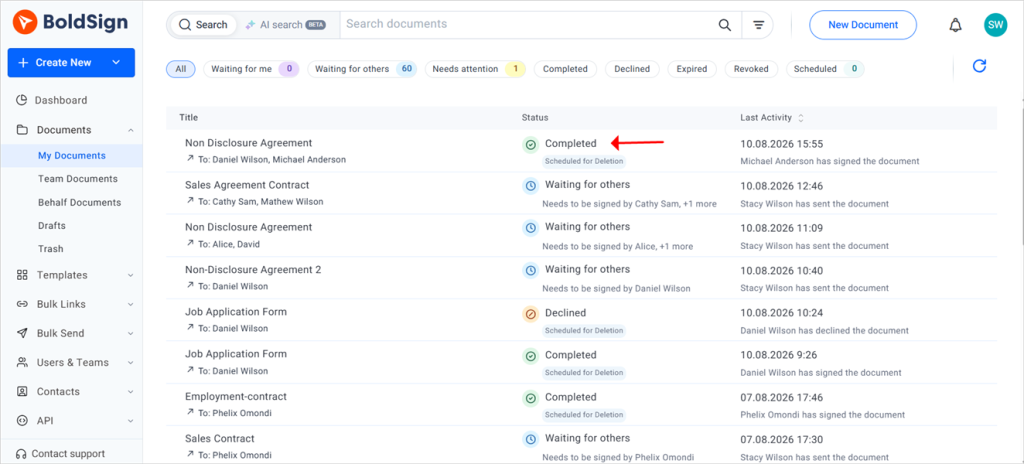
From the document overview, you can see who has opened, signed, or not yet acted, and trigger automated reminders for anyone stalling. Once everyone has signed, download the completed document with its audit trail, the time-stamped record of who viewed, signed, and completed the agreement.
Matching signer authentication to the risk
Not every NDA needs the same proof of identity. A routine vendor NDA and an NDA covering investor financials or unreleased trade secrets carry very different consequences if the wrong person opens the file.
BoldSign supports five methods, and you can assign a different one to each signer in the same document:
- Email OTP: A one-time password sent to the signer’s inbox. Confirms control of the address the request went to, which is enough for routine disclosures.
- SMS OTP: A one-time password sent to the signer’s phone, adding a second channel that a compromised inbox doesn’t cover.
- Access code: A code you set and share separately, useful when you want sender-controlled entry or when email delivery is unreliable.
- Knowledge-based authentication (KBA): Verifies a signer’s identity by asking questions based on information associated with them. It provides stronger assurance for higher-risk disclosures but adds more steps to the signing process.
- Identity verification: A higher-assurance check that can involve a passport, driver’s license, or government-issued ID. Worth the friction for genuinely sensitive disclosures.
There’s a real tradeoff. Each added step is another place a signer can drop off, so use the lowest-friction method that gives you the assurance the disclosure actually requires. Availability of specific methods varies by plan, so check yours before building it into a standard process.
Automating recurring NDA requests
When an NDA is triggered by something happening in another system, such as a new hire record, a deal reaching a stage, or a partner application being approved, sending it by hand is the bottleneck. The BoldSign API lets developers send a document straight from an existing template, so the application supplies the signer name and email and the request goes out without anyone opening the dashboard. Webhooks then report status changes back, which keeps your own system in sync without polling for updates.
Getting from draft to signed agreement
A useful NDA isn’t just one that gets signed quickly. It’s one built with the right clauses for the disclosure actually happening, matched to the right signer verification, stored somewhere you can find it again, and set up once so nobody rebuilds it next month.
Start your free BoldSign trial and send your first NDA today. Upload your agreement or pick a confidentiality template, place the fields once, and every NDA after that goes out in a couple of minutes with reminders, tracking, and a full audit trail behind it.
Frequently asked questions
What is a non-disclosure agreement (NDA)?
An NDA is a legally binding contract that sets rules for how one party, or both, will handle information the other treats as confidential. It defines what counts as confidential, what the receiving party may and may not do with it, and how long those obligations last.
Can an NDA be signed electronically?
Yes. Under the ESIGN Act and UETA, an electronically signed NDA carries the same legal effect as a paper one, provided the signer intended to sign and both parties agreed to transact electronically. No special software or certificate is required for a standard business NDA.
Is an online NDA legally binding?
It is, and the practical question is usually evidence rather than validity. If a signature is ever challenged, what supports it is proof of intent, consent to sign electronically, and a record of the signing events. An audit trail capturing timestamps, IP addresses, and signer actions is what makes that record available later.
What should be included in an NDA?
At minimum: the parties' legal names, a specific definition of confidential information, exclusions from that definition, permitted use, a stated term, a return-or-destroy clause for materials, remedies for breach, and governing law.
What is the difference between a mutual NDA and a unilateral NDA?
A unilateral NDA applies when only one party discloses confidential information, so only the receiving party carries obligations. A mutual NDA applies when both parties share sensitive information with each other, so both sides carry obligations.
Does an NDA need to be notarized?
No. A standard business NDA doesn't require notarization to be enforceable. Some specific document types or jurisdictions require notarization for unrelated reasons, but that isn't a general NDA requirement.
Can I use an NDA template for contractors or vendors?
Yes, as long as the template's scope, duration, and permitted use match that relationship. A template written for full-time employees often fits a short-term contractor or a vendor poorly, so review those three elements before reusing it.
Do both parties need to sign an NDA?
In practice, yes. A party is bound once they've signed, and a signature is the cleanest proof they accepted the obligations. If only the disclosing party signs, you're left arguing that the other side accepted the terms some other way, which is a much harder position.
What clauses should not be missing from an NDA?
Disputes tend to turn on four omissions: no specific definition of confidential information, no exclusions, no stated term, and no return-or-destroy obligation. The first two make the scope arguable, and the second two leave no clear end point for the receiving party's duties.

Preethi Loganathan
Preethi is a Digital Marketing Executive at BoldSign who develops precise, research-driven content on eSignatures, compliance, and digital signing workflows. She works closely with product and engineering teams to ensure every article is accurate, validated, and aligned with industry best practices. Connect with her on LinkedIn.
More posts by Preethi Loganathan